My recent work on mtt.sh led me down a bit of a rabbit hole as I struggled to understand the file system metadata for Linux software RAID devices. While I don’t claim to have a complete understanding of all metadata fields, it seems useful to document what I learned for anybody else who might need it.
The most helpful documentation I found along the way includes:
- RAID documentation at kernel.org that gives terse information about various on-disk structures
- Linux RAID source code, specifically md_p.h which defines the RAID superblock structure, struct mdp_superblock_1
- Source code for the mdadm application which includes the struct bitmap_super_s definition for the RAID bitmap superblock as well as the code for the calc_sb_1_csum() function used to calculate checksums for the RAID superblock
Note that there have been multiple versions of the Linux software RAID implementation and the metadata placement and content is very different between the various versions. This article only discusses the current v1 format and not the older v0.90.0 superblock format.
The RAID Superblock
The RAID superblock is a 256 byte structure that is written 4096 bytes from the beginning of each RAID device. The data is written in little-endian format.
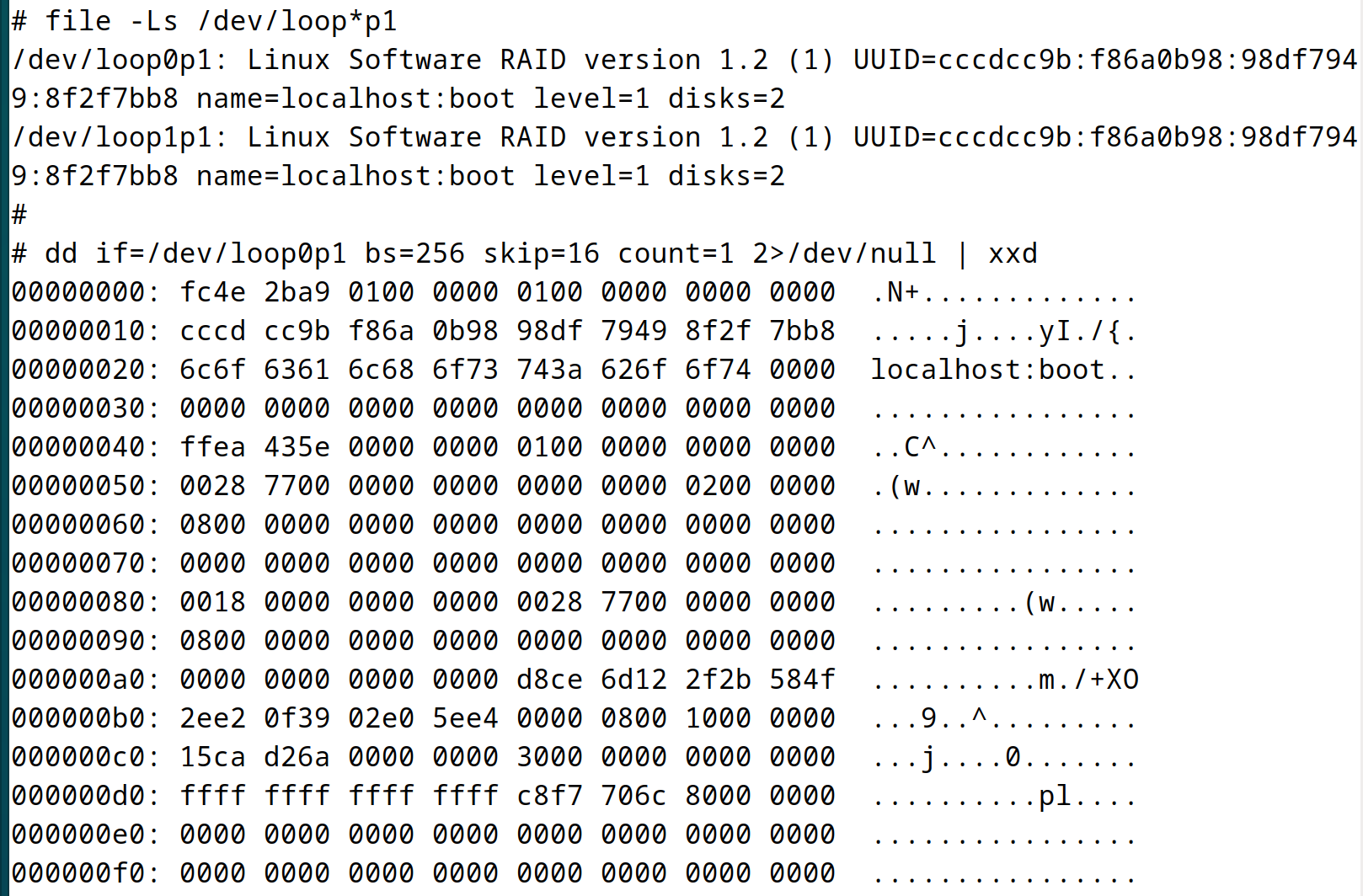
0-3      Magic number                    0xfc4e2ba9 in little-endian
4-7      Major version                   currently always 1
8-11     Feature map                     0x00000001 (???)
12-15    Padding                         set to zero

16-31    UUID                            cccdcc9b:f86a0b98:98df7949:8f2f7bb8
32-63    RAID device name (ASCII)        "localhost:boot"

64-71    ctime                           low 40 bits are seconds, rest is usec
72-75    RAID level                      this device is RAID 1 (0x00000001)
76-79    Layout                          0x00000000 (???)

80-87    Device size in sectors          7809024 (0x0000000000772800)
88-91    Chunk size in sectors           0x00000000 (???)
92-95    Num disks in RAID set           2 (0x00000002)

96-99    RAID bitmap offset              8 (0x00000008) -- see below
100-103  New level                       used when modifying RAID level
104-111  Reshape position                used when modifying RAID level

112-115  Disks delta                     used when modifying RAID level
116-119  New layout                      used when modifying RAID level
120-123  New chunk size                  used when modifying RAID level
124-127  Padding                         set to zero

128-135  Data offset in sectors          6144 (0x0000000000001800)
136-143  Number of data sectors          same as bytes 80-87 (???)

144-151  Superblock sector offset        should always be 8 (0x0000000000000008)
152-159  Recovery offset                 Used when resyncing

160-163  Device number in RAID group     0x00000000
164-167  Number of corrected errors      0x00000000
168-183  Device specific UUID (ignored?) 0xd7a81e609ce11c08ac3e3350492cafe5
184      Device specific flags           0x00080000 (???)
185-191  Padding                         why is this not zero???

192-199  utime                           low 40 bits are seconds, rest is usec
200-207  Superblock update count         48 (0x0000000000000030)

208-215  Max offset of consistent data   all data consistent (max value)
216-219  Superblock checksum             0x6c70f7c8 (see below)
220-223  Num of entries in max_devs[]    128 (0x00000080) (see below)

224-255  Padding                         set to zero
My main focus when working on mtt.sh was changing the RAID UUID and name by overwriting the superblock with new data. But changing these values meant the superblock checksum (bytes 216-219) needed to be updated. More on that in a moment.
The RAID Bitmap Superblock
Once I got past these hurdles, however, I discovered that there is also a superblock in front of the RAID device’s bitmap. This bitmap superblock also stores the RAID UUID and the two superblocks need to agree on the UUID or the device will fail.
Bytes 96-99 store the offset of the RAID bitmap in sectors from the start of the main RAID superblock. The RAID bitmap offset tells us that the bitmap starts 8 sectors (4096 bytes) from the start of this superblock, which is 4096 bytes from the start of the device. The bitmap starts with its own 256 byte superblock, though most of this 256 bytes is padding.
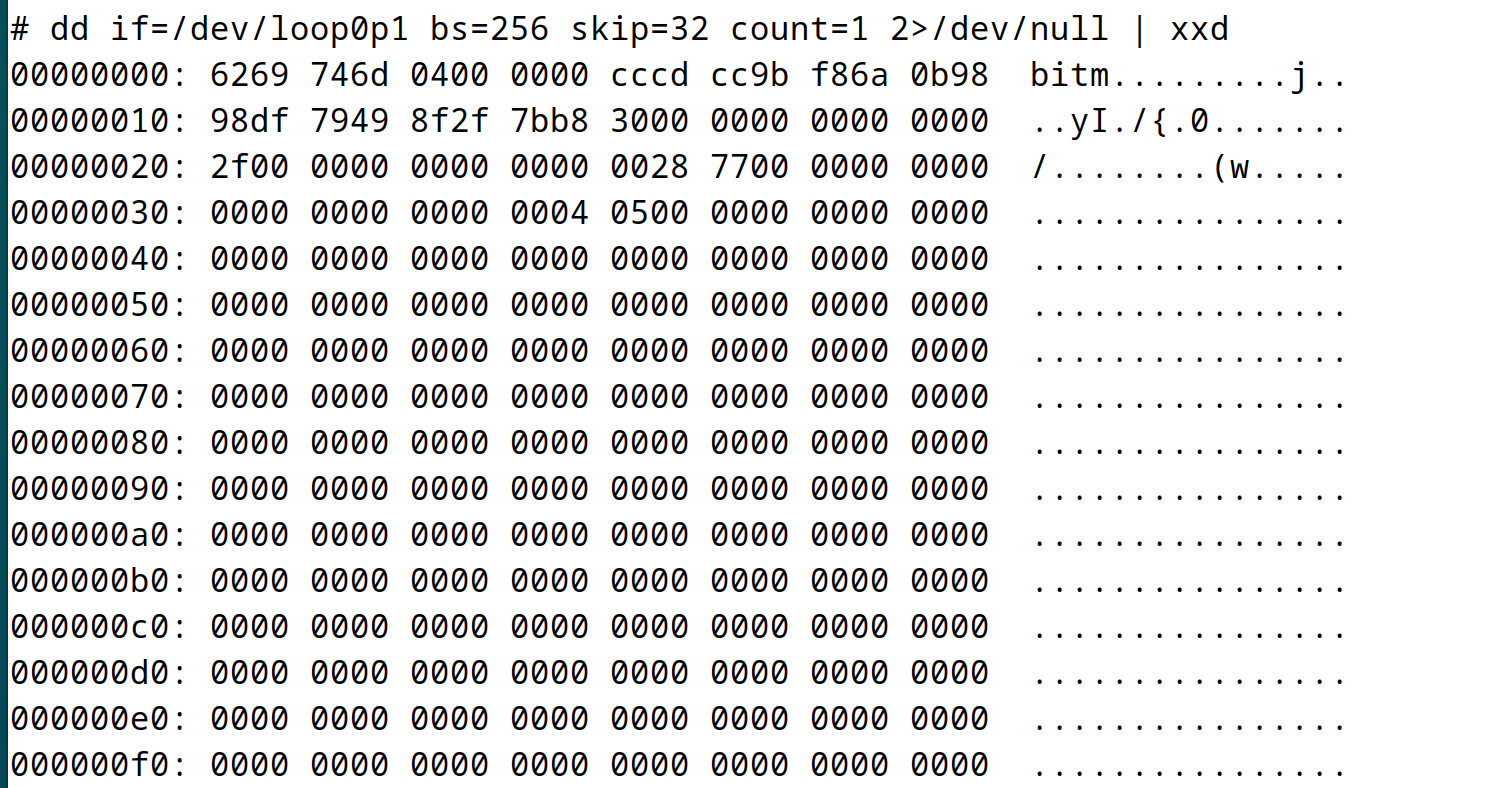
0-3      Bitmap superblock magic number   "bitm" (0x6269746d)
4-7      Bitmap major number              always 4 (???)
8-23     UUID                             cccdcc9b:f86a0b98:98df7949:8f2f7bb8
24-31    Event counter                    48 (same as superblock update count?)

32-39    Event counter when last cleared  47 (just (event counter - 1)???)
40-47    Size of RAID device sync range   for RAID 1, same as device size???

48-51    Bitmap state info                0x00000000 (???)
52-55    Bitmap chunk size in bytes       67108864 (0x04000000)
55-59    Seconds between disk flushes     5 (0x00000005)
60-63    Num pending write-behind writes  0x00000000

64-67    Sectors reserved for bitmap      0x000000 (???)
68-71    Max number of nodes in cluster   0x000000 (???)

72-135   Cluster name                     currently blank
136-256  Padding                          set to zero
For whatever reason the bitmap superblock does not include a checksum field. So I was able to overwrite the UUID here without additional machinations.
Computing the Superblock Checksum
As noted above, the superblock checksum calculation is performed by the calc_sb_1_csum() function. The tricky part is that the checksum not only includes the bytes in the superblock, it also includes the bytes in the max_devs array that immediately follows the superblock.
Superblock bytes 220-223 give the length of the max_devs array– 128 entries in our case. Each of these entries is two bytes long. So the number of additional bytes to incorporate into our checksum is 2x the number of entries, or 256 additional bytes in our case.
The checksum calculation treats the bytes in the superblock plus max_devs array as a series of four-byte unsigned integer values and simply adds them together. Note that the checksum field is set to zero before this addition happens.
The checksum field is a four-byte value, but the result of adding up all the numbers is not going to fit into 32 bits. So the upper 32 bits of the sum are added to the lower 32 bits to create the final 32 bit checksum value.
One Final Note
The UUID value and all of the other data in the RAID superblock are written to disk in little-endian byte order. But when the RAID device is active, the operating system tracks this UUID in big-endian (network byte order) form. You can see the live UUID in the /run/mdadm/map file.
# file -Ls /dev/loop*p1
/dev/loop0p1: Linux Software RAID version 1.2 (1) UUID=cccdcc9b:f86a0b98:98df7949:8f2f7bb8 name=localhost:boot level=1 disks=2
/dev/loop1p1: Linux Software RAID version 1.2 (1) UUID=cccdcc9b:f86a0b98:98df7949:8f2f7bb8 name=localhost:boot level=1 disks=2

# grep localhost:boot /run/mdadm/map
md126 1.2 9bcccdcc:980b6af8:4979df98:b87b2f8f /dev/md/localhost:boot
This discrepancy caused me to go down some unproductive paths in my research. But now you benefit from my confusion.


